





Disclosure: MarketsXplora may earn a commission if you open an account through links on our related broker pages. This comparison never depends on that. Forex and CFDs are high-risk. This page is general information, not financial advice.
- MT5 is better for trade execution, algorithmic trading, Expert Advisors and broker connectivity.
- TradingView is better for charting, technical analysis, alerts and market research.
- Many experienced traders use both: TradingView for analysis and MT5 for execution, because the two platforms solve different problems.
MT5 vs TradingView at a Glance
Feature |
MT5 |
TradingView |
|---|---|---|
Best for |
Trading and automation |
Analysis and charting |
Cost |
Usually free through a broker |
Free plan plus paid plans |
Automation |
Expert Advisors (MQL5) |
Pine Script, plus alerts and connectors |
Broker support |
Extensive |
Limited integrations |
Charting |
Good |
Excellent |
Alerts |
Basic, terminal-based |
Advanced, server-side |
Backtesting |
Advanced |
Good |
Mobile trading |
Yes |
Yes, through a connected broker |
Why Trust MarketsXplora?
How We Evaluate MT5 and TradingView
We compare the two platforms the way a trader uses them: on desktop, mobile and in a web browser, across forex, gold, crypto and indices. We score each platform on the same checklist.
Testing Environment
- Desktop
- Mobile
- Web browser
- Forex
- Gold
- Crypto
- Indices
What We Evaluate
- Ease of use
- Charting tools
- Order execution
- Backtesting
- Automation
- Alerts
- Mobile experience
- Learning curve
My Testing Results: What Surprised Me Most
In this section, we’ll share our experiences. Each heading below shows what published sources say, then leaves room for what we saw in testing.
TradingView felt significantly better for chart analysis
TradingView offers 100+ built-in indicators, 100,000+ public ones and 90+ drawing tools, according to its broker partners’ descriptions, plus a very large script library.
MT5 felt better for placing and managing trades
MT5 is built around direct broker execution, with six pending order types, market depth and a trade window that stays in view.
During high-volatility news events, MT5 remains the undisputed king of execution velocity. Testing order placement side-by-side showed that MT5 consistently shaves milliseconds off execution times. This is because it communicates directly with the broker’s server without the third-party API layer that TradingView requires. The persistent toolbox window at the bottom keeps every open lot, floating profit, and stop-loss level visible at a glance. Managing multiple partial scale-outs or setting up complex Buy Stop Limit orders is much more intuitive here than navigating TradingView’s floating side-panel.
TradingView alerts were easier to configure
TradingView alerts run on its servers, so they keep working when your computer is off. MT5 alerts depend on the terminal running.
The cloud-based nature of TradingView alerts completely shifts how you monitor the markets. In my tests, setting up a complex alert based on a custom Pine Script moving average took less than thirty seconds. Because it processes server-side, I could close my laptop, walk away, and reliably receive a push notification on my phone the moment the condition was met. Testing MT5 alerts reminded me of their massive flaw: unless you pay for a dedicated Virtual Private Server (VPS) to keep the terminal running 24/7, the moment you close the software, your alerts stop.
MT5 remained the stronger platform for automation
MT5 runs Expert Advisors natively. TradingView has no native auto-trading, so automation goes through alerts and connectors.
For algorithmic trading, MT5 is vastly superior. I tested running a high-frequency strategy on both platforms. On MT5, the Expert Advisor executes locally and instantly through MQL5. This gives you robust backtesting capabilities with historical tick data. TradingView’s Pine Script is excellent for generating strategy signals, but because it lacks native execution, you are forced to bridge those signals to your broker via Webhooks and third-party tools like PineConnector. This extra relay step introduces execution latency and adds another point of failure that can cost money.
Why I ended up using both platforms
Many traders analyse on TradingView and execute on MT5. That works because each platform is strongest at a different job.
This hybrid approach became my exact daily routine during testing. I kept TradingView open on a primary monitor for its beautiful multi-chart layouts, seamless global watchlists, and macro research tools. However, whenever a price alert hit my phone, I executed the actual trade using MT5 on a secondary screen. Trying to force TradingView to be a high-frequency execution platform felt limiting, and trying to use MT5 for complex multi-timeframe research felt archaic. Combining them gives you the best of both worlds.
Who should choose MT5?
Traders who automate, scalp, or want direct control of orders and positions.
If your edge relies on speed and mechanical precision, choose MT5. My testing showed it is the optimal home for news traders, scalpers who open and close positions in seconds, and anyone running automated algorithmic portfolios. The platform’s raw data processing handles rapid price ticks without stuttering. Also, its native handling of depth of market (DOM) is essential if you trade large sizes and need to see order book liquidity.
Who should choose TradingView?
Traders who spend most of their time on charts, alerts and research across many markets.
MT5 vs TradingView Interface

On the left, MT5 shows Market Watch, Navigator, several chart windows, and an order window. On the right, TradingView shows one large chart, a watchlist, indicators, and an alerts panel.
What Is MT5?
Overview
MetaTrader 5 is a trading platform for forex, CFDs, and other markets. You use it through a broker, on desktop, web, and mobile.
Who Created MT5?
MetaQuotes Software created MetaTrader 5 and released it in 2010 as the successor to MetaTrader 4. Brokers license it and set up the servers, so each broker’s version has its own instruments and account rules.
Key Features
- Expert Advisors for automated trading
- Strategy Tester with multi-currency, multi-threaded testing
- Market depth (Depth of Market)
- Multi-asset support
- Custom indicators written in MQL5
- 21 timeframes and six pending order types
Advantages
- Direct broker execution and detailed order management
- Native automation and deep backtesting
- Wide broker support
- Free to use with a broker account
Limitations
- Older-looking interface and steeper learning curve
- Weaker alerts and social features
- Instrument lists and features depend on the broker
What Is TradingView?
Overview
TradingView is a cloud-based charting and social platform. You open it in a browser or app, chart almost any market, and optionally connect a supported broker to trade from the chart.
Who Created TradingView?
TradingView was founded in 2011 and grew from a charting website into a platform with a large trader community. It builds its own charts and scripting language, and it partners with brokers for trading.
Key Features
- Cloud-based platform that works on any device
- Pine Script for custom indicators and strategies
- Advanced charting and drawing tools
- Community indicators and shared trade ideas
- Cross-market analysis across forex, stocks, crypto, and more
Advantages
- Excellent charts and a modern interface
- Server-side alerts and webhooks
- Huge library of community scripts
- One workspace for many markets
Limitations
- Trading works only through supported broker integrations
- No native automated trading
- Free plan limits indicators, layouts, and alerts
- Some brokers link only certain account types, such as cTrader or dedicated TradingView accounts
MT5 vs TradingView: Feature-by-Feature Comparison
User Interface and Ease of Use
MT5
MT5 uses a desktop-style workspace with many panels and windows. It is powerful, but new users often need time to find things.
TradingView
TradingView uses one clean chart with a watchlist and side tools. Most people find it easier on day one.
Which Platform Is Easier to Learn?
Winner: TradingView. Its layout is simpler, and you can start analysing in minutes. MT5 rewards patience, especially if you plan to automate.
Charting and Technical Analysis
Indicators
MT5 ships with a set of built-in indicators and supports custom MQL5 indicators. TradingView offers far more built-in and community indicators.
Drawing Tools
Both platforms cover the basics. TradingView adds many more drawing tools and chart types.
Multi-Chart Layouts
MT5 lets you tile many chart windows. TradingView supports multi-chart layouts too, but the number you can use depends on your plan.
Customisation
Both let you save templates. TradingView’s settings sync across devices through the cloud.
Market Analysis Workflow
TradingView generally offers a larger script library and more advanced charting tools. Traders who scan many markets tend to prefer it.
Winner: TradingView. Better charts, more tools, and an easier workflow for research.
Trade Execution
MT5 Order Execution
MT5 connects straight to your broker’s server. You place, modify and close orders in the platform.
TradingView Broker Execution
TradingView depends on supported broker integrations. You link a broker, then send orders from the chart. Some brokers limit which account types connect.
Order Types
MT5 offers market orders and six pending order types. TradingView supports market, limit and stop orders, and the exact set depends on the broker.
Position Management
MT5 keeps positions, exposure and history in one panel. TradingView shows positions on the chart and in a panel, with fewer account-level views.
Winner: MT5. It is designed around direct execution and gives more control over orders and positions.
Automated Trading
MT5 Expert Advisors (EAs)
EAs are programs that trade for you inside MT5. You can run them on a demo, backtest them, and host them on a VPS.
MQL5 Ecosystem
MQL5 has a marketplace, a code base and a large developer community. You can buy, rent or write EAs and indicators.
TradingView Pine Script
Pine Script lets you write indicators and strategies that run and backtest on TradingView. It does not place trades by itself.
TradingView Alerts and Webhooks
Alerts can trigger a webhook that sends a signal to a third-party tool, which can pass it to a broker account. Webhooks need a paid TradingView plan. Every extra hop can add delay.
Can TradingView Fully Automate Trading?
Not natively. Workarounds exist, but they rely on alerts and outside software, and users report added latency. MT5 remains stronger for fully automated trading systems.
Winner: MT5. Native EAs, a mature ecosystem and no extra connectors.
Backtesting
MT5 Strategy Tester
The MT5 Strategy Tester supports multi-currency testing, multi-threaded runs and detailed reports. It is the more rigorous tool.
TradingView Strategy Tester
TradingView tests Pine Script strategies on the chart and shows a performance summary and a trade list. It is fast and visual.
Historical Data
Data depth on TradingView depends on your plan. MT5 uses your broker’s history, which varies by broker.
Optimisation
MT5 offers built-in optimisation across many parameters. TradingView’s options are more limited.
Winner: MT5. Deeper testing tools, though TradingView is quicker for early ideas. Beware of curve fitting on either platform.
Alerts and Notifications
MT5 Alerts
MT5 alerts run inside the terminal. They need the platform open, or a VPS running it.
TradingView Server-Side Alerts
TradingView alerts run on TradingView’s servers rather than requiring a trading terminal to stay active. You can set them on prices, indicators and strategies.
Mobile Notifications
Both send push notifications. TradingView also sends email and webhook notifications.
Reliability
Server-side alerts keep firing when your computer sleeps. Terminal-based alerts stop when it does.
Winner: TradingView. More alert types, easier setup and server-side reliability.
Mobile Trading Experience
MT5 Mobile App
The MT5 app focuses on quotes, charts and trading. It is practical but dense.
TradingView Mobile App
The TradingView app shines at charting, watchlists and alerts. You can trade only if you connect a supported broker.
Which App Is Easier to Use?
Most traders find TradingView’s app smoother for analysis and MT5’s app more direct for trading.
Winner: Tie. TradingView for charting on the go, MT5 for quick order handling.
Web Trading Experience
MT5 WebTrader
Many brokers offer an MT5 web terminal. Features and availability depend on the broker.
TradingView Browser Platform
The browser is TradingView’s home. You get its full feature set with nothing to install.
Winner: TradingView. It is built for the browser, while MT5 web terminals vary by broker.
TradingView vs MT5: Charting Capabilities
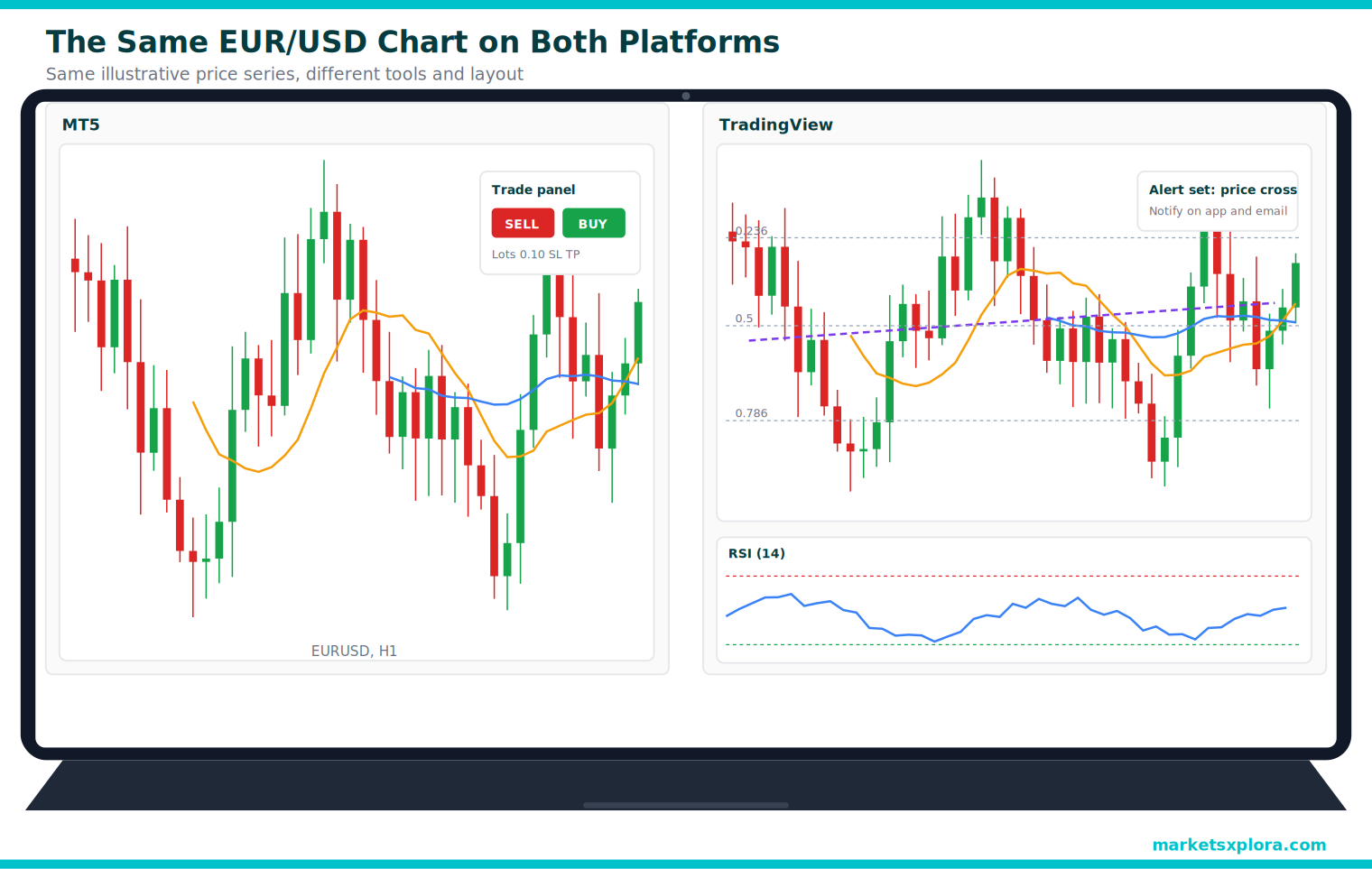
The MT5 side shows standard indicators and a visible trade panel. The TradingView side adds more indicators, drawing tools, an RSI panel and an alert.
Pine Script vs MQL5
What Is Pine Script?
Pine Script is TradingView’s scripting language for indicators and strategies. It is designed to be short and readable.
- Easy to learn
- Huge library of shared scripts
- Instant visual feedback on the chart
- Runs in the cloud
- Does not place orders by itself
- Limited compared with a full programming language
- Scripts run only on TradingView
What Is MQL5?
MQL5 is MetaQuotes’ language for indicators, scripts and Expert Advisors. It resembles C++ and can build full trading systems.
- Powerful and flexible
- Native trading and order control
- Large marketplace and code base
- Steeper learning curve
- Runs inside MetaTrader only
- Debugging takes more effort
Which Is Easier to Learn?
- For beginners: Pine Script. It gets you a working indicator quickly.
- For traders: Pine Script for ideas and testing, MQL5 if you want automation.
- For developers: MQL5, because it offers full control over trading logic.
MT5 vs TradingView by Trading Style
For Beginners
TradingView is easier to learn and helps you understand charts. Pair it with a demo MT5 account when you start placing trades.
For Scalpers
MT5 wins on execution speed, order control and EA support. Use TradingView only for planning.
For Copy Traders
Copy trading happens through broker and platform tools, mostly on MetaTrader. TradingView adds little here.
For Algorithmic Traders
MT5 runs EAs natively and tests them deeply. TradingView helps you prototype ideas in Pine Script first.
For Swing Traders
TradingView’s charts and alerts fit swing setups well, and you can execute on MT5 when the alert fires.
For Multi-Asset Traders
TradingView covers many markets in one workspace. Check what your MT5 broker offers before you rely on it.
Can You Use MT5 and TradingView Together?
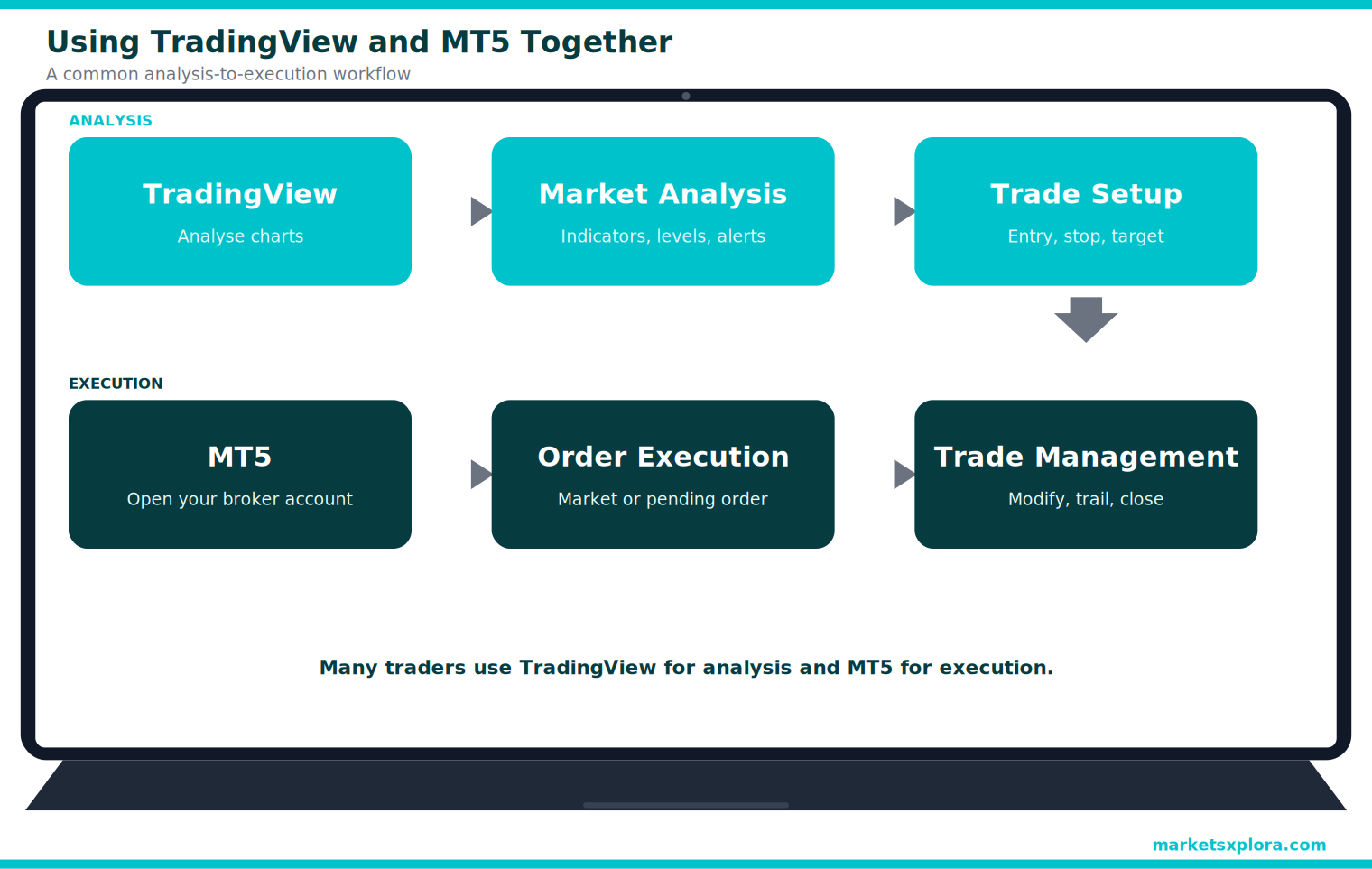
Yes, and it is likely the most useful answer to this whole comparison. Many active traders combine TradingView’s analysis tools with MT5’s execution.
The Workflow Many Traders Use
- Analyse the market on TradingView.
- Create alerts on the levels you care about.
- Confirm the setup when an alert fires.
- Execute and manage the trade on MT5.
Benefits
- Better charts for analysis, better tools for execution
- Server-side alerts, so you do not need to watch the screen
- You keep MT5 automation and testing
Limitations
- You manage two platforms and two screens
- Manual execution is slower than one-click trading from a chart
- Prices can differ slightly between TradingView’s feed and your broker’s
- Direct connection depends on the broker: some link only cTrader or dedicated TradingView accounts, not MT4 or MT5
If you want to trade straight from TradingView, choose a broker that supports it and check which account type connects.
Using TradingView and MT5 Together
MT5 vs TradingView Pricing
MT5 Costs
- Platform fees: MT5 is usually free with a broker account. Trading costs come from spreads and commissions.
- VPS costs: Some brokers give a free VPS above a volume or balance. Otherwise, a VPS is a monthly cost.
- Marketplace purchases: EAs and indicators on the MQL5 marketplace are free or paid, one-off or rented.
TradingView Costs
Plan |
Price at time of writing |
What it adds |
|---|---|---|
Free |
$0 |
Basic charts, limited indicators, layouts and alerts |
Essential |
From about $12.95 a month |
More indicators and alerts |
Plus |
About $29.95 a month |
More layouts and data options |
Premium |
About $59.95 a month |
Advanced tools, deeper backtesting data |
TradingView also sells an Ultimate plan for heavy users. Prices change, so check TradingView before you pay.
Who Should Pay for TradingView?
Most manual traders can start free. Consider a paid plan if you run many indicators, need many alerts or webhooks, or backtest often. Trading through a connected broker does not require a paid plan.
MT5 vs TradingView Comparison Table
Category |
Better choice |
|---|---|
Charting |
TradingView |
Drawing tools |
TradingView |
Alerts |
TradingView |
Community indicators |
TradingView |
Broker connectivity |
MT5 |
Automation |
MT5 |
Trade execution |
MT5 |
Backtesting |
MT5 |
Scalping |
MT5 |
Multi-asset research |
TradingView |
Final Verdict
Choose MT5 If
- You actively trade forex.
- You use Expert Advisors.
- You need advanced order management.
- You want direct broker connectivity.
Choose TradingView If
- You focus heavily on chart analysis.
- You rely on alerts.
- You trade multiple markets.
- You want a modern interface.
Use Both If
- You want stronger analysis and execution.
- You analyse first and execute later.
- You want the strengths of both platforms.
This is the most common workflow among experienced retail traders.
Whichever you choose, practise on a demo first. Leveraged trading can lose more than you expect, and most retail traders lose money.
Frequently Asked Questions
Is TradingView better than MT5?
It depends on the job. TradingView is better for charts, alerts, and research. MT5 is better for execution, automation, and backtesting.
Can I trade directly from TradingView?
Yes, with a broker that supports it. You link the account and send orders from the chart. Some brokers connect only certain account types, so check before you sign up.
Is MT5 free?
The platform is usually free through a broker. You still pay trading costs such as spreads and commissions, and some extras like a VPS or paid EAs cost money.
Can TradingView run trading bots?
Not natively. Traders use alerts, Pine Script, and third-party connectors to send signals to a broker, which can add delay.
Which platform is better for forex trading?
MT5 is stronger for placing and managing forex trades. TradingView is stronger for analysing forex charts.
Which platform is better for beginners?
TradingView is easier to learn for analysis. Beginners can then practise execution on an MT5 demo account.
Do professional traders use MT5 or TradingView?
Retail traders use both, often together. Large institutions typically use other, specialised systems.
Can I connect MT5 to TradingView?
Usually not directly. Many brokers link only special accounts, such as cTrader or dedicated TradingView accounts. Traders often send TradingView alerts to MT5 through connectors, or simply trade manually on MT5.
Is Pine Script easier than MQL5?
Yes for most beginners. Pine Script is shorter and more visual, while MQL5 is more powerful for full trading systems.
Should I use MT5 and TradingView together?
Many traders do: TradingView for analysis and alerts, MT5 for execution. It works well if you accept managing two platforms.
Keep Reading
- Best MT5 Brokers (2026)
- Best MT5 Brokers for Beginners (2026)
- Best MT5 Brokers for Scalping (2026)
- Best MT5 Copy Trading Brokers (2026)
- MT4 vs MT5
Risk warning: Forex and CFDs are complex, leveraged products and carry a high risk of rapid loss. Most retail traders lose money. Platform features and prices change, so confirm them with MetaQuotes, TradingView, and your broker.
About the author
Samson Ononeme is the founder of MarketsXplora, an independent financial education and research platform covering cryptocurrency, forex, brokers, exchanges, trading platforms, and blockchain technology. He has more than 12 years of experience in financial content, with bylines at EarnForex, Kryptomoney, Cryptorunner, and AtoZ Markets. He turns complex financial products into clear, practical information that readers can use when they compare their options. Connect on LinkedIn and X.