





Affiliate disclosure: we may earn a commission if you buy through our links. It does not change the price you pay or our scores.
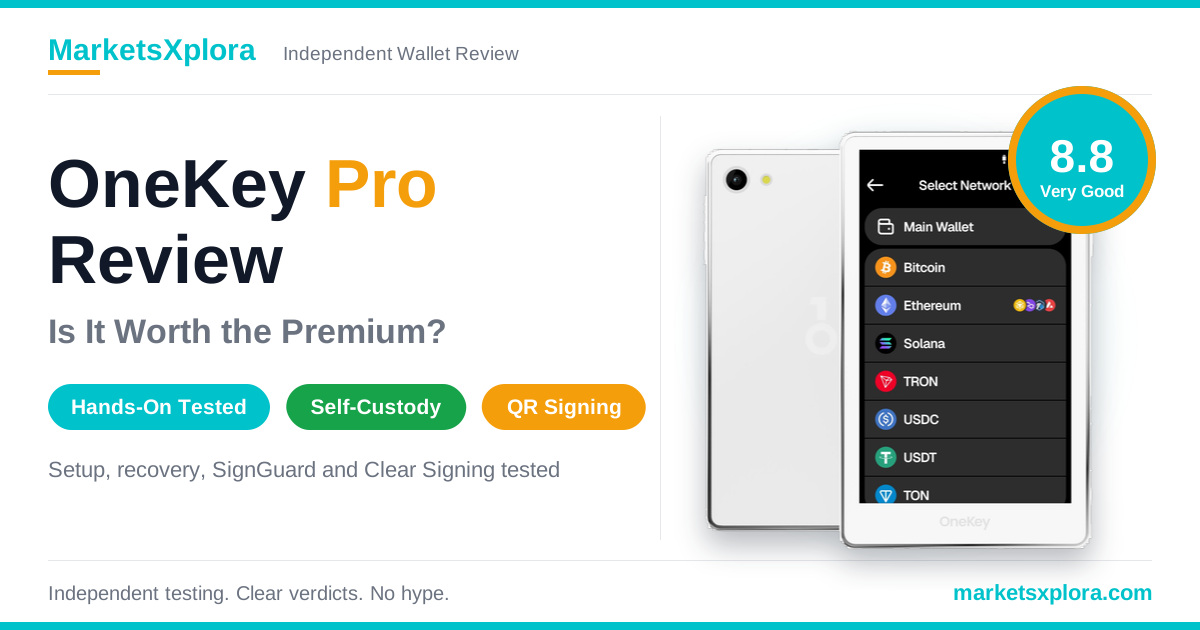
- ✔ Four EAL6+ secure elements with air-gapped QR signing
- ✔ 3.5-inch touchscreen and fingerprint unlock
- ✔ Full addresses on screen and SignGuard warnings in our tests
OneKey Pro Rating Breakdown
We score the OneKey Pro out of 10 across five categories. Security carries the most weight because it is the reason to own a hardware wallet. The overall score is 8.8 out of 10 (Very Good).
Category |
Weight |
Score |
What the score measures |
|---|---|---|---|
Security |
30% |
9.0 |
Key protection, signing clarity, backup and independent evidence |
Ease of use |
20% |
8.8 |
Setup, interface, transaction workflow and recovery |
Compatibility |
20% |
9.0 |
Assets, networks, platforms and integrations |
Build quality |
15% |
8.6 |
Screen, controls, fingerprint sensor and connection stability |
Value for money |
15% |
8.0 |
Price relative to tested capabilities and support |
Overall |
100% |
8.8 ★★★★★ |
Weighted result of the five categories |
Value scores lower than the rest because the Pro costs $278 and OneKey now sells a newer Pro 2 for $299. The wallet itself held up well in every test.
OneKey Pro at a Glance
Spec |
OneKey Pro |
|---|---|
List price |
$278 (checked on October 9, 2026) |
Display |
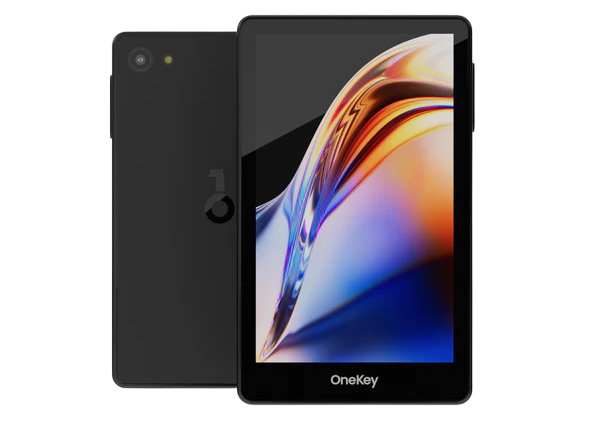
3.5-inch IPS color touchscreen, 480 × 800, tempered glass, oleophobic coating |
Secure elements |
Four EAL6+ certified chips |
Unlock |
Fingerprint and PIN |
Battery and charging |
530 mAh battery; USB-C wired charging; wireless charging (OneKey lists Qi2) |
Connectivity |
USB-C, Bluetooth and air-gapped QR codes |
Assets |
30,000+ coins and tokens on 100+ chains, including Bitcoin, Ethereum, Solana, XRP and USDT |
Platforms |
macOS, Windows, iOS, Android, Chrome and Linux |
Backup and recovery |
24-word recovery phrase (the option we tested), optional passphrase, hidden wallet through a second PIN |
Web2 login |
FIDO2 passkeys (security key) |
Multisig |
Safe on Ethereum, Squads on Solana, Sparrow on Bitcoin |
In the box (our unit) |
Wallet, USB-C to USB-C cable, three blank recovery sheets, quick-start guide |
Warranty |
One year |
What Is the OneKey Pro?
The OneKey Pro is OneKey’s premium cold wallet, and it keeps your private keys offline. It pairs a touchscreen with four secure elements and fingerprint unlock. You can connect it over USB-C or Bluetooth, or sign through QR codes with no link to your phone or computer.
OneKey is a self-custody company founded in 2019. It says YZi Labs (formerly Binance Labs) and Coinbase Ventures back it. That backing shows investors have studied the company. It does not prove the wallet is secure, so we rely on testing and audits instead.
Here is how the wallet works in plain terms. Your coins stay on the blockchain. The wallet holds the private key that controls them. When you send crypto, the OneKey App builds the transaction and passes it to the wallet. You check the details on the wallet’s screen and approve. The wallet signs inside its secure elements and returns only the signature. The private key never leaves the device.
If you lose the wallet, your coins stay safe on-chain. You buy a new device and restore with your recovery phrase. If someone finds that phrase, they can take your coins, so guard it.
Who is the OneKey Pro for?
- Frequent users and DeFi users who want to read contract details on a large screen.
- Security-focused holders who want four secure elements and air-gapped signing.
- Phone users who want fast Bluetooth pairing without giving up on-device checks.
Who should skip it? Long-term holders who rarely move funds can pay less for a OneKey Classic 1S Pure ($79) or Classic 1S ($99).
Hands-On Test Results: What We Found
We tested the OneKey Pro ourselves. Every number below comes from one unit and one test session. Your timings can differ with your phone, app version and cable. We describe each result as an observation and do not promise it for every unit.
Test setup
Item |
Version or model |
|---|---|
Wallet firmware |
v4.11.0 (stable production release) |
Mobile app |
OneKey Mobile v4.19.1 |
Phone |
iPhone 15 Pro on iOS 17.5.1 |
Desktop app |
OneKey Desktop v4.19.1 |
Computer |
Mac with Apple Silicon M3 on macOS Sonoma 14.5; MacBook Pro for USB-C tests |
Wireless charger |
Anker PowerWave Pad (A2503), standard Qi profile at 5 W |
Wired charger |
5 V / 2 A adapter |
Test 1: Unboxing and device authenticity
Result: The OneKey Pro passed OneKey’s device verification in about 4.2 seconds, and the packaging carried a working tamper seal.
The box was matte black and wrapped in plastic film. A laser holographic seal ran across the opening edge. When we cut it with a razor, the film pattern visibly distorted. A seal like this shows interference. It cannot prove the supply chain was clean.
Inside, we found the wallet in protective film, one USB-C to USB-C cable, three blank recovery sheets and a quick-start guide. The recovery sheets were blank. Never use a wallet that arrives with a filled-in phrase.
We then ran the device verification through the desktop app over a USB-C data cable. The app sent the wallet a random 32-byte challenge. The wallet signed it inside its secure module with a key that OneKey injects at the factory. The app checked that signature against OneKey’s public registry, then showed “Verification Successful.” The whole check took about 4.2 seconds.

Test 2: Setup and wallet creation
Result: PIN and fingerprint setup took 1 minute 15 seconds.
We held the side power button for about three seconds and picked English. Then we chose Create a New Wallet and a 24-word recovery phrase. Next, we set a six-digit PIN and registered a fingerprint. The sensor needed six taps.
That 1:15 covers PIN and fingerprint setup only. It is not the full time from unboxing to a backed-up wallet.
Test 3: Backup and recovery
Result: The wallet reset after repeated wrong PINs, and the 24-word phrase restored it with matching addresses in 3 minutes 5 seconds.
Step |
Time or outcome |
|---|---|
Write the 24 words on a blank sheet |
2 minutes 40 seconds |
Verify the phrase on the device |
1 minute 18 seconds |
Write and verify combined |
3 minutes 58 seconds |
PIN, fingerprint, write and verify combined |
5 minutes 13 seconds |
Wrong PIN entries before reset |
Reset after the tenth consecutive wrong attempt |
Restore from the 24-word phrase |
3 minutes 5 seconds |
Public addresses after restore |
Matched the addresses we recorded before the reset |
To repeat this result, the account, network, derivation path and address type must match. We report the reset as we saw it. We did not open the device to inspect what it erased.
Check each recovery word as you write it. Anyone who gets your phrase can reach your funds.
Test 4: Bluetooth and USB-C
Result: Bluetooth paired in 3.8 seconds and reconnected in 1.2 seconds. USB-C worked on all 50 connection cycles.
Test |
Result |
|---|---|
Bluetooth pairing with iPhone 15 Pro |
3.8 seconds, from app discovery to the pairing-code step finishing |
Reconnection after locking the wallet and moving about 5 m away |
1.2 seconds |
30-minute idle period |
No unexpected disconnections |
USB-C recognition on a MacBook Pro, 50 connect and disconnect cycles |
Under 1 second each time |
Gentle cable movement during app communication |
No interruption observed |
Phone, app and firmware versions all affect Bluetooth. Our USB-C test measures app recognition. It does not prove long-term port durability.
Test 5: Signing speed and address verification
Result: The Pro signed 40 transactions without a failure, and its screen showed every address in full.
Measurement |
Result |
|---|---|
Simple ETH transfer over USB-C |
0.8 seconds |
Uniswap swap interaction |
1.6 seconds |
Transactions in the sample |
40, with no signing failures |
Addresses compared (Bitcoin Native SegWit, Ethereum, Solana) |
10, each under 5 seconds |
The timer starts when the wallet accepts the fingerprint or PIN. It stops when signing finishes. It leaves out the time you spend reading the screen and tapping Approve, plus app processing and network confirmation. So treat these as chip-processing times, not end-to-end times.
The 3.5-inch screen showed each address without shortening it. It split the address across three rows in a high-contrast monospaced font. Green brackets marked the first six and last six characters. That layout makes a mismatch easier to spot.
Test 6: Clear Signing and SignGuard
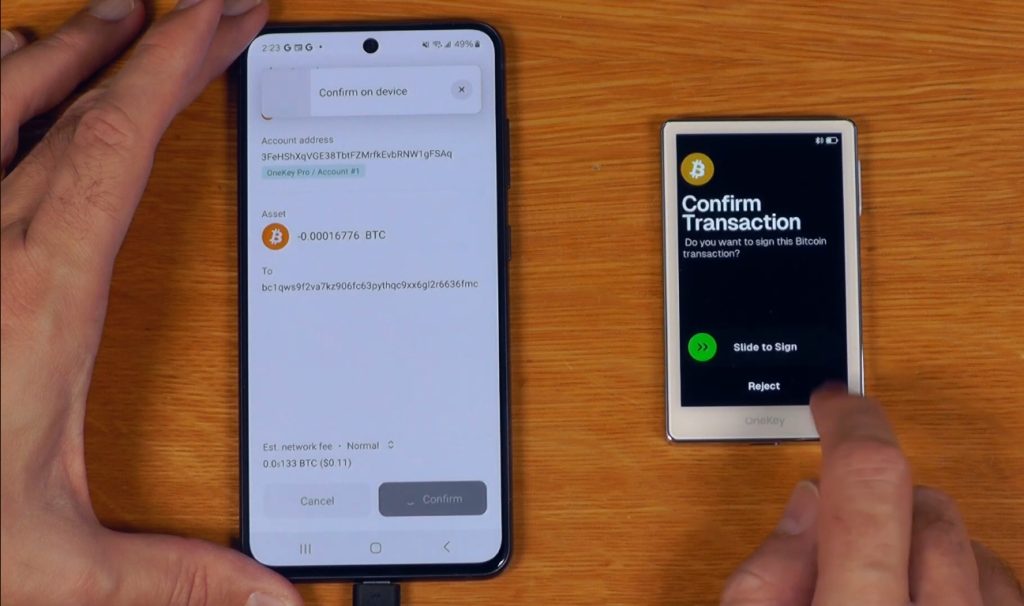
Result: The wallet showed readable approval details, and SignGuard displayed a critical warning for our simulated drainer contract.
Clear Signing. We started a Set Approval For All request through OpenSea. This permission lets a contract move every asset in a collection. The wallet showed this screen:
Interaction: Set Approval For All
Platform: OpenSea: Seaport 1.6
Asset: Bored Ape Yacht Club (BAYC)WARNING: This transaction grants permission to move ALL
assets inside this specific collection from your wallet
at any time.[ Hold to Confirm ]
SignGuard. Next, we simulated a risky contract on Ethereum Mainnet. We used a newly deployed contract that imitates a drainer. We did not use a live malicious service. The wallet showed this warning:
Destination: 0x7a259…b41e
Risk Level: CRITICAL WARNINGDetected: This smart contract address was deployed < 24
hours ago and matches known malicious drainer deployment
signatures. Funds are highly likely to be extracted upon
signature broadcast.[!] Security Intercept: Counter-sign blocked natively.
To bypass this alert, hold the button below for 3 seconds.
[ Hold 3s to Force Bypass ]
The full address of our test contract was 0x7a25992984920401831aa962828a162df948b41e. It opens with 0x7a25, the same characters that begin the real Uniswap V2 Router address. Scammers use lookalike addresses like this to fool people who check only the first few characters. That is why the full address on the Pro’s screen matters.
Keep the limits in mind. SignGuard showed a warning in this test. That does not mean it will catch every malicious transaction. A calm result for a known protocol also does not make every transaction with that protocol safe.
Test 7: Battery and charging
Result: The battery fell 17 percentage points in a two-hour stress test, and a wired charge from 0 to 100 percent took 1 hour 14 minutes.
Time |
Battery level |
|---|---|
Start |
100% |
After 1 hour |
91% |
After 2 hours |
83% |
We ran the screen at 80% brightness with Bluetooth on and attempted a transaction about every five minutes. A battery gauge does not drain in a straight line, so do not turn this into a multi-week estimate. A light-use or standby test would give a better real-world figure.
Wired charging with a 5 V / 2 A adapter took 1 hour 14 minutes from empty to full. We also placed the wallet on an Anker PowerWave Pad (A2503), and charging began about 1.5 seconds after we aligned it. OneKey lists Qi2 wireless charging for the Pro, and our pad ran the standard Qi profile at 5 W. Pad, alignment, temperature and use all change charging time.
Test 8: Screen readability and touchscreen accuracy
Result: The screen stayed readable indoors and outdoors at 70% brightness. We made three typing errors in 120 keyboard taps.
That is a 2.5% error rate. It comes from one short test, so it records our experience. It does not give a general accuracy rate. Finger size and typing habits change the result.
Hands-on results summary
Metric |
OneKey Pro result |
|---|---|
Device verification |
About 4.2 seconds, passed |
PIN and fingerprint setup |
1:15 |
Recovery phrase: write and verify |
2:40 and 1:18 |
Restore after reset |
3:05, addresses matched |
Bluetooth pairing and reconnection |
3.8 seconds and 1.2 seconds |
USB-C |
Under 1 second recognition across 50 cycles |
Signing time |
0.8 s (ETH transfer), 1.6 s (swap) |
Signing failures |
0 in 40 transactions |
Address verification |
Under 5 seconds each, full address shown |
Battery after two-hour stress test |
83% |
Wired charge, 0 to 100% |
1 hour 14 minutes |
Typing errors |
3 in 120 taps (2.5%) |
These results do not show that the OneKey Pro resists every supply-chain attack. They also do not show that SignGuard catches every malicious transaction.
Design, Display and Fingerprint Unlock
Short answer: The 3.5-inch touchscreen is the Pro’s best everyday feature, because it lets you read full addresses and contract warnings without squinting.
OneKey lists an IPS panel at 480 × 800 with a tempered glass cover and an oleophobic coating, which helps resist smudges. In our tests, the screen stayed readable in office and outdoor light.
The fingerprint sensor registered after six taps. It gives you a quick unlock, and you still need the PIN as a fallback. Fingerprint unlock suits a wallet you use often. Rarely used wallets gain less from it.

Wireless charging adds convenience. You can top the wallet up on a pad without hunting for the cable, though wired charging was faster in our test.
OneKey Pro Security Review
Short answer: The Pro has strong hardware protection, open code and third-party audits. No wallet is invulnerable, and your own habits decide the final risk.
Four secure elements: what that means
A secure element is a tamper-resistant chip that stores keys and signs transactions. OneKey says each Pro uses four EAL6+ certified chips, and it says each chip handles a separate job. EAL6+ is a Common Criteria rating (ISO/IEC 15408). It also applies to chips in passports and bank cards.
A chip rating covers the chip. It does not cover the firmware, the screen or your habits. For that reason, independent audits of the whole system matter as much as the chip count.
Open source, audits and certifications
- Open code: OneKey publishes its firmware and apps on GitHub and says its builds are reproducible.
- Audit: SlowMist published an audit report for the OneKey Pro.
- EU certification: OneKey says an EU Notified Body, LGAI Technological Center (Applus+), issued an EN 18031 EU-Type Examination Certificate for the Pro in September 2025. The certificate covers resistance to cyber attacks, personal data protection and protection from fraud. See OneKey’s announcement.
- ISO/IEC 27001: OneKey lists this certification on its site.
Clear Signing and SignGuard
Clear Signing turns raw transaction data into readable details, such as the address, asset, amount and permission. SignGuard adds risk checks. OneKey says it covers risky approvals, fake tokens, honeypot contracts and phishing sites. Its apps use alerts from GoPlus and Blockaid. We saw both features work in Test 6.
Warnings only help if you read them. If a threat goes undetected, the wallet shows you the transaction and nothing more. At that point, only your own check stands between you and a loss.
Air-gapped QR signing
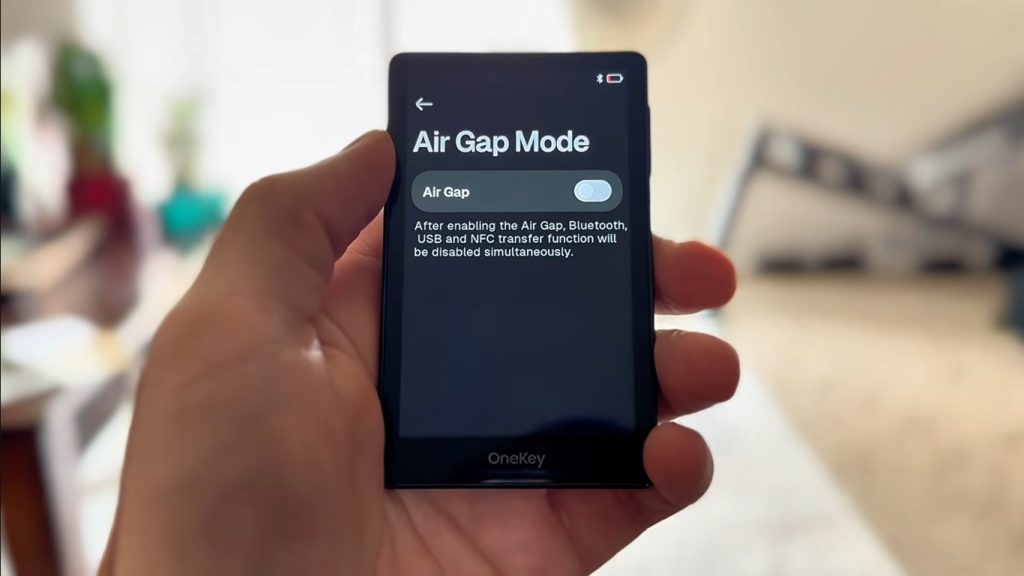
Air-gapped signing passes a transaction between the app and the wallet through QR codes. The wallet scans a code from your screen and then shows its signature as a QR code. No cable or radio link carries the data. Our test log covers USB-C and Bluetooth, so this paragraph relies on OneKey’s documentation.
Method |
What passes between devices |
Main benefit |
Main risk |
|---|---|---|---|
Air-gapped QR |
Transaction and signature as QR codes |
No cable or radio link |
Slower; needs a camera |
USB-C |
Transaction data and signature |
Fast and stable |
Connects to a computer that may carry malware |
Bluetooth |
Transaction data and signature |
Convenient on a phone |
Adds a wireless link |
In every case, the private key stays inside the secure elements.
Recovery phrase, PIN and passphrase
- PIN: In our test, the wallet reset after the tenth consecutive wrong PIN.
- Passphrase: An optional passphrase creates a separate hidden wallet. OneKey also lets you attach it to a second PIN.
- Recovery phrase: We tested the 24-word option. Write it on paper and keep it private.
The biggest OneKey Pro security risks
- Phishing: fake sites and fake support staff ask for your recovery phrase.
- Unsafe approvals: unlimited token approvals can drain a wallet later.
- Fake apps: download the OneKey App only from onekey.so.
- Supply chain: buy from OneKey or an authorized reseller.
- Your backup: anyone who finds your phrase can empty the wallet.
OneKey Pro Troubleshooting: Fixes We Would Try First
Most problems with a hardware wallet come from cables, permissions or old software. Try these fixes in order.
Problem |
What to try |
|---|---|
The desktop app does not see the wallet |
Use the supplied USB-C data cable, try another port and update the OneKey App. With the supplied cable, our test unit connected in under a second. |
Bluetooth will not pair |
Unlock the wallet, switch Bluetooth on, allow Bluetooth permission for the OneKey App and stay within a few metres. Our unit paired in 3.8 seconds. |
The fingerprint will not register |
Clean the sensor and your finger, then try again. Our registration needed six taps. |
You forgot your PIN |
Repeated wrong PINs reset the wallet. Restore it with your recovery phrase. |
An address looks right but feels off |
Compare the whole address on the wallet screen with your destination, not just the first and last characters. |
The battery drains fast |
Lower the screen brightness, turn off Bluetooth when you do not need it and charge by cable or pad. |
If none of these work, contact OneKey support through its help center. Your coins stay on the blockchain either way.
OneKey App and Supported Assets
Short answer: The OneKey App covers most major chains, and the wallet works with the browser wallets people already use.
OneKey lists support for Bitcoin, Ethereum, Solana, XRP, USDT and 30,000+ other coins and tokens across 100+ chains. Check OneKey’s supported crypto list before you buy if you hold a niche asset.
- Platforms: macOS, Windows, iOS, Android, Chrome and Linux.
- Integrations: WalletConnect v2, MetaMask, OKX Wallet, Rabby and Sparrow.
- Multisig: Safe on Ethereum, Squads on Solana and Sparrow on Bitcoin.
- Passkeys: The Pro can act as a FIDO2 security key for sites such as Google, GitHub and Binance. We did not test this feature.
The wallet does not remove blockchain fees. You still pay network fees on every transaction. Swaps and card purchases run through third-party providers, and they set their own prices. OneKey App Prime is a paid membership.
OneKey Pro Price, Warranty and Referral Code
How much does the OneKey Pro cost?
The OneKey Pro costs $278 on OneKey’s site. We checked the price on October 9, 2026. OneKey also sells the Pro 2 at $299, the Classic 1S at $99 and the Classic 1S Pure at $79. Prices can change, so check the live page before you pay.
What is in the box?
- OneKey Pro wallet
- USB-C to USB-C cable
- Three blank recovery sheets
- Quick-start guide
This is the list from our unit. Contents can vary by production run.
Warranty, shipping and returns
- Warranty: one year. OneKey replaces a faulty device free of charge, except for damage from misuse. See OneKey’s refund policy.
- Returns: OneKey generally does not accept returns or exchanges unless the product has a quality problem. It says this protects buyers from tampered devices.
- Shipping: OneKey’s store lists free shipping on the Pro.
The returns rule matters. Pick the right model before you order.
Promo Code & Discount
Our referral code is H27WG8. Use any OneKey button in this article, because each one carries our referral link. Then enter the code if checkout asks for one. OneKey sets any offer at checkout, so confirm the final price in your cart.
Is the OneKey Pro worth the price?
Yes, if you want the touchscreen, fingerprint unlock and air-gapped signing. You get four secure elements, open code and a wallet that passed every test we ran. If you only need basic storage, a $79 or $99 Classic wallet gives you the same open-source approach with fewer extras.
OneKey Pro Pros and Cons
Pros
- Four EAL6+ secure elements
- 3.5-inch touchscreen that shows full addresses
- Fast signing: 0.8 s for an ETH transfer
- Clean recovery: matching addresses after a reset
- SignGuard warning in our drainer test
- Air-gapped QR signing, USB-C and Bluetooth
- Open-source code with a SlowMist audit
- Wireless charging
Cons
- $278 costs more than the Classic wallets
- The newer Pro 2 has a sharper screen and a bigger battery
- Returns are limited to quality problems
- Stress-test battery fell 17 points in two hours
- Warnings can miss threats, so you must read each screen
- You alone must protect the recovery phrase
OneKey Pro vs Other Wallets
Pick the right wallet by comparing the Pro with its closest rivals. We start with OneKey’s own lineup.
OneKey Pro vs OneKey Pro 2
OneKey launched the Pro 2 on October 8, 2026, at $299. We have not tested it. The comparison below uses OneKey’s product page and launch post.
Factor |
OneKey Pro ($278) |
OneKey Pro 2 ($299) |
|---|---|---|
Screen |
3.5-inch IPS, 480 × 800 |
3.54-inch AMOLED, 1024 × 604, up to 800 nits |
Battery |
530 mAh |
700 mAh |
Secure elements |
4 × EAL6+ |
4 × EAL6+ |
Air-gapped QR signing |
Yes |
Yes |
On-device portfolio view |
No |
Yes |
SeedCard (NFC backup) |
Not included |
Included |
Apple Find My |
No |
Coming in a future update |
TOTP codes |
No |
Coming in a future update |
Case and App Prime in the box |
No |
Magnetic case and six months of Prime |
Hands-on tested by MarketsXplora |
Yes |
No |
Should you pick the Pro 2 instead? Not necessarily. Both wallets share the four-chip design and QR signing. The Pro 2 adds a better screen, a bigger battery and a SeedCard. Its two headline extras, Find My and TOTP, are not live yet. Choose the Pro 2 if you want the screen and extras today. Choose the Pro if you want the tested wallet for $21 less.
OneKey Pro vs OneKey Classic 1S
Factor |
OneKey Pro ($278) |
OneKey Classic 1S ($99) |
|---|---|---|
Screen |
3.5-inch color touchscreen |
1.54-inch monochrome OLED, buttons |
Secure elements |
4 × EAL6+ |
1 × EAL6+ |
Fingerprint unlock |
Yes |
No |
Air-gapped QR signing |
Yes |
No |
Battery |
530 mAh, wireless charging |
110 mAh, no wireless charging |
Connectivity |
USB-C, Bluetooth, QR |
USB-C, Bluetooth |
The Classic 1S covers everyday storage for much less. Pick the Pro if you read many contract details, want QR signing or like a big screen.
OneKey Pro vs Trezor Safe 5, Ledger Flex and Tangem
Factor |
OneKey Pro |
Trezor Safe 5 |
Ledger Flex |
Tangem Wallet |
|---|---|---|---|---|
Price |
$278 |
$169 |
$249 |
Sold in card sets |
Screen |
3.5-inch color touchscreen |
1.54-inch color touchscreen |
2.84-inch e-ink touchscreen |
None; uses your phone |
Connectivity |
USB-C, Bluetooth, QR |
USB-C |
USB-C, Bluetooth, NFC |
NFC |
Air-gapped QR signing |
Yes |
No |
No |
No |
Fingerprint unlock |
Yes |
No |
No |
No |
Wireless charging |
Yes |
No |
No |
No battery to charge |
Check each brand’s live page before you buy.
OneKey Pro vs Trezor
Trezor Safe 5 costs less and publishes its firmware. OneKey also publishes its firmware and apps, and it adds a larger screen, Bluetooth and QR signing. Pick Trezor if price and its software suite matter most. Pick OneKey if you want the bigger display and more ways to connect.
OneKey Pro vs Ledger
Ledger Flex has a polished e-ink screen and a large app ecosystem. Ledger keeps its secure-element operating system closed, while OneKey publishes its firmware. OneKey also adds air-gapped signing. Pick Ledger for its ecosystem. Pick OneKey for open code and QR signing.
OneKey Pro vs Tangem
Tangem is an NFC card with no screen, so you read transaction details in your phone app. The OneKey Pro shows the details on its own screen, which helps if your phone is compromised. Tangem wins on portability.
No brand wins for everyone. Match the wallet to how you store and spend your crypto.
Is OneKey Legit and Trustworthy?
Yes, OneKey is a legitimate company. It has operated since 2019, publishes its code, lists third-party audits and holds ISO/IEC 27001 and EN 18031 certifications. It sells through its own store and named resellers.
That answers one question. Whether the Pro is safe for you depends on other things: where you buy, how you set it up, how you store the phrase and how carefully you read each transaction.
- Buy only from OneKey or an authorized reseller.
- Check the seal and run the device verification the first time you power it on.
- Never type your recovery phrase into a website, app or support chat.
How to Set Up the OneKey Pro
- Buy from OneKey or an authorized reseller.
- Inspect the package and the seal.
- Install the official OneKey App from onekey.so.
- Power on the wallet and run the device verification.
- Create a new wallet. Do not reuse a phrase you typed into any phone or website.
- Write the recovery phrase on paper and keep it private.
- Register your fingerprint and set a PIN.
- Confirm a receiving address on the wallet’s screen.
- Send a small test transfer before you move larger amounts.
- Read the address and amount on the wallet screen before you approve each transaction.
Who Should Buy the OneKey Pro?
- DeFi users: the large screen helps you read approvals and contract calls.
- Frequent senders: signing took under two seconds in our tests.
- Security-focused users: four secure elements and QR signing add layers.
- Phone-first users: Bluetooth paired in 3.8 seconds.
- Budget buyers and long-term holders: look at the Classic 1S or Classic 1S Pure instead.
Final Verdict: Is the OneKey Pro Worth Buying?
The OneKey Pro earns 8.8 out of 10. It did everything we asked in testing, and it combines a large screen with strong hardware protection.
- Best for: DeFi users, frequent senders and security-focused holders.
- Biggest limit: warnings do not replace reading each transaction, and your recovery phrase is still your biggest risk.
- Better value elsewhere: a Classic 1S or Classic 1S Pure if you only need cold storage.
- Pro 2 alternative: worth a look if you want the newest screen and a SeedCard, but we have not tested it.
How we weight the score: security 30%, ease of use 20%, compatibility 20%, build quality 15% and value for money 15%. The Pro scores 9.0, 8.8, 9.0, 8.6 and 8.0, which gives 8.8.
A big touchscreen, four EAL6+ secure elements and air-gapped signing. It passed every test we ran.
Frequently Asked Questions
Is the OneKey Pro safe?
The OneKey Pro keeps private keys in four EAL6+ secure elements and needs on-device confirmation for every transaction. It also publishes open code and has a SlowMist audit. No wallet is risk-free, because phishing, unsafe approvals and a stolen recovery phrase can still cause losses.
Is OneKey a legitimate company?
Yes. OneKey has operated since 2019, publishes its code, lists third-party audits and holds ISO/IEC 27001 and EN 18031 certifications. Buy only from OneKey or an authorized reseller.
How much does the OneKey Pro cost?
The OneKey Pro costs $278 on OneKey’s site, checked on October 9, 2026. Prices can change, so check the live page.
What is in the OneKey Pro box?
Our unit contained the wallet, a USB-C to USB-C cable, three blank recovery sheets and a quick-start guide. Contents can vary by production run.
Does the OneKey Pro have Bluetooth?
Yes. In our test, it paired with an iPhone 15 Pro in 3.8 seconds and reconnected in 1.2 seconds. It also supports USB-C and air-gapped QR signing.
How fast does the OneKey Pro sign transactions?
In our test, a simple ETH transfer took 0.8 seconds and a Uniswap swap took 1.6 seconds. The timer starts after the fingerprint or PIN is accepted and excludes the time you spend reading and approving.
Can I restore a OneKey Pro with my recovery phrase?
Yes. In our test, the wallet reset after the tenth wrong PIN, and the 24-word phrase restored it in 3 minutes 5 seconds with matching public addresses.
What happens if I lose my OneKey Pro?
Your coins stay on the blockchain. Buy a new compatible device and restore with your recovery phrase. Anyone with the phrase can reach your funds, so store it privately.
What is SignGuard on the OneKey Pro?
SignGuard is OneKey’s risk-warning system. OneKey says it checks approvals, fake tokens, honeypot contracts and phishing sites. In our test, it showed a critical warning for a simulated drainer contract. A warning does not guarantee it will catch every threat.
Does the OneKey Pro support wireless charging?
Yes. OneKey lists Qi2 wireless charging for the Pro. In our test, the wallet charged on an Anker PowerWave Pad (A2503) running the standard Qi profile at 5 W.
Which coins does the OneKey Pro support?
OneKey lists Bitcoin, Ethereum, Solana, XRP, USDT and 30,000+ other coins and tokens across 100+ chains. Check OneKey’s supported-crypto list for niche assets.
Does the OneKey Pro work with MetaMask?
Yes. OneKey works with MetaMask, OKX Wallet, Rabby and Sparrow, and with WalletConnect v2.
Is the OneKey Pro better than the OneKey Pro 2?
Not necessarily. The Pro 2 has a sharper AMOLED screen, a bigger battery and a SeedCard. Its Find My and TOTP features are still due in future updates. The Pro costs $21 less and passed our tests.
Is the OneKey Pro better than Ledger or Trezor?
It depends on your priorities. The OneKey Pro offers a larger screen, QR signing and fingerprint unlock. Trezor Safe 5 costs less, and Ledger Flex has a large app ecosystem.
Related Guides
- OneKey Pro 2 Review
- OneKey Classic 1S Review
- ADD LINK – OneKey Classic 1S Pure Review
- OneKey Pro vs OneKey Pro 2
- [ADD LINK – OneKey vs Ledger]
- [ADD LINK – OneKey vs Trezor]
- [ADD LINK – OneKey vs Tangem]
- Best Hardware Wallets for Crypto
- What Is a Hardware Wallet?
Sources: OneKey’s Pro product page, Pro 2 page, Pro 2 launch post, refund policy and EN 18031 announcement; the SlowMist audit of the OneKey Pro; Ledger.
About the author
Samson Ononeme is the founder of MarketsXplora, an independent financial education and research platform covering cryptocurrency, forex, brokers, exchanges, trading platforms, and blockchain technology. He has more than 12 years of experience in financial content, with bylines at EarnForex, Kryptomoney, Cryptorunner, and AtoZ Markets. He turns complex financial products into clear, practical information that readers can use when they compare their options. Connect on LinkedIn and X.