



By Samson Ononeme · Founder & Financial Content Strategist, MarketsXplora
Last updated: August 2026
If you’re wondering whether the new Flex is worth upgrading to, this Ledger Flex review covers everything you need to know. From its E Ink® touchscreen to Clear Signing technology, we unpack what sets it apart.
Here’s how it compares to other Ledger devices in 2026.
Learn how we test financial products by reading our Editorial Methodology.
Ledger Flex Review: The Bottom-Line Verdict
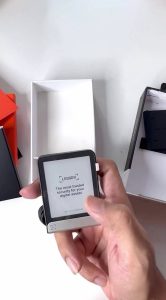 Ledger Flex
⭐⭐⭐⭐☆
Security
4.1/5
⭐⭐⭐⭐☆
Ease of Use
4.0/5
⭐⭐⭐⭐☆
Features
4.0/5
⭐⭐⭐⭐☆
Value for Money
3.8/5
MarketsXplora Verdict
After hands-on testing, the Ledger Flex earns an overall rating of 8/10, combining strong Secure Element-backed security, a large E Ink® touchscreen, Bluetooth connectivity, and support for over 5,500 digital assets — offset by real limitations like the lack of a screen backlight and tighter-than-expected app storage. It delivers most of the flagship Ledger Stax experience at a significantly lower price, making it a strong value pick for the right kind of buyer.
What is Ledger Flex?
The Ledger Flex is the newest hardware wallet from Ledger, and it’s truly a game-changer. Ledger introduced this wallet at the Bitcoin 2024 conference in Nashville on a Friday, making quite the splash! Since the announcement was made, the crypto community has not stopped talking about it.
This wasn’t just another incremental update—Ledger positioned the Flex as a revolutionary device that bridges the gap between their budget-friendly Nano series and the premium Stax model.
What makes this particularly noteworthy in our Ledger Flex review is the timing. Ledger announced this device when hardware wallet competition was intensifying, with Trezor launching the Safe 5 and other competitors pushing innovative features. The Flex represents Ledger’s response to market demands for better screens and user experience without luxury pricing.
🧪 How We Tested This: We ran the Flex through everyday account checks, setup from scratch, Bluetooth pairing, and a real $500 ETH-to-BTC swap through Ledger Live, paired with an iPhone 16 Pro Max on iOS 19. Specific figures throughout this review — battery drain, pairing times, setup duration — come from that hands-on testing rather than manufacturer specs.
Physical & Design Upgrades: Hands-On Analysis
Design & Display
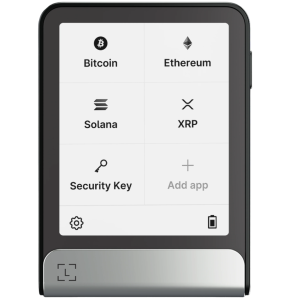
The standout feature in this Ledger Flex wallet review is the revolutionary 2.84-inch secure E Ink® touchscreen—the first in any hardware wallet to be directly powered by a Secure Element chip. Unlike traditional displays, every pixel you see is cryptographically verified and tamper-proof, eliminating the possibility of screen manipulation attacks.
Screen Specifications:
- Display Size: 2.84 inches diagonal (confirmed as tested)
- Technology: E Ink® bistable (zero power for static images)
- Security Integration: CC EAL6+ Secure Element controls display
- Visibility: Excellent in direct sunlight; no backlight, so unusable in total darkness
- Touch Response: Deliberate, precise navigation — see 2.4 below
- Customization: Lock screen supports personal images and NFTs
Why This Matters
The E Ink® technology delivers exceptional readability where smartphone screens fail — but it comes with real trade-offs worth knowing before you buy. In our outdoor testing, the screen stayed readable in direct sunlight without needing to adjust the viewing angle, noticeably better than the Nano X and Nano S Plus displays, and the anti-glare coating meant reflections were never a problem. It’s genuinely paper-like: reflective, not emissive.
That cuts both ways, though. There’s no backlight at all. In a dark room the screen is completely unreadable and invisible — we ended up using a phone flashlight to illuminate it, since there’s no internal brightness setting to fall back on. We also noticed occasional faint E Ink ghosting (a brief after-image during transitions or scrolling); Ledger’s own support documentation describes this as normal behavior for their E Ink screens that clears up after a subsequent refresh, and that matched what we saw. Refreshes themselves feel more deliberate than an LCD or OLED screen — scrolling through a long transaction log has a slight, intentional pause to it rather than snapping instantly. That’s arguably a feature, not a bug: it forces you to actually read what’s on screen instead of swiping past a security warning.
Build Quality

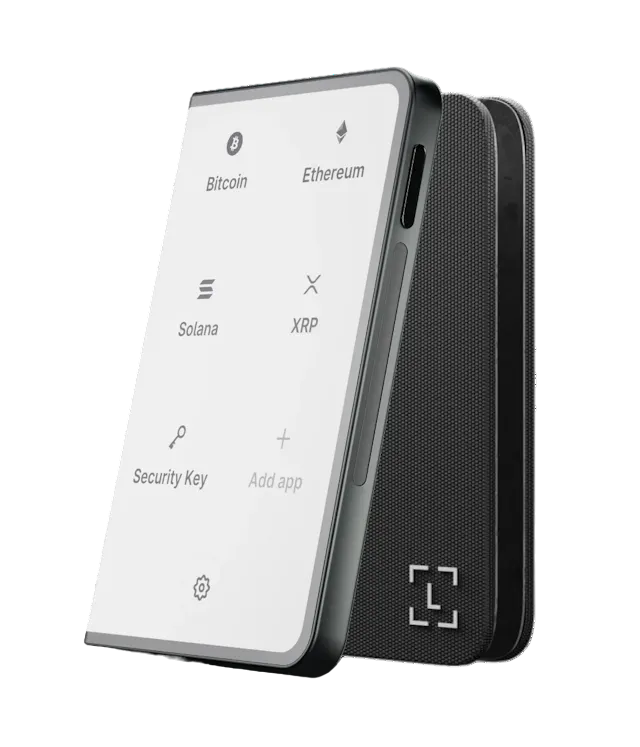
At $249, you’d expect some build quality compromises, but this Ledger Flex review found the opposite. The device features an aircraft-grade aluminum frame paired with lightweight plastic, creating a perfect balance between durability and portability at just 57.5 grams.
Build Quality Specifications:
- Frame Material: Aircraft-grade aluminum for structural integrity
- Total Weight: 57.5g (lighter than most smartphones)
- Thickness: Ultra-slim 7.7mm profile
- Available Colors: Graphite Black and BTC Orange
- Feel: Premium tactile experience comparable to $400+ devices
The 7.7mm thickness makes it one of the slimmest hardware wallets available, easily slipping into any pocket or wallet compartment. Despite housing a large screen, robust battery, and complete connectivity suite, the Flex maintains this impressively compact form factor.
Customizable Lock Screen (NFT & Personal Image Support)
Personalization options distinguish the Flex in this Ledger Flex wallet review. The customizable lock screen allows displaying your favorite NFT, personal photo, or even memes as wallpaper. This image remains visible even when the device is in standby mode, thanks to E Ink®’s bistable technology requiring zero power for static displays.
Customization Options:
- NFT Display: Showcase any NFT from your collection
- Personal Photos: Upload images through Ledger Live
- Crypto Art: Display artwork or custom graphics
- Always Visible: Image remains when device is powered off
- Zero Battery Drain: Static images consume no power
- Easy Updates: Change lock screen anytime through Ledger Live
This feature transforms the hardware wallet from purely functional tool into something personal and engaging. For NFT collectors, showcasing digital art on the secure hardware protecting it creates a unique connection between investment and security device.
Touchscreen Accuracy & Responsiveness
Since the Flex’s entire interaction model hinges on its touchscreen, we spent extra time specifically testing tap accuracy and scroll behavior rather than just the display quality. The touchscreen is deliberately built to resist accidental input — Ledger calls this an industrial-grade secure touchscreen — which means a fast or overly light tap won’t always register on the first try. That’s by design: it prevents accidental confirmations, but it does mean you need to tap with intent rather than swipe casually the way you would on a phone.
What We Found:
- Missed Taps: Occasional unresponsiveness on parts of the right side of the screen, sometimes requiring a second press
- No Accidental Confirmations: Clear spacing and explicit confirmation steps mean we never tapped the wrong button by mistake
- Scrolling: Precise and reliable through long transaction details — the view stays anchored correctly even mid-scroll
- Swipe Feel: Smooth and intuitive, closer to an iPhone than to a typical E Ink device
- Lag: A slight inherent response delay from the E Ink panel itself, but nothing disruptive during normal use
- Our Responsiveness Rating: 7.5/10
Build Quality, Magnetic Case & Unboxing
Beyond the spec-sheet numbers in 2.2, our hands-on impression of the build was strongly positive. The frame felt exceptionally rigid with no flexing, creaking, or rattling, and the Flex felt significantly lighter in hand than an iPhone 16 Pro Max — the finish came across as noticeably more premium than the Nano X’s plastic shell. We didn’t notice fingerprint buildup or scratches over the course of testing. Our build quality rating: 9/10.
Our unit shipped with Ledger’s Magnet Shell protective case, which we used throughout testing. The magnetic attachment felt strong and secure, and the case never detached unexpectedly. The box itself was minimal — just the device, the case, and essential documentation, no bundled extras. Our unboxing experience rating: 9/10.
Buttons & Controls: the physical power/lock button felt tactile, firm, and clicky with no mushiness, was easy to find without looking, and never misfired or failed to register during testing.
Security Deep-Dive: Clear Signing vs Blind Signing
Security Features & the CC EAL6+ Secure Element
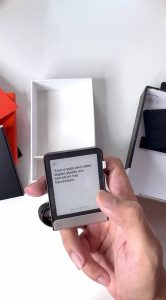
Security forms the foundation of any hardware wallet, and this Ledger Flex wallet review confirms Ledger deployed military-grade protection. The CC EAL6+ certified Secure Element chip represents the second-highest security evaluation level globally—identical to the protection in government passports and credit cards.
Security Certifications:
- Chip Certification: CC EAL6+ (Common Criteria Evaluation Assurance Level 6+)
- Operating System: Proprietary Ledger OS designed specifically for crypto security
- Key Storage: Private keys physically isolated, never exposed to external access
- Tamper Resistance: Automatic wipe capabilities upon physical attack detection
- Industry Standard: Same security level as passport chips and payment cards
What CC EAL6+ Actually Means: This certification requires extensive independent testing and verification by accredited laboratories. It ensures the chip can withstand sophisticated attacks including side-channel analysis, fault injection, and physical probing—attacks that would compromise lesser hardware wallets.
Our biggest positive from testing: the secure touchscreen itself. This isn’t just a touchscreen bolted on as a convenience upgrade over Ledger’s physical buttons — the information displayed for signing is generated by the Secure Element itself, which matters when you’re relying on that screen to confirm exactly what you’re approving. Combined with the larger E Ink® display, this made transaction verification noticeably more comfortable in our testing than on Ledger’s older button-based models — it’s the feature that most clearly justifies the Flex’s move away from the traditional Nano-style design.
Clear Signing Technology
One of the most significant security advances highlighted in this Ledger Flex review is Clear Signing technology. Traditional hardware wallets display cryptic hexadecimal strings, forcing users to blindly trust transaction details. The Flex’s 2.84-inch screen changes everything.
Clear Signing Benefits:
- Human-Readable Transactions: See “Swap 1 ETH for 2,500 USDC on Uniswap” instead of hex code
- Complete Transparency: Exact amounts, recipient addresses, network fees displayed
- DApp Information: Shows which decentralized application you’re interacting with
- Cryptographic Verification: All information verified by Secure Element before display
- Security Enhancement: Eliminates blind signing vulnerabilities that plague smaller devices
When interacting with DeFi protocols, you’ll see precisely what you’re approving. In our testing, a real $500 ETH-to-BTC swap through Ledger Live displayed the source asset, destination asset, amount, fees, and recipient details clearly on-screen before approval — no scrolling through multiple screens was needed, and the information was easy to understand.
We also compared the recipient address shown on the Flex against the one shown in Ledger Live character-for-character; the Flex displays the full, unabbreviated address rather than a truncated version, and the two matched. Ledger’s swap flow follows a strict “What You See Is What You Sign” model, breaking the transaction into separate confirmation screens rather than one blanket approval — we had to approve each piece individually before the swap executed, and it completed successfully with confirmation landing in under 3 minutes after signing.
We also deliberately tested a smart-contract interaction (not just a straightforward swap) to see how Clear Signing handles the harder case. When a contract’s data can’t be fully decoded into plain English, the Flex doesn’t silently fall back to raw hex — it explicitly displays a blind-signing warning telling you the transaction details could not be fully decoded. That’s an important trust signal: the device tells you when it can’t vouch for what you’re approving, rather than pretending it can.
PIN Protection
The Ledger Flex implements sophisticated PIN protection extending beyond basic access control. You can set a PIN between 4-8 digits, but the real security lies in the anti-tampering mechanism: automatic data wiping after three consecutive failed attempts.
PIN Security Features:
- PIN Length: Customizable 4-8 digits for security/convenience balance
- Auto-Wipe Function: Complete device reset after 3 failed attempts
- Physical Theft Protection: Prevents brute-force attacks on stolen devices
- No Recovery Backdoors: No master PIN or manufacturer override exists
- Fund Protection: Your crypto remains safe via separately stored recovery phrase
This feature ensures that even if someone physically steals your Flex, they have exactly three attempts before the device permanently wipes itself. Your funds remain secure because they’re ultimately protected by your 24-word recovery phrase, which should be stored in a completely separate location.
One thing to know before you start
The Flex shuffles the position of digits 0-9 on the touchscreen every time you enter your PIN, rather than using a fixed keypad layout like a smartphone. In our testing this felt slightly challenging at first — you can’t rely on muscle memory or a spatial habit, so you have to actively look for each digit on every unlock — and it did cause us to mis-tap at least once during testing.
It becomes easy and quick with a small amount of practice, and it’s a deliberate anti-shoulder-surfing measure, not a flaw. We tested PIN entry repeatedly (roughly three unlocks over the course of testing), changed the PIN once, and confirmed the device behaves as expected after an incorrect entry.
Where first-time users might get confused
A few of the Flex’s security behaviors look like malfunctions if you don’t know what to expect. The shuffling keypad itself can read as a glitch to someone unfamiliar with the design. If the device disconnects abruptly mid-session, it can enter a temporary lock state as an anti-tamper measure — which can feel alarming if you don’t realize it’s intentional and assume the device has wiped itself. And when a smart contract can’t be decoded (see 3.2 above), the warning screen requires actually reading it; a beginner clicking through prompts without pausing could authorize something risky without realizing it.
Passphrase / Hidden Wallet
Beyond the standard PIN, the Flex supports an optional passphrase feature that creates a separate “hidden” wallet layered on top of your standard 24-word recovery phrase — useful as plausible deniability if you’re ever forced to unlock your device. We tested this directly: setup was straightforward and easy to understand, we successfully created a passphrase-protected hidden wallet, accessed it, and confirmed we could switch back to the normal wallet without issue.
Ledger Security Key App
Beyond cryptocurrency security, this Ledger Flex wallet review discovered impressive identity protection capabilities through the Ledger Security Key app. The device functions as a hardware security key for two-factor authentication and passwordless logins across major platforms.
Identity Protection Features:
- Two-Factor Authentication: Hardware-based 2FA for supported platforms
- Passwordless Logins: FIDO2/WebAuthn standard compliance
- Supported Services: Google, Binance, Coinbase, social media platforms
- AI Protection: Defense against deepfake and synthetic identity fraud
- Phishing Resistance: Impossible to phish hardware security key credentials
“Proof of You” Technology: Instead of relying on SMS codes (vulnerable to SIM swapping) or authenticator apps (vulnerable to device compromise), you use your Flex for secure logins. This becomes increasingly important as AI-generated deepfakes and sophisticated identity theft techniques proliferate.
Optional Recovery Key
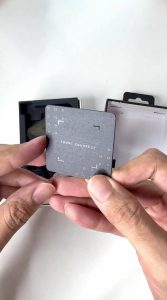
Ledger introduced an optional hardware backup called the Recovery Key, specifically designed for Flex and Stax models. This NFC-enabled device provides tap-and-go wallet restoration, offering an alternative to traditional 24-word recovery phrases that many users struggle to manage securely.
Recovery Key Features:
- NFC Technology: Tap-to-restore functionality, no typing required
- Offline Backup: Complete backup and recovery occurs offline
- Restoration Time: Minutes instead of the lengthy 24-word entry process
- Security Audited: Verified by Ledger’s internal security teams
- Compatibility: Works exclusively with Flex and Stax models
- Optional Purchase: Not required; traditional 24-word phrases still supported
To verify the Recovery Key actually works rather than taking Ledger’s word for it, we ran a real-money test: we deposited $80 of BTC into a newly created wallet, then intentionally triggered the auto-wipe by entering the PIN incorrectly three times. After the wipe, we powered the device back on, selected “Restore access to assets,” chose “Ledger Recovery Key,” tapped the Recovery Key card against the back of the Flex, and entered the card’s own PIN. The Flex pulled the encrypted backup over NFC and rebuilt the wallet immediately — the $80 in BTC reappeared right away. Start to finish, the restoration took under 3 minutes.
In a separate full-recovery test using the traditional 24-word phrase instead (factory reset, then manual restore), the process took about 7 minutes and every account and balance came back correctly.
Learn More → Is the Ledger Flex Hardware Wallet Safe?
Critical Security Best Practices
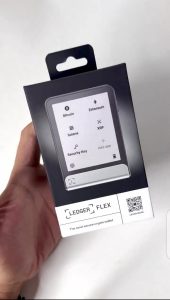
Proper security practices become crucial with any hardware wallet, and this Ledger Flex review emphasizes key recommendations for maximum protection. Following these guidelines ensures your cryptocurrency remains secure even if your device is lost, stolen, or damaged.
Essential Security Practices:
Recovery Phrase Management:
- Never share your 24-word recovery phrase with anyone, including Ledger support
- Write recovery phrase on paper only; never store digitally
- Store recovery phrase in multiple secure locations (fireproof safe, bank deposit box)
- Consider metal backup solutions for fire/water resistance
Purchase and Setup:
- Purchase only from official Ledger website or authorized retailers
- Verify device integrity upon arrival (tamper-evident packaging)
- Never use a device with pre-generated recovery phrase
- Verify firmware authenticity during first setup
Ongoing Security:
- Keep firmware updated with latest security patches
- Verify all transaction details on device screen before approval
- Never approve transactions you don’t understand completely
- Use PIN protection and enable auto-wipe after failed attempts
⚠️ Common Scams to Avoid:
- Ledger will never email requesting your recovery phrase
- No legitimate support will ask for remote access to your device
- Beware of fake Ledger Live apps on mobile app stores
- Verify website URL is exactly ledger.com before downloading software
Practical Troubleshooting & Ecosystem Setup
Connectivity
We tested Bluetooth pairing with an iPhone 16 Pro Max on iOS 19. Initial pairing took approximately one minute, and subsequent reconnections took around 30 seconds. Our 15-foot range test had walls between the phone and the device — not a clear line of sight — and we experienced no disconnects during account synchronization at that distance. Pushing further, we maintained a stable connection out to roughly 25 feet before it dropped, and reconnection happened automatically once we walked back within Ledger’s stated 10-meter range. Over the course of broader testing we did hit one Bluetooth timeout inside Ledger Live (see 4.4 below) — toggling Bluetooth off and on on the phone resolved it immediately, so it wasn’t a lasting issue, but it’s worth knowing it can happen. We haven’t independently tested Android pairing on this unit; see the troubleshooting notes below for reported Android-specific issues.
Bluetooth Specifications:
- Standard: Bluetooth 5.2 for improved range and stability
- iOS Compatibility: iPhone running iOS 14 or later
- Android Compatibility: Devices running Android 10 or later
- Connection Range: Up to 10 meters (33 ft) rated; we maintained a stable connection to ~25 ft through walls in testing
- Battery Impact: Minimal power consumption during active connections
- Pairing Time (Tested): ~1 minute initial pairing, ~30 seconds on reconnect
Mobile crypto management becomes genuinely convenient with the Flex’s Bluetooth capability. You can approve transactions, check portfolio balances, and manage assets entirely from your smartphone without ever connecting to a computer—perfect for users who prefer mobile-first workflows.
USB-C Charging
The inclusion of USB-C for charging and data connectivity represents a practical improvement highlighted throughout this Ledger Flex wallet review. Unlike older hardware wallets requiring proprietary cables, the Flex uses the same USB-C cable as modern smartphones, tablets, and laptops.
USB-C Advantages:
- Universal Compatibility: Same cable as iPhone 15, Samsung Galaxy, MacBook
- Fast Charging: Full battery charge achieved in under 2 hours
- Data Transfer: High-speed connection for desktop/laptop firmware updates
- No Proprietary Cables: Never worry about losing special charging cables
- Future-Proof: Industry-standard connector for years to come
This standardization means you’re less likely to be caught without a charging solution. Whether traveling internationally or moving between home and office, the same cable powers your phone, laptop, tablet, and hardware wallet.
We connected the Flex to a laptop over USB-C directly, and Ledger Live recognized the device immediately with no setup delay. We also ran an actual transaction over the wired connection — it completed instantly and felt like the most secure way to move funds, since there’s no wireless link involved at all. The port itself felt tightly molded around the cable with no wobble or side-to-side play, even while operating the touchscreen with the cable connected.
Battery Life
In our testing, the Flex went from a full 100% charge to 6% remaining after eight days of typical intermittent use — checking balances, occasional transactions, Bluetooth connected but not constantly active. We recharged at that point rather than letting it run flat, so this isn’t a full-drain figure, but it’s a realistic real-world number for normal day-to-day use rather than constant screen or Bluetooth activity. Recharging from near-empty to full took approximately 2 hours using a standard wall adapter.
Ledger’s own stated range is broader than what we measured, since it depends heavily on how actively you use Bluetooth and the touchscreen — see the manufacturer figures below for context. Unlike LCD or OLED screens that constantly consume power, E Ink® only uses energy when the display changes, which is what makes multi-day use possible at all.
Ledger Flex Battery Performance:
- Our Tested Result: 8 days of typical intermittent use, 100% → 6%
- Our Heaviest Single Day: ~20% battery lost across 4 transactions with Bluetooth continuously active and the screen left on for extended periods
- Recharge Time (Tested): ~2 hours, near-empty to full via wall adapter
- Manufacturer’s Typical Usage Claim: 2-4 weeks per charge with moderate daily use
- Manufacturer’s Heavy Usage Claim: 1-2 weeks with frequent transactions and Bluetooth activity
- Standby Time: Months when powered off but displaying lock screen
- Charging Time: 0-100% in under 2 hours via USB-C
- Lock Screen: Always visible even when completely powered off (zero battery drain)
The bistable nature of E Ink® technology means your custom lock screen image remains visible even when the device is completely powered off. This creates an always-on display effect without any battery consumption—impossible with traditional screen technologies.
Ledger Live Mobile Experience
We used Ledger Live’s mobile app throughout testing on the iPhone 16 Pro Max, and came away rating it 8.5/10. Connecting the Flex to the app took less than a minute, and account synchronization typically completed in under a minute as well. Balances and transaction history updated correctly the large majority of the time — Bitcoin, Ethereum, Solana, and XRP all displayed accurately — though we did occasionally see delayed or briefly inaccurate balances when the app fell out of sync with the blockchain, and transaction history indexing isn’t perfect on every network.
We hit one connectivity hiccup: a Bluetooth connection timeout between the iPhone and the Flex during use, resolved immediately by turning the phone’s Bluetooth off and back on. Separately, we noticed the Flex will automatically sleep or disconnect if left idle for a few minutes mid-session — a deliberate battery/security measure, but one that could read as a malfunction if you don’t expect it while reviewing a transaction.
Ledger Live Desktop Experience
We also connected the Flex to Ledger Live on a Mac (macOS) via USB-C. Desktop pairing took less than 10 seconds — noticeably faster than mobile Bluetooth pairing, since it’s a direct wired connection — and we didn’t encounter any connection or sync problems during testing. Overall the desktop experience felt excellent, at least as good as mobile and faster for the initial connection. One thing worth flagging even though we didn’t hit it ourselves: Ledger’s servers can occasionally return an “API HTTP 503” error during periods of extremely high network load (e.g. major market volatility) — not a device fault, but worth knowing if you see it.
Cryptocurrency Support
This Ledger Flex wallet review confirmed extensive cryptocurrency compatibility across virtually every major blockchain. The device supports over 5,500 different cryptocurrencies and tokens, from Bitcoin and Ethereum to newer projects on Solana, Polygon, Avalanche, and Cosmos networks.
Supported Cryptocurrencies:
- Bitcoin (BTC): Native SegWit and Taproot support
- Ethereum (ETH): Full ERC-20 token compatibility
- Solana (SOL): Including all SPL tokens
- Cardano (ADA): Native token support
- Polygon (MATIC): Layer-2 scaling solution
- Cosmos (ATOM): IBC-compatible chains
- Avalanche (AVAX): C-Chain and X-Chain support
- 5,500+ Total Assets: Regular updates add new projects
NFT Support: The Flex natively supports Ethereum and Polygon NFTs through Ledger Live, allowing you to view collections directly on the E Ink® screen. You can even display your favorite NFT as the lock screen wallpaper—a feature that transforms this security device into a personal showcase for digital art.
Features & Functionality
Staking Capabilities
Passive income opportunities are integrated into the Flex through native staking support for major proof-of-stake cryptocurrencies. This Ledger Flex wallet review confirmed smooth staking experiences with real-time reward tracking directly through the Ledger Live application.
Staking Support:
- Ethereum (ETH): Consensus layer staking with validator selection
- Solana (SOL): Delegation to validators with flexible unstaking
- Cosmos (ATOM): Multiple validator options with IBC compatibility
- Cardano (ADA): Stake pool participation with automatic reward distribution
- Polkadot (DOT): Nominated proof-of-stake participation
- Tezos (XTZ): Delegation with regular reward cycles
How It Works: Staking rewards appear automatically in your portfolio, with detailed transaction history showing distribution timing. Security remains intact since private keys never leave the hardware device, even while participating in network validation.
We tested staking directly, delegating Ethereum through Ledger Live. Setup took under 3 minutes — the Flex required us to explicitly approve the delegation contract, verify the exact validator node address, and confirm the token amount before it would proceed, all clearly displayed on the secure screen. We didn’t encounter any errors during the process.
Crypto Swapping
The Flex includes integrated cryptocurrency swapping through Uniswap Protocol, eliminating the need to transfer funds to centralized exchanges for basic token swaps. This Ledger Flex review found the swapping process secure and transparent, with all transaction details displayed clearly on the 2.84-inch screen.
Crypto Swapping Features:
- Direct Integration: Uniswap Protocol access without leaving Ledger Live
- Supported Networks: Ethereum, Polygon, Arbitrum, Optimism
- Token Coverage: Major ERC-20 tokens and stablecoins
- Fee Transparency: Network gas fees and swap fees displayed before approval
- Price Protection: Slippage settings customizable per transaction
- Security: Clear Signing shows exact swap details before confirmation
The Clear Signing feature excels during swap transactions, displaying precisely which tokens you’re exchanging, the current exchange rate, expected slippage, and all associated fees. This transparency ensures complete understanding before approving any trade on the secure hardware.
100+ App Capacity
Storage capacity for cryptocurrency apps is generous, supporting 100+ simultaneous installations. This Ledger Flex review found this capacity sufficient for even the most diverse crypto portfolios, eliminating the constant app uninstalling/reinstalling cycle that plagued earlier Ledger devices.
App Management Benefits:
- Simultaneous Apps: 100+ blockchain apps installed concurrently
- No More Juggling: Manage entire portfolio without uninstalling apps
- Quick Access: All your cryptocurrencies ready for immediate transactions
- Future-Proofing: Room for new blockchain projects and tokens
- Easy Management: Install/uninstall through Ledger Live with one tap
The generous app capacity future-proofs your investment as new cryptocurrencies and blockchain networks emerge. Whether you hold Bitcoin, Ethereum, and 10 altcoins or maintain exposure across 50+ different projects, the Flex accommodates comprehensive portfolio diversity.
Multi-Platform Compatibility
5/6
Supported Platforms
83%
Platform Coverage
⭐⭐⭐⭐⭐
Compatibility Rating
4.8/5
💡 Compatibility Verdict
The Ledger Flex delivers excellent cross-platform support, working seamlessly across Windows, macOS, Linux, iPhone, and Android devices. Most users can manage their crypto portfolio from desktop or mobile without restrictions. The only notable limitation is the lack of Chrome OS support, which may affect Chromebook users but is unlikely to impact the majority of cryptocurrency investors.
Third-Party Wallet Integration
The Flex supports popular third-party wallets like MetaMask and MyEtherWallet, extending functionality beyond the native Ledger Live ecosystem. This Ledger Flex wallet review found this flexibility valuable for users who prefer different interfaces or need access to specific DeFi protocols not yet integrated into Ledger Live.
Supported Third-Party Wallets:
- MetaMask: Full Ethereum ecosystem and EVM chain access
- MyEtherWallet (MEW): Comprehensive Ethereum tools
- Rabby Wallet: Multi-chain DeFi interface
- Frame: Desktop-focused Ethereum wallet
- Additional Wallets: Any wallet supporting hardware wallet standards
Security Maintenance: Third-party integration doesn’t compromise security since your private keys remain safely stored on the hardware device. External wallets simply interface with the Flex to request transaction signatures, maintaining the security model while providing interface flexibility for advanced DeFi users.
Ledger Flex Hardware Wallet Reviews from Reddit Community
Reddit users who’ve spent time with the Ledger Flex offer honest perspectives in this Ledger Flex wallet review compilation. User catdaddysoprano praised the premium feel, compact form factor, and “retro Palm Pilot” vibe, calling it “a great ADHD toy” while highlighting the satisfying keyboard and e-ink screen for everyday use.
Common User Praise:
- Premium build quality with satisfying tactile feedback
- True mobile independence for crypto management
- Successful staking experiences with ETH, SOL, ATOM, and ADA
- Effective QR code functionality for transactions
- Significant upgrade from Nano series devices
- Easy-to-read screen in all lighting conditions
Reported Issues:
- Bluetooth Problems: Users manzamanna and calr0x reported Android connectivity issues, with connections dropping or failing until using nRF Connect app workaround
- App Capacity Confusion: Plenty_Membership_62 criticized limited app installations, maxing out at nine apps despite 100+ claims
- Ecosystem Trust: Some users expressed concerns about Ledger’s broader ecosystem following past controversies
- Learning Curve: First-time hardware wallet users reported initial navigation challenges
Redditors generally admire the design, portability, and usability but flag technical hiccups and ecosystem trust as considerations before purchasing. The device excels for experienced crypto users but may overwhelm complete beginners.
Disadvantages of Ledger Flex
Honesty matters in this Ledger Flex review, so here are the documented limitations. While the device excels in most areas, several issues deserve consideration before purchase, particularly for users with specific platform requirements or preferences.
No Screen Backlight — Our Biggest Disappointment:
- The E Ink® display has no backlight of any kind, and there’s no setting to add one
- In a dark room the screen is completely unreadable and invisible
- In our testing, we resorted to shining a phone flashlight on the screen to read it in low light
- Direct sunlight and normal indoor lighting are excellent; darkness is the one condition the Flex genuinely struggles with
Bluetooth Connectivity Issues (Android):
- Some Android users report connection drops and pairing failures
- Workaround involves using nRF Connect app for initial pairing
- iOS users generally experience stable Bluetooth performance
- Firmware updates continue addressing connectivity problems
- USB-C connection provides reliable alternative for affected users
Editor’s note: our own hands-on testing was done on an iPhone 16 Pro Max (iOS 19), where Bluetooth setup was reliable throughout — the steps below address Android-specific reports we have not personally reproduced, compiled from the Reddit users cited earlier in this review (manzamanna and calr0x) and general nRF Connect documentation. If your Flex pairs normally, you don’t need this.
Before troubleshooting: check Location Services. On Android, Ledger Live’s Bluetooth setup can prompt you to enable Location Services as part of the pairing permission flow, and pairing can occasionally fail if the process times out. Confirm Location Services is on before assuming the pairing has actually failed.
nRF Connect Workaround — Step by Step:
- Install the free nRF Connect for Mobile app (by Nordic Semiconductor) from the Google Play Store.
- Turn off Bluetooth on your Android phone, then turn it back on to reset the radio.
- Open nRF Connect and tap Scan. Your Ledger Flex should appear in the device list once it’s powered on and in pairing mode.
- Tap Connect next to the Flex’s entry in nRF Connect. Wait for the connection to establish — this forces a clean BLE handshake outside of Ledger Live’s own pairing flow.
- Once nRF Connect shows a stable connection, disconnect from within the app and close it.
- Open Ledger Live and attempt to pair the Flex again through the app’s normal Bluetooth setup flow. Users reporting this fix say the device pairs successfully on this second attempt.
- If pairing still fails, forget the Flex under your phone’s Bluetooth settings, restart the phone, and repeat the process from Step 2.
- As a fallback with no workaround required, connect via USB-C — this bypasses Bluetooth entirely and Ledger Live functions identically over the wired connection.
No Wireless Charging:
- Stax model includes wireless charging; Flex requires wired USB-C
- Full charge takes under 2 hours, minimizing inconvenience
- Universal USB-C partially offsets wireless charging absence
- Battery life measured in weeks reduces charging frequency
Chromebook Incompatibility:
- Chrome OS currently unsupported for Ledger Live application
- Affects users who primarily operate on Chromebook devices
- Windows, macOS, Linux, iOS, and Android fully supported
Limited App Storage — Our Biggest Criticism:
- Available app memory is relatively small in practice, despite the “100+ apps” figure quoted for the device
- Users who want many different cryptocurrency apps installed at once will likely need to uninstall/reinstall to make room for others
- This limitation feels dated on a device positioned as Ledger’s premium touchscreen model — it’s a carryover from Ledger’s smaller legacy devices
- Removing an app doesn’t delete the underlying blockchain assets — you can reinstall and regain access — but it’s inconvenient if you regularly switch between many networks
- Some users report maxing out well below 100 apps depending on which specific blockchain apps they install
How to Set Up Your Ledger Flex (Step-by-Step)
In our testing, setting up a new Ledger Flex — choosing “new wallet” rather than restoring an existing one — took approximately 10 minutes for the on-device setup flow itself, including a firmware update that took under 5 minutes. Writing down and verifying the 24-word recovery phrase took longer than the rest of the process combined — about 11 minutes — since it requires carefully transcribing and then re-confirming all 24 words rather than just tapping through screens. This guide walks through the entire process from unboxing to your first secure transaction.
Step 1: Power On Your Device
- Hold the right-side button for 1 second
- Screen displays: “Ledger. The most trusted security for your digital assets”
- Tap screen to begin setup navigation</li>
Step 2: Choose Your Setup Method
- Option A – Mobile: Select “Set up with Ledger Live mobile”
- Scan QR code to download iOS/Android app
- Enable Bluetooth on both smartphone and Flex
- Option B – Desktop: Select “Set up with Ledger Live desktop”
- Visit ledger.com/start to download computer application
- Connect Flex via USB-C cable</li>
Step 3: Name Your Device
- Choose unique name for easy identification
- Use on-screen keyboard to enter name
- Tap “Confirm name” to proceed</li>
Step 4: Set Your Security PIN
- Choose 4-8 digit PIN (longer = more secure)
- Enter PIN using on-screen numeric keyboard
- Re-enter PIN to confirm accuracy
- Remember: 3 failed attempts trigger automatic device wipe</li>
Step 5: Generate Recovery Phrase
- New Device: Select “Set it up as a new Ledger”
- Device generates unique 24-word recovery phrase
- Write each word on provided recovery sheets in exact order
- Restoring Wallet: Select “Restore using Secret Recovery Phrase”
- Enter existing 24 words to restore access</li>
Step 6: Verify Recovery Phrase
- Device prompts you to confirm words in random order
- Select correct words from multiple-choice options
- Ensures you’ve accurately recorded recovery phrase
- Tap “Done” when verification completes</li>
Step 7: Install Cryptocurrency Apps
- Open Ledger Live on mobile or desktop
- Navigate to “Manager” section
- Install apps for cryptocurrencies you hold
- Apps install directly to Flex via connection
If you prefer a more visual guide, we’ve put together a full video walkthrough of the setup process.
Watch the full setup walkthrough here →
Important Security Reminders
- 🔒 Never photograph or digitally store your recovery phrase
- 📝 Write recovery phrase on paper only, stored securely offline
- ⚠️ Ledger will NEVER ask for your recovery phrase
- 🛡️ Verify firmware authenticity during setup
- 💾 Consider purchasing optional Recovery Key for NFC backup
Ledger Flex Warranty
Support and warranty coverage provide peace of mind in this Ledger Flex wallet review assessment. The device includes a comprehensive 3-year warranty protection covering manufacturing defects and hardware failures. Ledger’s customer support team assists with multiple channels including email ticketing, extensive documentation, and active community forums.
Support Features:
- Warranty: 3-year comprehensive coverage from purchase date
- Support Channels: Email tickets, live chat during business hours
- Knowledge Base: Extensive documentation and troubleshooting guides
- Ledger Academy: Free cryptocurrency education and security tutorials
- Video Guides: Step-by-step visual instructions for all features
- Community Forums: Active user community for peer assistance
- Response Time: Typically 24-48 hours for support tickets
Ledger maintains comprehensive educational resources through Ledger Academy, offering cryptocurrency education alongside device-specific tutorials. These resources help users maximize device capabilities while maintaining security best practices—particularly valuable for newcomers to hardware wallets.
Competitive Alternatives: Mid-Tier vs Flagship
Price and Value


💡 MarketsXplora Value Verdict:
At $249, the Ledger Flex crypto hardware wallet delivers roughly 80% of the Ledger Stax experience for only 62% of the price, making it the sweet spot in Ledger’s lineup. Compared to the Nano X, the additional $100 buys a dramatically larger E Ink® touchscreen, improved navigation, and a significantly better user experience. Against the Trezor Safe 5, the Flex stands out with its premium E Ink® display, superior battery life, and more intuitive interface, making it one of the strongest value propositions among premium hardware wallets.
Ledger Flex vs Trezor Safe 5
This is the closest direct matchup at this price tier, and the two wallets take genuinely different approaches: Ledger bets on a big touchscreen and wireless convenience, Trezor bets on a smaller screen with a fully wired, open-source design.
💡 Ledger Flex vs Trezor Safe 5 Verdict
The two wallets serve different priorities rather than one simply beating the other. The Flex’s larger E Ink® display, internal battery, and Bluetooth support make it the better fit for mobile-first users and NFT collectors who want to browse a bigger screen. The Safe 5 is lighter, fully open-source at the firmware level, and deliberately wireless-free — appealing to users who prioritize a minimal attack surface and code transparency over screen size or mobile convenience.
Ledger Nano S Plus vs Nano X vs Flex vs Stax
Nano S Plus
⭐⭐⭐⭐☆
6/10
Best Budget Option
Nano X
⭐⭐⭐⭐☆
6/10
Best Mid-Range Choice
🏆 Ledger Flex
⭐⭐⭐⭐☆
8/10
Best Overall Value
Ledger Stax
⭐⭐⭐⭐⭐
8/10
Premium Experience
Which we’d actually recommend, based on using both: for everyday use, we prefer the Flex over the Nano X — the screen, Clear Signing, and NFC Recovery Key support make transaction verification and navigation substantially easier. Bluetooth connectivity also felt like the stronger overall experience on the Flex. Two areas where the Nano X came out ahead in our experience: physical durability — the Nano X’s simpler, button-based body felt like it could take more abuse — and battery experience specifically. That’s not about raw endurance, since the Flex’s E Ink® display comfortably outlasts the Nano X’s roughly 8-hour rating; it’s more likely about predictability — knowing exactly where your charge stands day to day, rather than estimating from days-since-last-charge. Against the Nano S Plus, the Flex’s touchscreen is a major improvement over physical buttons, transaction verification is substantially easier, and we’d say it’s worth the extra cost even for someone who just wants basic cold storage. If you already own a Nano X or Nano S Plus, we’d recommend upgrading to the Flex.
💡 MarketsXplora Comparison Verdict
The Ledger Flex sits perfectly between the Nano X and Ledger Stax, offering the biggest upgrade in everyday usability without crossing into luxury-wallet pricing. You get a large 2.84-inch E Ink® touchscreen, Bluetooth 5.2 connectivity, an internal battery, lock-screen customization, and full clear-signing security for $150 less than the Stax. For most crypto investors, the Flex delivers the strongest balance of features, security, and value, making it the standout choice in Ledger’s current hardware wallet lineup.
The Ledger Flex sits perfectly between the Nano X and Ledger Stax, offering the biggest upgrade in everyday usability without crossing into luxury-wallet pricing. You get a large 2.84-inch E Ink® touchscreen, Bluetooth 5.2 connectivity, an internal battery, lock-screen customization, and full clear-signing security for $150 less than the Stax. For most crypto investors, the Flex delivers the strongest balance of features, security, and value, making it the standout choice in Ledger’s current hardware wallet lineup.
Should You Buy the Ledger Flex Crypto Hardware Wallet?
After this comprehensive Ledger Flex wallet review covering 25 essential facts, the verdict is clear: this device represents exceptional value for serious cryptocurrency users. The $249 price point delivers features previously reserved for more expensive hardware wallets, making premium security accessible without luxury pricing.
✓
Best ForWho should consider the Ledger Flex
✓ Serious crypto investors managing <strong>$10,000+ portfolios
✓ Users wanting mobile-first crypto management without desktop dependency
✓ NFT collectors who value visual display capabilities
✓ Users upgrading from basic hardware wallets such as Nano S Plus or older Trezor models
✓ DeFi users needing Clear Signing for complex protocol interactions
✓ Anyone prioritizing transaction transparency and security
✓ Multi-chain investors holding diverse cryptocurrency portfolios
!
Consider Alternatives IfWhen another wallet may make more sense
! You primarily use Chromebook devices (Chrome OS is incompatible)
! You prefer ultra-basic functionality without touchscreen complexity
! You want wireless charging, which is available on the Stax
! Your portfolio is under $1,000, where the Nano S Plus may suffice
! You exclusively use Android and require flawless Bluetooth connectivity
★★★★☆
MarketsXplora Verdict: Ledger Flex — 8/10
A strong choice for the right buyer — premium touchscreen security, with real trade-offs like no backlight and tighter app storage worth knowing going in.
Learn More → Is the Ledger Flex Safe?
Where to Buy Ledger Flex
Purchase your Ledger Flex exclusively from official channels to ensure device authenticity and security. This Ledger Flex review strongly recommends buying directly from the official Ledger website to avoid tampered devices—crucial for maintaining cryptocurrency security.
Official Purchase Options:
- Website: ledger.com (official and authorized retailers only)
- Price: $249 USD (may vary by region)
- Shipping: Free standard (15-30 days) or Express (5-8 days via FedEx/DHL/UPS)
- Warranty: 3-year coverage from purchase date
- Returns: 14-day return policy for unopened devices
Payment Methods Accepted:
- Credit/Debit Cards (Visa, Mastercard, American Express)
- PayPal Express Checkout
- Crypto.com Pay
- BitPay (cryptocurrency payments)
- Google Pay
- Apple Pay
Important: Never purchase hardware wallets from third-party sellers on Amazon, eBay, or similar marketplaces. Tampered devices can compromise your entire cryptocurrency portfolio. The modest savings aren’t worth the catastrophic security risk.
Final Thoughts: Is the Ledger Flex Worth It in 2026?
After hands-on testing covering setup, staking, a real swap, both mobile and desktop use, and address recovery, our verdict is that the Ledger Flex earns its price for the right kind of buyer — though it’s not without real trade-offs.
The single feature that most justifies the Flex, in our testing, is Clear Signing — seeing exactly what you’re approving on a secure, Secure-Element-driven screen rather than trusting a hex string. The single biggest weakness is limited app storage, which feels dated on a device positioned as Ledger’s premium touchscreen model. What surprised us most was how responsive and precise the on-screen keyboard felt; what disappointed us most was the complete lack of a screen backlight, which makes the device unusable in the dark without an external light source.
We’d recommend the Flex hardware wallet to active traders, security-conscious beginners who want a more forgiving interface than a button-only device, and anyone diversifying across many assets who values Clear Signing. However, we’d steer people who trade primarily at night or in low-light settings, or anyone shopping strictly on a budget, toward a different device given the backlight limitation and the higher price versus the Nano S Plus. We’d personally continue using it as a main hardware wallet, and would buy it again.
If you prioritize these premium features, then buy Ledger Flex as your cryptocurrency security solution in 2026. Make sure to buy only from official Ledger channels to ensure device authenticity and security.
Compare
-
Ledger Flex vs Ledger Nano X: Which Crypto Wallet is Right for You?
- Trezor Safe 7 vs Ledger Flex: The 2026 Winner You Didn’t Expect
-
Ledger Nano Gen5 vs Ledger Flex (2026): Which One Should You Buy?
- Tangem vs Ledger Flex: What’s the Real Difference?
-
Ledger Flex vs Ledger Stax: Which Offers Better Security in 2026?
Frequently Asked Questions
Is the Ledger Flex wallet safe?
Yes. The Ledger Flex uses a CC EAL6+ Secure Element chip — the same standard used in passports and credit cards. Your private keys stay offline in tamper-resistant hardware. The E Ink® touchscreen is powered directly by the Secure Element, ensuring all on-screen information is cryptographically verified. With a secure PIN and proper recovery phrase storage, the Flex is among the most secure wallets available in 2026.
How much does the Ledger Flex cost?
The Ledger Flex costs $249 USD, sitting between the Nano X ($149) and the Stax ($399). It delivers around 80% of the Stax’s premium features — including a 2.84-inch E Ink® touchscreen, Clear Signing, and broad crypto support — at a much lower price. Compared to rivals like the Trezor Safe 5, it offers a superior screen and smoother user experience.
Can I recover my crypto if I lose my Ledger Flex?
Yes. As long as you have your 24-word recovery phrase, you can restore your crypto on any compatible wallet or another Ledger device. Your funds live on the blockchain, not the device — the Flex only stores your private keys. Restoring regenerates those same keys, giving you full access. The optional Recovery Key also allows tap-to-recover backup via NFC.
Does the Ledger Flex support NFTs?
Yes. The Flex supports NFTs on Ethereum and Polygon through Ledger Live, letting you view and manage your collection securely. The 2.84-inch E Ink® screen clearly displays NFT artwork, and you can set one as your lock screen image — visible even when powered off thanks to zero-battery E Ink® technology. More NFT networks are added through regular updates.
What happens if someone steals my Ledger Flex?
Your funds stay safe. Without your PIN, no one can access your wallet. After three failed attempts, the device automatically wipes itself, erasing all data. Since your crypto is secured by your recovery phrase, a stolen Flex alone is useless to thieves. Always store your recovery phrase separately from the device.
How long does the Ledger Flex battery last?
The Flex lasts several weeks per charge, thanks to the power-efficient E Ink® display, which only uses energy when the screen changes. Moderate users often get 3–4 weeks, while heavy Bluetooth use may reduce that to 1–2 weeks. The lock screen image stays visible even when powered off, and a full USB-C recharge takes under 2 hours.
Can I stake cryptocurrencies with the Ledger Flex?
Yes. You can stake coins like ETH, SOL, ATOM, ADA, DOT, and XTZ directly in Ledger Live, with automatic reward tracking and payouts. Your private keys never leave the secure device, and the Clear Signing feature shows all staking details before approval.
What’s the difference between Ledger Flex and Ledger Stax?
The Stax has a larger 3.7-inch screen, wireless charging, and a more premium build. The Flex’s 2.84-inch screen lacks wireless charging but costs $150 less ($249 vs $399) and still offers the same security chip, Clear Signing, Bluetooth 5.2, and multi-week battery. Unless you need the biggest screen or wireless charging, the Flex offers better value.
Does the Ledger Flex work with MetaMask?
Yes. The Flex integrates with MetaMask, MyEtherWallet, Rabby, and other third-party wallets. This lets you access DeFi apps while keeping your private keys secure on the device. The Flex simply signs transactions, maintaining Ledger’s full hardware-level protection.
About the Author
Samson Ononeme is the founder of MarketsXplora, an independent financial education and research platform covering cryptocurrency, forex, brokers, exchanges, trading platforms, and blockchain technology. He focuses on turning complex financial products and platform features into clear, practical information that readers can use when comparing their options.
Crypto & Blockchain
Forex & Brokers
Financial Research
Trading Platforms