



By Samson Ononeme, Founder & Financial Content Strategist, MarketsXplora
Last updated: October 17, 2026.
THE SHORT ANSWER
Yes. The Ledger Nano Gen5 is safe to use.
This signer has a certified Secure Element chip that keeps your private keys offline. You check and approve every transaction on the Gen5’s own touchscreen. It also uses the same chip as the Flex and the Stax, at the lowest price of Ledger’s three touchscreen wallets. We score it 8.8 out of 10. However, its weak points are partly closed-source firmware and a smaller, lower-resolution screen.
IMPORTANT UPDATE · OCTOBER 17, 2026
Buy your Ledger Nano Gen5 directly from Ledger.com
Devices bought directly from Ledger are safe. Ledger says it has found no sign that its own systems or its direct sales channel were compromised.
We no longer recommend buying from resellers at the moment, including authorized ones. Tampered devices turned up in the reseller channel, and the investigation is still open.
Want the full story? Read our report: Ledger Hack Explained: The $102M CryptoBilis Attack.
Ledger Nano Gen5
★★★★★
8.8 Very Good
Security 9.3
Ease of use 8.4
Value 9.2
Ease of use 8.4
Value 9.2
- ✓ CC EAL6+ Secure Element keeps keys offline
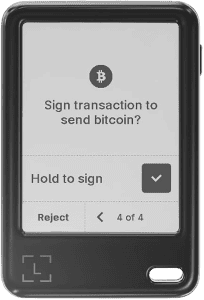
- ✓ 2.8-inch E Ink touchscreen for on-device approval
- ✓ Bluetooth, USB-C and NFC, plus a Recovery Key in the box
List price: $179 · Sold by Ledger.com
Ledger Nano Gen5 rating breakdown
Category |
Weight |
Score |
Why |
|---|---|---|---|
Security architecture |
35% |
9.3 |
Certified Secure Element, PIN lockout, on-device approval. Partly closed-source firmware holds the score back. |
Backup and recovery |
20% |
8.5 |
24-word phrase plus an included Recovery Key. Optional Ledger Recover needs an ID check. |
Ease of use |
20% |
8.4 |
Simple touchscreen and Ledger Wallet app. The screen is smaller and lower resolution than the Flex and Stax screens. |
Connectivity and compatibility |
15% |
8.4 |
Bluetooth 5.2, USB-C and NFC. Works with iOS, Android, Windows, macOS and Ubuntu. |
Value |
10% |
9.2 |
At $179 it is the cheapest touchscreen wallet in Ledger’s range, with the same Secure Element. |
Overall |
100% |
8.8 |
Very Good |
In this guide
How the Ledger Nano Gen5 keeps your crypto safe
The Gen5 protects your crypto by keeping private keys inside a certified chip and making you approve every transaction on the device. Those two rules block most remote attacks. Here is how each layer works.

Safety feature |
What it does |
What it means for you |
|---|---|---|
Secure Element (ST33K1M5, CC EAL6+) |
Stores private keys and signs inside the chip |
Keys never reach your phone or computer |
On-device touchscreen |
Shows transaction details for approval |
You check every transaction yourself |
PIN lockout |
4 to 8 digits, factory reset after 3 wrong tries |
A thief gets three guesses |
Bluetooth 5.2, USB-C, NFC |
Connects to phone and desktop, reads the Recovery Key |
Use wireless or wired, as you prefer |
Recovery Key (in the box) |
PIN-protected private backup, read over NFC |
A second way back into your wallet |
Ledger Recover (optional) |
Encrypted key fragments held by three companies |
Backup you can restore with ID checks |
1. The Secure Element chip
The Gen5 uses an ST33K1M5 Secure Element with CC EAL6+ certification, running Ledger OS. Your private keys live inside this chip. The chip signs transactions internally, so your phone or computer only ever receives the finished signature.
One point of fairness: the EAL6+ certification covers the chip, not every piece of software around it. That is why the other layers below matter too.
2. The touchscreen approval
The Gen5 has a 2.8-inch monochrome E Ink touchscreen with a 300 x 400 display and scratch-resistant glass. You read the transaction on the Gen5 and tap to approve. Malware on your phone can ask for a signature, but it cannot tap the screen for you.
Ledger adds two helpers. Clear Signing aims to show readable transaction details instead of raw data. Transaction Check flags risky transactions and common scams. Both depend on the blockchain and the app you use, so treat them as extra signals. Always check the address and amount on the Gen5 before you approve.
3. The PIN and lockout
You choose a PIN of 4 to 8 digits. Three wrong attempts trigger a factory reset, which erases the account data on the device. Use all 8 digits. You can restore your wallet from your recovery phrase if a reset ever happens.
4. Bluetooth, USB-C and NFC
The Gen5 supports Bluetooth 5.2 for iOS and Android, USB-C for desktop and Android, and NFC for the Recovery Key. Bluetooth moves data between the Gen5 and the app. It does not move your private keys, because they never leave the chip. Prefer a wired setup? Use USB-C.
Ledger Nano Gen5 8.8
★★★★★
Certified chip, touchscreen approval, Recovery Key included.
Backup and recovery options
You have three ways back into your wallet: the 24-word recovery phrase, the Recovery Key, and the optional Ledger Recover service. The phrase is the one that matters most.
The 24-word recovery phrase
The Gen5 shows you a 24-word phrase during setup. Write it on paper and store it offline. Anyone with this phrase can restore your wallet on another device and move your funds. Never type it into a website, an app or a support form. Ledger says it will never call or message you to ask for it. The box includes three recovery sheets for writing it down.
The Ledger Recovery Key
Every Gen5 comes with a Recovery Key. It is a PIN-protected private backup that you read with an NFC tap, and it comes with no ongoing fee. Think of it as a second route back in, not a replacement for your written phrase.
Ledger Recover (optional)
Ledger Recover is a paid, opt-in service. It encrypts a spare key inside your Secure Element and splits it into three encrypted fragments. Hardware security modules run by three independent companies in three countries store those fragments. Coincover provides the service.
To recover, you verify your identity in the Ledger Wallet app, and two independent companies check it online. Ledger asks for a passport or national ID card. It accepts driver’s licenses for US and Canadian users. Existing owners can start a one-month free trial, and the plan renews automatically until you cancel.
Ledger Recover suits people who fear losing their paper backup. It does not suit people who want zero third-party involvement. The Gen5 works fully without it.
How to buy and set up your Ledger Nano Gen5 safely
Buy directly from Ledger.com, and set the device up yourself. This removes the biggest supply-chain risk, which is a device that someone else handled before you.
Why direct matters right now: A reseller-channel incident showed that a device can look new and still carry a hidden modification. Ledger says its Genuine Check cannot catch every physical modification. Buying direct keeps the chain of custody short. Our news report has the details.
Follow these rules on day one:
- Order from Ledger.com only. Skip resellers, marketplaces and second-hand listings.
- Reject any pre-set device. A Gen5 that arrives with a written recovery phrase or an already-set PIN is not safe to use.
- Generate your own phrase. The Gen5 creates it during setup. Nobody else should ever see it.
- Run the Genuine Check. It is useful, but treat it as one check, not proof.
- Update your coin apps. A firmware update alone does not replace them, so open the Ledger app and update each coin app too.
- Beware of recovery scams. Ledger will never ask for your 24 words.
Ledger’s security track record
Ledger’s hardware keys have held up, but the company has faced data and software incidents. The Gen5 launched in October 2025, so it has a shorter public record than older Nano models. The company’s record still applies, and a fair review should cover it.
- 2020 data leak. Attackers exposed customer contact details, including about 272,000 records with names, addresses and phone numbers. Ledger said its hardware wallets were not compromised and that funds stay safe while you protect your phrase. The leak fed phishing campaigns.
- 2023 Connect Kit attack. A former employee fell for a phishing attack, and attackers pushed malicious versions of the Connect Kit software library. The bad code ran for about five hours and drained more than $600,000 from users of affected apps. The compromise hit a software library, not the hardware or firmware.
- 2026 app flaw (Ledger bulletin LSB 023). A flaw in Ledger’s Secure SDK let a connected computer change signing details after you saw them on screen but before the device signed. Ledger says it has no evidence anyone exploited it. The fix shipped in the Ethereum app 1.22.2 and in SDK v26.6.1. Because it sits in coin apps, a firmware update alone does not fix it, so update your apps.
The lesson is consistent. Attackers target people, software and sales channels more often than the chip itself. That is why on-device approval, up-to-date apps, a short supply chain and phishing awareness matter as much as the Secure Element.
One real limit remains. Ledger’s low-level firmware is partly closed source, so outsiders cannot audit all of it. If open-source code matters most to you, compare Ledger with Trezor in our Ledger vs Trezor guide.
Ledger Nano Gen5 pros and cons
Pros
- Certified Secure Element keeps private keys offline
- Lowest-priced touchscreen wallet in Ledger’s range at $179
- Touchscreen shows transaction details for on-device approval
- Bluetooth, USB-C and NFC cover phone and desktop use
- Recovery Key comes in the box at no extra cost
- Pocket-size at 46 g, in four colors
Cons
- Low-level firmware is partly closed source
- Smaller, lower-resolution screen (300 x 400) than the Flex (480 x 600)
- Ledger Recover needs an ID check and a paid plan
- E Ink refreshes more slowly than a phone screen
- Newer design, so a shorter public track record than older Nanos
- Buy only direct for now, so you cannot shop around
Ledger Nano Gen5 vs Flex and Stax
Choose the Gen5 if you want a touchscreen and the same chip at the lowest price. Choose the Flex for a sharper screen. You can pick the Stax for the biggest screen and wireless charging.
Ledger Nano Gen5 |
Ledger Flex |
Ledger Stax |
|
|---|---|---|---|
List price |
$179 |
$249 |
$399 |
Secure Element |
ST33K1M5, CC EAL6+ |
ST33K1M5, CC EAL6+ |
ST33K1M5, CC EAL6+ |
Screen |
2.8-inch E Ink touchscreen (300 x 400) |
2.8-inch E Ink touchscreen (480 x 600) |
3.7-inch curved E Ink touchscreen (400 x 670) |
Bluetooth |
Yes |
Yes |
Yes |
Qi wireless charging |
No |
No |
Yes |
Weight |
46 g |
57.5 g |
44.2 g |
Ledger Recover support |
Yes |
Yes |
Yes |
Best for |
Buyers who want a touchscreen at the lowest price |
Buyers who want a sharper screen |
Buyers who want the biggest screen |
Prices are list prices from Ledger and can change at checkout. Check Ledger.com for the current price in your region. Ledger’s older Nano X and Nano S Plus use buttons and small screens instead of a touchscreen.
Want a closer look? Read our Ledger Flex vs Stax and Ledger Flex vs Nano S Plus comparisons, our guide on whether the Ledger Flex is safe, or our report on the Nano Gen5 launch.
Ledger Nano Gen5 8.8
★★★★★
A touchscreen and the same Secure Element at Ledger’s lowest touchscreen price.
Our 5-step safety checklist
- Buy direct from Ledger.com. It is the one channel we recommend today.
- Use an 8-digit PIN. More digits make guessing harder.
- Write your 24 words on paper. Keep two copies in two separate, secure places.
- Check every address on the Gen5 screen. Do not trust the app alone.
- Keep firmware and coin apps up to date. Then decide on Ledger Recover only if you accept the ID check and third-party fragments.
New to cold storage? Start with our guides on what a hardware wallet is and how cold wallets work.
Final verdict: is the Ledger Nano Gen5 safe?
Yes. The Ledger Nano Gen5 is a safe, well-built hardware wallet. It combines a certified chip, on-device approval and several backup options. It loses a little for partly closed-source firmware and a smaller screen. What is more, the Nano Gen5 uses the same chip as the Flex and Stax, so it is the best value in Ledger’s touchscreen range. Buy it directly from Ledger.
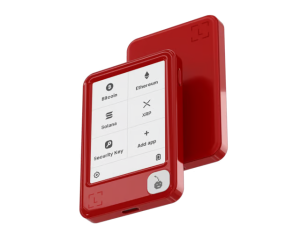
Ledger Nano Gen5
Our verdict: a Very Good (8.8/10) wallet and the lowest-cost way into Ledger’s touchscreen range. Buy it only from Ledger.com.
List price: $179 · Recovery Key included
Ledger Nano Gen5 FAQ
Is the Ledger Nano Gen5 safe to use?
Yes. The Ledger Nano Gen5 stores your private keys in a CC EAL6+ certified Secure Element and signs transactions only after you approve them on its touchscreen. Buy it directly from Ledger.com to make sure the device you receive is the one Ledger built.
Where should I buy a Ledger Nano Gen5?
Buy it directly from Ledger.com. Devices bought directly from Ledger are safe, and Ledger reports no sign of compromise in its direct sales channel. We do not recommend buying from resellers at the moment, including authorized ones, while Ledger’s investigation continues.
Is the Ledger Nano Gen5 affected by the CryptoBilis incident?
Ledger tied the confirmed thefts to devices sold through a Southeast Asian reseller called CryptoBilis. The problem was physical tampering before sale, not a flaw in the Gen5’s chip or software. Ledger says it has no indication that its infrastructure or direct sales channel was compromised. Our news report covers the full timeline.
Can someone hack my Ledger Nano Gen5 over Bluetooth?
Bluetooth only carries data between the Gen5 and the Ledger Wallet app. Your private keys stay inside the Secure Element, and the chip signs only after you approve on the Gen5’s screen. If you prefer a wired setup, you can connect over USB-C instead.
What happens if I lose my Ledger Nano Gen5?
Your crypto stays on the blockchain. Restore your wallet on a new Ledger device or a compatible wallet with your 24-word recovery phrase. The Recovery Key in the box and the optional Ledger Recover service give you extra backup routes.
What happens if someone steals my Ledger Nano Gen5?
The thief needs your PIN. The PIN is 4 to 8 digits long, and three wrong attempts trigger a factory reset that erases the device’s account data. Your 24-word phrase can then restore your wallet on another device.
Does the Ledger Nano Gen5 need a subscription?
No. The Gen5 works fully without one. Ledger Recover is a separate, optional service. It splits an encrypted backup of your key into three pieces held by three independent companies, and it requires a passport or national ID check.
Is the Ledger Nano Gen5 as secure as the Flex or Stax?
Yes, on the core design. All three use the same ST33K1M5 Secure Element with CC EAL6+ certification, and all three need your approval on the device. The Flex and Stax add bigger screens and, on the Stax, wireless charging. They do not add a stronger chip.
Sources
- Ledger Nano Gen5 product page, Ledger
- The world of Nano: which one is for you, Ledger Academy
- Ledger Recover, Ledger
- Ledger PIN code guide, Ledger Academy
- Update on the 2020 data leak, Ledger
- Ledger Connect Kit supply chain attack, Security Affairs
- Security bulletin LSB 023, Ledger Donjon
- Ledger revamps its classic line with Nano Gen5, Bitcoin.com News
- Ledger wallets compromised via hardware implant, Help Net Security
Disclosure: MarketsXplora may earn a commission if you buy through our links, at no extra cost to you. Our scores follow our published testing methodology and are not for sale. Crypto assets carry risk, and this article is not financial advice.
About the author
Samson Ononeme is the founder of MarketsXplora, an independent financial education and research platform covering cryptocurrency, forex, brokers, exchanges, trading platforms, and blockchain technology. He has more than 12 years of experience in financial content, with bylines at EarnForex, Kryptomoney, Cryptorunner, and AtoZ Markets. He turns complex financial products into clear, practical information that readers can use when they compare their options. Connect on LinkedIn and X.