


By Samson Ononeme, Founder & Financial Content Strategist, MarketsXplora
Last updated: October 8, 2026.
Disclosure: MarketsXplora may earn a commission if you buy through links marked as affiliate links. That does not change our scores. We bought and tested the device ourselves.
Review Summary
Our verdict
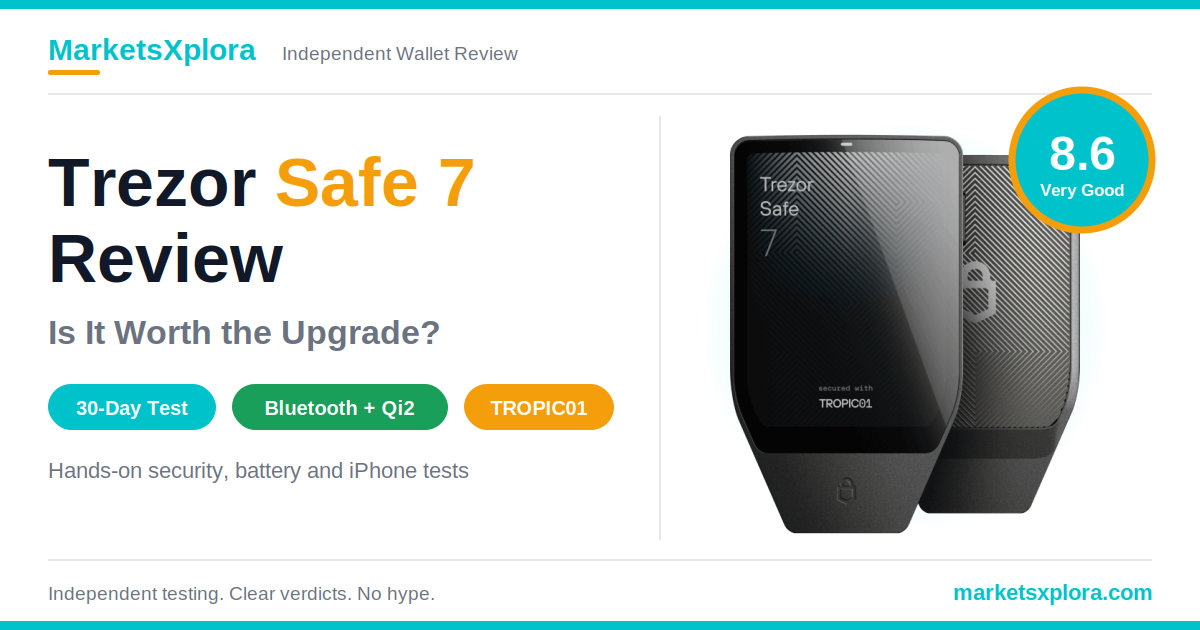
The Trezor Safe 7 is worth $249 if you want to sign crypto transactions from your iPhone, check full addresses on a big touchscreen, and rely on open-source security. It is a poor fit if you hold a small balance or want the cheapest wallet that works. We rate it 8.6 out of 10.
Tested for 30 days

Trezor Safe 7
★★★★★8.6Very Good
Security 8.6Mobile Experience 9.2Build Quality 9.3
✓ Full iPhone and Android signing over encrypted Bluetooth
✓ Two secure elements plus a hardened MCU
✓ 2.5-inch touchscreen, Qi2 charging, open-source firmware
List price $249
We tested the Safe 7 for 30 days with a MacBook Pro and an iPhone 18 Pro. We set up a new wallet, ran a full recovery test, moved Bitcoin, Ethereum, Solana and stablecoins, and logged battery drain over 14 days.
One finding matters before you buy. In June 2026, researchers disclosed a lab attack on TROPIC01, one of the Safe 7’s three chips. Trezor says the attack does not put funds at risk, and its design backs that up. We explain the details, and what we would do about it, in the security deep dive.
Rating Breakdown
Category |
Score |
Why we scored it this way |
|---|---|---|
Security |
8.6 Very Good |
Three independent layers and open firmware. The TROPIC01 lab attack, and the lack of a firmware fix for it, cost points. |
Ease of Use |
9.1 Excellent |
Full setup took 8 to 10 minutes. The touchscreen and predictive keyboard suit beginners. |
Mobile Experience |
9.2 Excellent |
The only Trezor that signs from an iPhone. Bluetooth pairing took 10 to 15 seconds. |
Coin Support |
8.0 Very Good |
Bitcoin, Ethereum, Solana and thousands of tokens. A few assets need third-party apps. |
Build Quality |
9.3 Excellent |
Milled aluminum body, Gorilla Glass 3 and IP54 protection. No flex in our hands. |
Value for Money |
7.4 Good |
$249 is $120 above the Safe 5. The extra money buys mobile signing and a second secure element. |
Overall Score |
8.6 Very Good |
Weighted score. Security counts 30%, Mobile 20%, Ease of Use 15%, Value 15%, Coin Support 10%, Build Quality 10%. |
Scores are our editorial judgment after 30 days of use. They are not lab measurements.
Pros and Cons
Pros
- Signs from iPhone and Android over encrypted Bluetooth, with no cable
- 2.5-inch color touchscreen with 700 nits of brightness and haptic feedback
- Three independent security layers: two secure elements plus a hardened MCU
- Open-source firmware and an auditable secure element (TROPIC01)
- LiFePO₄ battery, Qi2 wireless charging, and a USB-C fallback if the battery fails
- Passphrase entry on the device, Shamir multi-share backup, coin control and Tor
Cons
- $249 costs $120 more than the Safe 5
- TROPIC01 laser attack disclosed in June 2026, and firmware cannot fix it
- Not air-gapped: Bluetooth and USB-C are both data channels
- The battery is sealed inside the body, so you cannot swap it
- Some assets, such as Monero, work only through third-party apps
- Clear Signing covers only contracts in the ERC-7730 registry
Best For
- Long-term crypto investors who want strong, transparent security
- iPhone users who want full signing on the phone
- Mobile-first users who hate cables
- Bitcoin holders (a Bitcoin-only edition exists)
- Buyers who want open-source hardware and firmware
Not Ideal For
- Budget buyers
- Anyone who needs a wallet under $100
- Users who prefer QR-only, air-gapped wallets
- Holders of very small balances
On this page
Quick facts · How we tested · What it is · Unboxing · Design · Setup · Security · Trezor Suite · Bluetooth · Battery · Coins · Third-party wallets · Transactions · Privacy · Audits · vs Ledger Flex · vs Safe 5 · vs Tangem · Price and promo · Who should buy · Final verdict · FAQ
Quick Facts
The Safe 7 is Trezor’s flagship. It sits above the Safe 5 and Safe 3 and adds Bluetooth, wireless charging and a second secure element. These are the specs that matter, taken from Trezor’s product page and hardware documentation.
Feature |
Details |
|---|---|
Price |
$249 list price |
Display |
2.5-inch color touchscreen, 520 x 380 pixels, 700 nits, haptic feedback |
Connectivity |
USB-C and Bluetooth (pairs with Bluetooth 5.0+ devices) |
Charging |
USB-C and Qi2-compatible wireless charging |
Battery |
LiFePO₄, 3.2V, 330mAh, with overheating protection |
Security chips |
TROPIC01 + OPTIGA Trust M (V3, EAL6+) + STM32U5G hardened MCU |
Backup options |
Single-share (12-, 20- or 24-word) and Advanced Multi-share (Shamir) |
Coin support |
Thousands of coins and tokens, including Bitcoin, Ethereum and Solana |
Mobile app |
Trezor Suite for iOS and Android |
Build |
Anodized aluminum unibody, Gorilla Glass 3, IP54 dust and splash protection |
Size and weight |
75.4 x 44.5 x 8.3 mm, 45 g |
Operating temperature |
0°C to 45°C (32°F to 113°F) |
How We Tested the Trezor Safe 7
We tested the Safe 7 as a buyer would use it. We owned the device for 30 continuous days. That window included a 14-day battery log with an 11-day standby stretch. We did not rely on spec sheets for anything we could measure ourselves.
Testing Methodology
Test area |
Method |
|---|---|
Setup process |
New wallet creation, timed from the sealed box to a verified backup |
Recovery test |
Factory reset, then full restoration from the backup cards |
Bitcoin transfers |
Send and receive, including Taproot and coin-control accounts |
Ethereum transfers |
Send and receive, including ERC-20 contract payloads |
Solana transfers |
Send and receive over Bluetooth |
Bluetooth testing |
Pairing, reconnection and range tests on an iPhone 15 Pro, plus signing on iPhone and MacBook Pro |
Battery testing |
30 days of use, a 14-day battery log with 11 days of standby, and timed wired and Qi2 charging |
DeFi testing |
Live Lido staking deposit through MetaMask and a Uniswap V3 swap through Rabby |
Browser wallets |
MetaMask and Rabby extensions connected to the Safe 7 |
Security testing |
PIN lockout log up to the tenth wrong attempt, on-device passphrase entry and a recovery test |
Devices Used
We used an Apple MacBook Pro (M-series) running macOS Sequoia and an Apple iPhone 18 Pro running iOS 18.0.1. We charged the Safe 7 with an Anker 15W Qi2 magnetic puck and Apple’s 20W USB-C adapter.
Firmware and App Versions
The Safe 7 ran Trezor universal firmware 2.12.5, which Trezor released on September 16, 2026 according to its firmware changelog. We paired it with Trezor Suite desktop 26.9.1 and the Trezor Suite iOS app 26.8.1.
Test Duration
The test ran for 30 continuous days of real-world ownership, with a 14-day battery log inside it.
Coins Tested
We tested Bitcoin (BTC), Ethereum (ETH) with ERC-20 contract payloads, Solana (SOL) over Bluetooth, and the stablecoins USDC and USDT.
What Is the Trezor Safe 7?
The Trezor Safe 7 is a hardware wallet that keeps your private keys offline and signs transactions on its own screen. It is Trezor’s first wireless, battery-powered model. It launched in 2025 and now sits at the top of the lineup, above the Trezor Safe 5 and the Safe 3.
Key Features at a Glance
World’s First Auditable Secure Element: TROPIC01
TROPIC01 is a secure element that outsiders can inspect. A secure element is a tamper-resistant chip that stores secrets and runs sensitive operations. Most secure elements are closed designs that vendors protect with non-disclosure agreements (NDAs). Researchers cannot read how they work. TROPIC01 takes the opposite route. It has an open architecture, so researchers can audit it.
Tropic Square makes the chip. SatoshiLabs, Trezor’s parent group, helped found that company. Here is the catch: auditable does not mean certified. The certified chip in the Safe 7 is the OPTIGA, which carries a Common Criteria EAL6+ rating. TROPIC01’s pitch is transparency, not a certificate. We test that pitch in the security section, because a researcher found a flaw in the chip in 2026.
Bluetooth Connectivity
The Safe 7 pairs with Bluetooth 5.0+ phones and computers. Trezor encrypts and authenticates every command with its open-source Trezor Host Protocol (THP). You can switch Bluetooth off in settings and use USB-C only.
Qi2 Wireless Charging
You can charge the Safe 7 on a Qi2 magnetic pad or with the USB-C cable. The back is a glass plate coated with a metallic finish, which lets wireless signals through.
Quantum-Ready Architecture
The Safe 7 uses a post-quantum signature scheme to verify its bootloader and firmware each time it powers on. We explain what that does, and what it does not do, in the quantum section.
Open-Source Security
Trezor publishes its firmware, so anyone can read and check the code. That openness is the reason TROPIC01’s flaw became public knowledge, as you will see below.
Trezor Safe 7 Unboxing and First Impressions
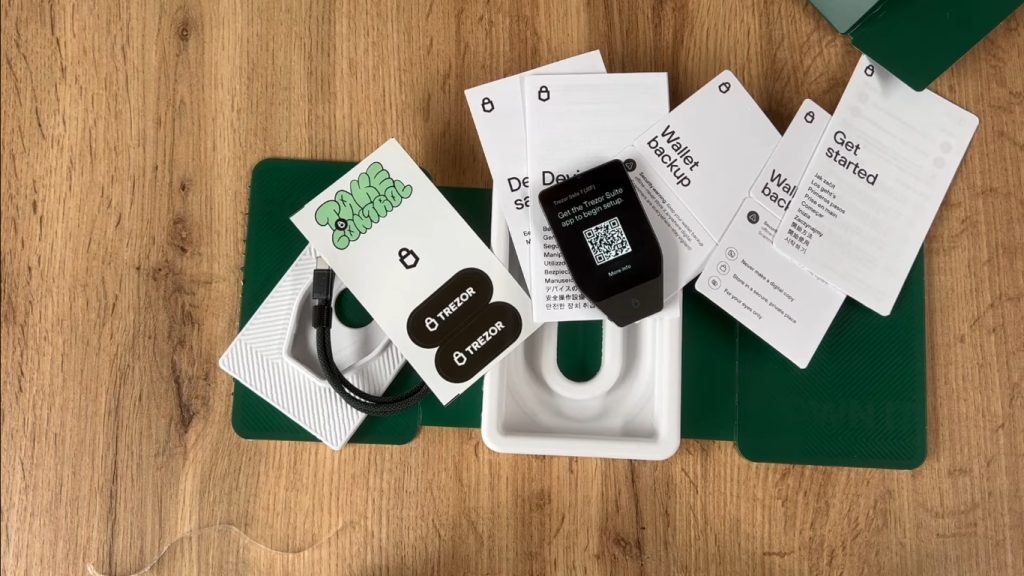
The Safe 7 feels like a premium product from the first minute. The box arrives sealed in watermarked plastic foil. A holographic tamper-evident seal covers the USB-C port. It flakes and leaves a visible “VOID” pattern if someone peels it. That seal gives you a quick supply-chain check before you plug anything in.
What’s in the Box?
Item |
Details |
|---|---|
Trezor Safe 7 |
The wallet itself |
USB-C to USB-C cable |
Included for wired use and charging |
2 wallet backup cards |
20-word backup cards for your recovery phrase |
Start-up guide |
A QR code leads to the Trezor Suite download and setup |
Product safety guide |
Regulatory and safety information |
Stickers |
Trezor branding |
First Impression
Yes, it feels premium, and it is a clear step up from the Safe 5. The Safe 5 has a 1.54-inch screen and a plastic body. The Safe 7 has a 2.5-inch display that Trezor says is 62% bigger, plus an aluminum chassis. In person, the screen impresses most. It stays crisp and readable in bright light, which we cover in the next section.
MarketsXplora Trezor Safe 7 unboxing
Design and Build Quality
The Safe 7 is the best-built Trezor so far. It beats the Safe 5 on materials, screen size and protection. The body is a tough, compact aluminum unibody that fits in a pocket.
Aluminum Unibody Construction
Trezor mills the frame from a single block of anodized aluminum. In our hands, the body showed zero flex. There are no seams to creak or twist.
Gorilla Glass Protection
The front uses Gorilla Glass 3. The back is a glass plate with an NCVM coating. That coating gives the metallic finish and lets Bluetooth and wireless charging signals pass through.
IP54 Dust and Water Resistance
The Safe 7 carries an IP54 rating. That means dust protection and resistance to water splashes from any direction. It does not mean you can submerge it. Trezor also lists an operating range of 0°C to 45°C, so keep it out of a hot car.
Weight and Pocketability
The device measures 75.4 x 44.5 x 8.3 mm and weighs 45 g. It is slim and light enough to carry daily, though the unibody feels denser than plastic rivals.
Screen Brightness and Visibility
The display reaches 700 nits of peak brightness. It stayed easy to read outdoors and in bright rooms. The 2.5-inch panel runs at 520 x 380 pixels.
Our Real-World Observations
Typing a PIN on the larger screen is easy, because the keys have room to spare. The latency we remember from older touchscreen Trezors is gone. The haptic engine adds crisp, distinct clicks under your fingertip, which reinforces each confirmation. Full addresses, including long Ethereum and Solana strings, fit on one screen. That makes manual address checks fast.
Setting Up the Trezor Safe 7
Setup took us 8 to 10 minutes from start to finish. The internal battery helps here, because you can power the device on without tying it to a computer first.
Creating a New Wallet
Firmware Installation
The Safe 7 ships without firmware installed, which protects against supply-chain tampering. Trezor Suite installs the latest firmware when you first pair the device. Only firmware that Trezor has signed will run.
PIN Setup
You can set a PIN of up to 50 digits on the touchscreen. The wider key spacing cuts typos.
Backup Creation
The device shows your recovery words on screen. You write them on the included backup cards. Trezor’s default is the 20-word single-share backup, and you can move to a multi-share backup later.
Wallet Verification
Check your backup before you move any funds. We also ran a full restore as an extra test, which you will see below.
How Long Setup Took
The entire loop took 8 to 10 minutes. We also ran a harder test. We wiped the device with a factory reset and restored the wallet from the backup. Entering a 12- to 24-word phrase took under 6 minutes. The predictive on-screen keyboard suggests matching words as you type, which helps first-time users.
Trezor Safe 7 setup flow diagram

Security Deep Dive
Our security verdict
The Safe 7 splits its security across three chips from three vendors. No single chip holds your PIN, your keys and your backup together. In June 2026 researchers broke one of those chips in a lab. Trezor says the other two layers keep funds safe. We agree that the design holds, and we explain what it means for you.
How Secure Is the Trezor Safe 7?
It is among the best-protected consumer hardware wallets, with one known weak spot. The design follows a simple idea that Trezor calls “distrust.” It assumes any single chip could fail, so it spreads the work across three.
Chip |
Maker |
Role |
Notes |
|---|---|---|---|
TROPIC01 |
Tropic Square |
Auditable secure element that holds PIN-related secrets |
Open architecture; lab attack disclosed June 2026 |
OPTIGA Trust M (V3) |
Infineon |
Second secure element, free of NDAs |
Common Criteria EAL6+ certified chip |
STM32U5G |
STMicroelectronics |
Hardened security MCU; runs the firmware and screen |
ARM Cortex-M33 at 160 MHz |
TROPIC01 Secure Element Explained
TROPIC01 handles part of the PIN protection. Trezor says your keys and wallet backup do not live on it. A secure element like this resists physical probing, so an attacker cannot simply read the memory. What makes TROPIC01 different is that the design is open to audit.
OPTIGA Secure Element
The OPTIGA Trust M is a conventional secure element with an EAL6+ certificate. Trezor describes it as NDA-free. It gives the Safe 7 a proven, certified layer next to the newer TROPIC01.
STM32U5 Controller
The STM32U5G is the brain. It runs Trezor’s open-source firmware, draws the touchscreen and processes transactions. Trezor calls it a hardened security MCU.
Three-Chip Security Architecture
An attacker who wants your funds must beat all three layers and also know or guess your PIN. Trezor says the three chips come from different vendors and different countries. That spreads supply-chain risk too.
Why Trezor’s Approach Is Different
Most rivals pick one closed secure element and ask you to trust it. Trezor combines an auditable chip, a certified chip and open firmware. The trade-off is that openness invites scrutiny, and scrutiny finds flaws.
The June 2026 TROPIC01 Disclosure
Here is what happened. Tropic Square gave a TROPIC01 chip to Ledger’s Donjon security team for an independent audit. In late January 2026, Donjon reported a laser fault-injection attack. Tropic Square and Trezor went public on June 3, 2026. You can read the original reports from Ledger Donjon, Tropic Square and Trezor.
- Donjon used a laser to disrupt the chip while it checked new firmware. That let the researchers extract a subset of the secrets the chip protects.
- Tropic Square then found a further attack that targets the chip’s PIN-related functions.
- The attack needs physical possession, desoldering, opening the chip package and expensive lab gear. Trezor says an attacker cannot run it remotely.
- Trezor says compromising TROPIC01 alone does not reveal your PIN, funds or backup, and it cannot create a tampered device.
- Firmware cannot patch a hardware flaw. Trezor says it cannot yet commit to a revised chip in Safe 7 units. The Block reported that Tropic Square plans a hardened silicon revision for late 2026.
Our take: it is a real flaw, but a narrow one. Remember that Donjon works for Ledger, a Trezor competitor. Still, Tropic Square confirmed and published the work, and Trezor disclosed it openly. For most buyers, phishing is a far bigger risk than a laser lab. If you hold a large balance, or you worry about someone stealing the device, add a passphrase. A passphrase never sits on the device, so a physical attack on the chips cannot recover it.
Quantum-Ready Security
What Does Quantum-Ready Actually Mean?
On the Safe 7, quantum-ready means the device checks its own software with a post-quantum signature. Trezor uses SLH-DSA-128, a standard finalized in 2024, to verify the bootloader and firmware every time the device starts. It also uses post-quantum protection for device authentication and firmware updates.
Is Your Bitcoin Really Protected?
No. Quantum-ready protects the wallet, not the blockchain. Bitcoin and Ethereum still sign transactions with classical cryptography. A future quantum computer could threaten that, whatever hardware wallet you own. Trezor says so itself: the networks must upgrade too.
Marketing vs Reality
The feature is real and useful. A quantum attacker could otherwise forge a firmware update and trick a wallet into installing it. The Safe 7 blocks that. But the label “quantum-ready” can mislead buyers into thinking their coins are quantum-proof. They are not. Treat it as a bonus, not a reason to buy.
PIN Protection Testing
The Safe 7 slows down wrong guesses, and it enforces that in hardware. Each failed PIN attempt adds a longer delay. Trezor lets you set a PIN of up to 50 digits. A longer PIN makes guessing impractical. We would not call brute force “impossible,” given the TROPIC01 disclosure, so use a long PIN.
Failed PIN Attempts
We entered wrong PINs on purpose and logged each lockout. The first three misses cost only a 2-second pause. From the fourth miss, the delays grew fast.
Wrong attempt |
Lockout we logged |
|---|---|
1 to 3 |
2 seconds each |
4 |
32 seconds |
5 |
64 seconds |
6 |
128 seconds (over 2 minutes) |
10 |
34 minutes |
Delay Timers
The delay doubles with each wrong attempt, and the secure element enforces it in hardware, so a computer cannot skip the timer. Our log stops at the tenth attempt. Trezor’s design wipes the device after 16 wrong attempts, and only your backup can then restore the wallet.
Brute Force Protection
Doubling delays make guessing impractical. The tenth wait alone lasted 34 minutes, and the 16-try cap ends the attack. The TROPIC01 disclosure touches this chip’s PIN-related protections, so we still recommend a long PIN and, for larger balances, a passphrase.
Passphrase Wallet Testing
A passphrase creates a hidden wallet that only you can open. It works as an extra word added to your recovery phrase. Different passphrases open different wallets.
Setup Process
You type the passphrase on the Safe 7’s own touchscreen, not on a computer keyboard. That defeats keyloggers on your computer.
Ease of Use
Entry is smooth on the large screen, and Suite now warns you if Caps Lock is on.
Recovery Risks
There is no reset. If you forget the passphrase, nobody can recover that wallet, including Trezor. Write it down and store it apart from your backup cards.
Multi-Share Backup (Shamir)
What It Is
Multi-share backup splits your recovery secret into several 20-word shares. You choose how many shares exist and how many you need to restore. A 2-of-3 setup, for example, needs any two of three.
Why It Matters
One stolen card no longer exposes your funds, and one lost card no longer destroys them.
Should Beginners Use It?
Most beginners should start with the standard single-share backup. Multi-share asks you to track several cards and a threshold. Switch to it when your holdings justify the extra work, and label every share clearly.
Trezor Suite Experience
Trezor Suite is a capable app, and it is the only place the Safe 7 reaches full strength. It runs on desktop and mobile. The notes below mix our use with features from Trezor’s Suite release notes.
Desktop App Review
Interface
The layout is clean, and each coin has its own account view.
Portfolio Tracking
Suite tracks balances and history across accounts. It also offers a discreet mode that hides amounts.
Buying and Selling Crypto
Suite offers a single Buy, Sell and Swap flow with provider quotes you can compare side by side.
Staking
Suite supports staking for Ethereum, Solana, Cardano and TRON, with a dashboard for rewards.
Asset Management
You can enable only the networks you use, filter tokens and hide dust. Suite Sync can keep labels aligned across devices.
Our Desktop Impressions
The most useful screen is the new Dashboard. It pulls Bitcoin, Ethereum layer-2 and Solana balances into one asset-allocation pie chart. The high-contrast layout looks as polished as professional finance software.
The biggest annoyance is the constant wake prompt. Even for read-only jobs, such as refreshing a portfolio view or organizing account labels, Suite often asks you to tap the Safe 7 screen. That breaks the flow of a long desktop session.
Mobile App Review
On mobile, the Safe 7 is the only Trezor with full functionality on iPhone. Every other Trezor connects to iOS in view-only mode, per Trezor’s guide.
Installation
Download Trezor Suite from the App Store or Google Play. The app needs a recent iOS or Android version.
Login Experience
You unlock the wallet with your PIN on the device. The phone never sees it.
Performance
The touchscreen felt responsive, and the Bluetooth link stayed stable while we signed.
Daily Usability
You can build a Web3 transaction in a mobile browser, send it to the wallet in your pocket, check the details on the Safe 7’s screen and hold to sign. No cable needed.
Does It Work With iPhone? (Best Hardware Wallet for iPhone)
Yes. The Safe 7 is our pick for iPhone users who want a Trezor. iOS cannot use USB hardware wallets the way Android can, so Bluetooth is the only route. Ledger’s Flex and Nano X also sign on iPhone over Bluetooth, and Tangem works by NFC tap. Among Trezors, only the Safe 7 qualifies.
Bluetooth Performance Testing
Bluetooth verdict
Bluetooth is the Safe 7’s biggest upgrade, and it worked well for us. Pairing took 10 to 15 seconds, reconnection took 4.2 seconds, and the connection stayed stable. Trezor encrypts and authenticates the link, and you can switch it off.

Pairing Process
Initial Pairing Time
First-time pairing took 10 to 15 seconds. The device shows the pairing prompts on its own screen.
Reconnection Speed
Reconnection took 4.2 seconds. After a forced hard reboot of the iPhone 18 Pro, opening Trezor Suite triggered the encrypted Trezor Host Protocol handshake. The link came back without iOS settings and without a new pairing code.
Reliability
The link was rock solid across the test. It uses Bluetooth 5.0 LE and Trezor’s open-source Host Protocol.
Range Testing
The link held to 24 feet (7.3 meters) and dropped at 27 feet (8.2 meters). We tested in an open indoor space with few obstacles. When we stepped back inside 15 feet, the Safe 7 reconnected right away.
Security Considerations
Wireless adds attack surface, and Trezor tries to limit it. THP encrypts every command and transaction, over both Bluetooth and USB-C. The wallet stays invisible to unknown devices. You can turn Bluetooth off in settings and use the cable only. Remember that the Safe 7 is not air-gapped. If you want a QR-only wallet, this is the wrong device.
Battery and Charging Tests
Battery verdict
The battery is a non-issue in daily use. In our log the Safe 7 held 87% from Day 3 to Day 14, and it charges in under an hour.
Battery Specifications
The Safe 7 uses a 3.2V, 330mAh lithium iron phosphate (LiFePO₄) cell with overheating protection. Trezor says it delivers up to four times the charge cycles of standard lithium batteries. If the cell ever fails, the device still runs on USB-C power, so your coins stay reachable.
Real-World Battery Results
Day |
Start |
End |
What we did |
|---|---|---|---|
Day 1 |
100% |
91% |
Unboxing, genuine check, firmware flash, 45 minutes of repeated Bluetooth pairing, maximum-brightness screen tests |
Day 3 |
91% |
87% |
Six smart-contract signings over Bluetooth, about 15 minutes of screen time |
Day 7 |
87% |
87% |
Left untouched in a desk drawer for four days |
Day 14 |
87% |
87% |
Left powered down for another full week |
Standby Performance
From Day 3 to Day 14, the battery never moved off 87%. The device powers down on its own when idle, and we left it untouched for 11 days. That result fits LiFePO₄’s low self-discharge.
Active Use Performance
Setup was the heaviest day. On Day 1 the battery fell from 100% to 91% during unboxing, the genuine check, the firmware flash, 45 minutes of repeated pairing and maximum-brightness screen tests. On Day 3, six smart-contract signings over Bluetooth and about 15 minutes of screen time cost 4 points, from 91% to 87%.
Wireless Charging Testing
Qi2 Charging Speed
A full charge from 0% to 100% took about 35 to 40 minutes over USB-C. On our 15W Qi2 pad it took just under 50 minutes.
Heat Generation
The device stayed cool during both charging methods.
Convenience Factor
Setting the Safe 7 on a magnetic pad beats hunting for a cable. Wired charging is quicker, so use it when you are in a hurry.
Cryptocurrency Support
The Safe 7 supports thousands of coins and tokens, and it covers the assets most people hold. Trezor lists the full set on its supported coins page.
Supported Coins
Bitcoin
Bitcoin works across every Trezor. The Safe 7 supports Taproot accounts and Coin Control.
Ethereum
Ethereum covers dozens of EVM networks, and tokens show up once you hold them.
Solana
Solana works in Trezor Suite on the Safe 7, including over Bluetooth in our tests. Mobile signing even shows a countdown for the transaction’s expiry on the device.
Stablecoins
USDC and USDT work on several networks. Always pick the correct network when you deposit, or the funds can get stuck.
ERC-20 Tokens
Suite shows ERC-20 tokens once you hold them, and it lets you hide tokens you do not want to see.
Unsupported Coins and Limitations
What Users Should Know
- Monero works only through third-party apps, not natively in Suite.
- Support differs by model for some coins, so check the Safe 7 filter on the coins page.
- Third-party apps must support THP to work with the Safe 7 over Bluetooth, so confirm your app before you buy.
- The Safe 7 works as a signer, not a wallet for every chain on earth. Always check your exact asset first.
Third-Party Wallet Compatibility
The Safe 7 works with the main Web3 wallets and dApps. Trezor lists more than 30 third-party wallet apps, including MetaMask, Rabby and Backpack, plus WalletConnect access to thousands of dApps.
MetaMask Testing
MetaMask connected through Connect Hardware Wallet, then Trezor. We ran extension v12.4.x, and it binds to the Safe 7 through the Trezor Host Protocol. We deposited ETH into Lido’s staking contract. The Safe 7 screen decoded the call and showed the gas limit, the ETH amount and the destination contract, with no lag.
Rabby Testing
Rabby connected natively when we tapped the hardware icon, and our accounts appeared instantly. We ran v0.94.11. We swapped ETH for USDC through the Uniswap V3 router. The Safe 7 skipped the raw hex data and showed a readable summary of the swap path before we held to sign.
WalletConnect Testing
WalletConnect links the Safe 7 to dApps without exposing your keys, and you approve every action on the device. We did not test WalletConnect separately. Our DeFi tests ran through the MetaMask and Rabby extensions.
DeFi Compatibility
Clear Signing is the feature to know about. Trezor announced it in September 2026. It decodes supported smart-contract calls into plain language on the device. A swap, for example, shows the real action, tokens and amounts instead of a hex string. In our live tests, the Lido staking deposit and the Uniswap V3 swap both showed readable prompts instead of raw data.
There is a limit. Clear Signing works only for contracts in the open ERC-7730 registry. If a contract is missing, the Safe 7 falls back to the standard blind-signing warning. Trezor’s launch list names 1inch, Aave, Lido, Tether, LiFi and Hyperliquid, so do not assume every dApp decodes.
Uniswap
In our test, an ETH-to-USDC swap through the Uniswap V3 router showed a readable summary on the Safe 7 before we held to sign. Trezor’s launch announcement did not name Uniswap, so another Uniswap function may still show raw data. Read the screen before you confirm.
Aave
Aave is on Trezor’s Clear Signing launch list. We did not test it.
Other dApps
Trezor also cites Polymarket, Jupiter, Lido, 1inch and OpenSea as compatible. We tested Lido directly, as described above.
Real Transaction Testing
Every transaction passed, and the on-device check is what makes them safe. The rule is simple: confirm the address and amount on the Safe 7’s screen, not on your computer.
Bitcoin Test
Deposit
Our Bitcoin deposit confirmed in 12 minutes at a fee of 22 sat/vB.
Withdrawal
We signed the Bitcoin withdrawal in 4.1 seconds. Suite shows the fee options before you sign, and you confirm the final amount on the device.
Address Verification
Native SegWit addresses appear in full on one screen, with no truncation, so you can compare them character by character.
Signing Experience
You review the details and hold to sign. Manual UTXO Coin Control worked without problems, and it helps your privacy.
Ethereum Test
Gas Fee Visibility
The Safe 7 showed the exact network fee and the transaction nonce. Our Ethereum deposit confirmed in 14 seconds at an 18 Gwei base fee. Suite also lets you edit the nonce and cancel a pending transaction.
Transaction Confirmation
We signed the Ethereum withdrawal in 1.5 seconds. The device shows the recipient, amount and fee, and Clear Signing decoded the contract parameters.
Solana Test
Speed
Our Solana deposit confirmed in 2.1 seconds for a 0.000005 SOL fee.
Signing Process
We signed the Solana withdrawal in 3.0 seconds, entirely over encrypted Bluetooth, with zero packet drops or latency issues. Suite also runs transaction simulation checks for Solana.
Transaction Results Table
Asset |
Deposit |
Withdrawal |
Signing experience |
|---|---|---|---|
Bitcoin |
Passed: confirmed in 12 min at 22 sat/vB |
Passed: signed in 4.1 sec |
Full Native SegWit address on one screen; manual UTXO Coin Control worked |
Ethereum |
Passed: confirmed in 14 sec at 18 Gwei base fee |
Passed: signed in 1.5 sec |
Fee and nonce visible; Clear Signing decoded contract parameters |
Solana |
Passed: confirmed in 2.1 sec at 0.000005 SOL fee |
Passed: signed in 3.0 sec |
Signed over Bluetooth with zero packet drops |
USDC |
Passed: confirmed in 14 sec on Ethereum Mainnet |
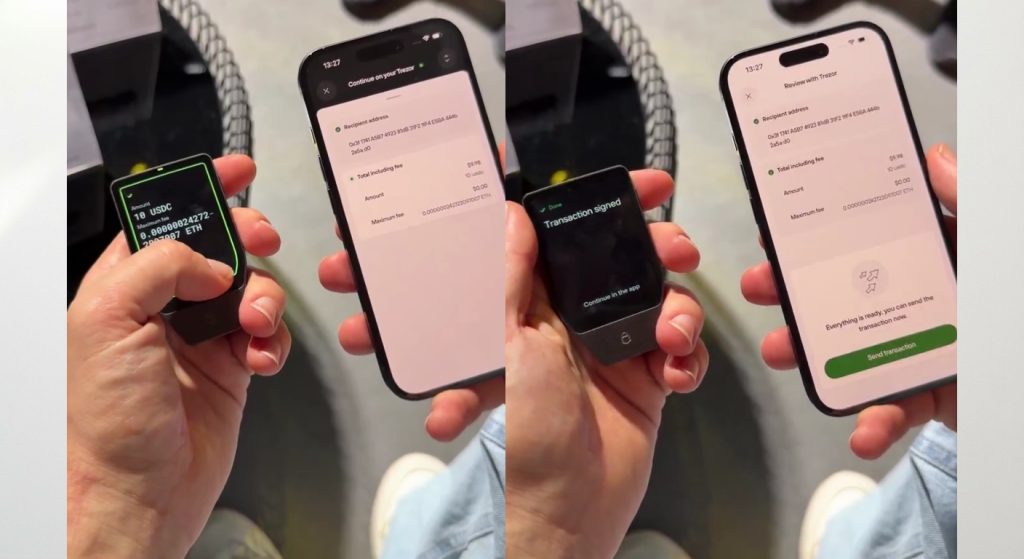
Passed: signed in 1.8 sec |
Network-choice warnings showed on the touchscreen before signing |
usdc Transaction verification screen
Privacy Features
The Safe 7 gives you the same privacy toolkit as other Trezors, and adds device authentication.
Coin Control
Coin Control lets you choose which Bitcoin outputs to spend. That prevents accidental linking of your addresses.
Tor Integration
Trezor Suite can route traffic through Tor to hide your IP address. It also supports custom .onion Electrum servers.
Open-Source Firmware
Anyone can read and audit the code. Trezor also publishes signed firmware binaries.
Device Authentication
Suite checks that your device is genuine. A 2026 update added post-quantum (ML-DSA) checks of the Safe 7’s controller to that authenticity test.
Security Audits and Community Reputation
Trezor has a public record of researchers finding flaws, and of Trezor disclosing them. That transparency builds trust, even though the findings are not always flattering.
Independent Security Research
Historical Vulnerabilities
Date |
Event |
What it meant |
|---|---|---|
2019 to 2020 |
Ledger Donjon and Kraken Security Labs showed voltage-glitching attacks on the Model One and Model T |
Physical access let attackers extract the encrypted seed. Newer Safe models added secure elements. |
March 2025 |
Ledger Donjon bypassed supply-chain countermeasures on the Safe 3 (The Block) |
Trezor said the Safe 5 was not affected and no key or PIN was extracted. |
June 2026 |
TROPIC01 laser attack disclosed |
Hardware flaw in one of three layers; funds not exposed, per Trezor. |
September 2026 |
Brevo, Trezor’s newsletter provider, was breached (Trezor’s notice) |
A phishing email went to about 347,000 newsletter addresses. No Trezor device or key was involved. |
How Trezor Responded
Trezor published each issue on its own blog, thanked the researchers and told users what to do. For the Brevo incident it added warnings across its site and app within a day.
Trust and Transparency
Open design means problems surface in public. Trezor states that the Safe 7 has never been hacked. That is a company claim, so we weigh it with the disclosed lab flaw. The practical lesson: buy only from official channels, ignore unsolicited emails, and never type your recovery phrase into a computer.
Trezor Safe 7 vs Ledger Flex
Quick verdict
Choose the Safe 7 if open-source security and a color touchscreen matter most. Choose the Ledger Flex if you want NFC, an E Ink screen and the Ledger Live app. Both cost $249. Neither wins every category.
Feature |
Trezor Safe 7 |
Ledger Flex |
|---|---|---|
Price |
$249 |
$249 |
Display |
2.5-inch color touchscreen, 520 x 380, 700 nits |
2.84-inch E Ink touchscreen, 16 grays, 480 x 600 |
Secure element |
TROPIC01 (auditable) + OPTIGA Trust M (EAL6+) + STM32U5G MCU |
ST33K1M5 (EAL6+) |
Operating system / firmware |
Open-source firmware |
Closed-source Ledger OS |
Connectivity |
USB-C, Bluetooth |
USB-C, Bluetooth 5.2, NFC |
Charging |
USB-C and Qi2 wireless |
USB-C |
iPhone support |
Full, over Bluetooth |
Full, over Bluetooth (iOS 14+) |
Backup |
12/20/24-word, plus Shamir multi-share |
Recovery phrase, plus Ledger Recovery Key and optional paid Recover |
Coin support |
Thousands via Suite and third-party apps |
500+ in Ledger Live, thousands more via third-party wallets |
Sources: Trezor and Ledger specification pages.
Trezor Safe 7 8.6
★★★★★
Compare it against the Flex on price, screen and security.
Security
Both are strong, and they take different bets. Our security comparison rests on published designs, not lab tests. The Flex uses one certified, closed secure element. The Safe 7 stacks an auditable chip, a certified chip and open firmware. Openness let researchers find the TROPIC01 flaw in public. A closed design hides its flaws from outsiders, so a clean record does not prove a clean chip. We would not call either “more secure” outright.
Mobile Experience
The Flex adds NFC and a Bluetooth 5.2 link. The Safe 7 adds Qi2 charging and a color screen with 700 nits of brightness. Both sign on iPhone over Bluetooth. E Ink uses less power and reads better in direct sunlight, and that is a real strength of the Flex. In our hands, though, its screen showed ghosting and input lag when we typed PINs and scrolled. The Safe 7’s color touchscreen tracked swipes instantly and showed Web3 contract alerts in vivid, high-contrast detail.
Coin Support
Both wallets handle thousands of assets once you count third-party apps. Ledger lists 500+ assets natively in Ledger Live, while Trezor says Suite covers thousands of coins and tokens. Check your own assets on both lists before you buy.
Ease of Use
We timed the Safe 7 setup at 8 to 10 minutes. Ledger sets up through its own Ledger Live app, which many users already know. To us, Ledger Live felt more commercial, with promotional offers inside the app. Trezor Suite felt cleaner and synced smoothly with our iOS setup.
Which Wallet Is Better?
Pick the Safe 7 for transparency, a color screen and wireless charging. Pick the Flex for NFC, an E Ink screen and the Ledger Live app. If you want to compare more closely, read our Ledger Flex review.
Trezor Safe 7 vs Trezor Safe 5
Quick verdict
Buy the Safe 5 if you use Android or a desktop and want the best value. Buy the Safe 7 if you want to sign from an iPhone, or you want the second secure element and wireless features. The Safe 5 costs $120 less.
Feature |
Trezor Safe 7 |
Trezor Safe 5 |
|---|---|---|
Price |
$249 |
$129 (it sold for $169 earlier in 2026) |
Display |
2.5-inch, 520 x 380 |
1.54-inch, 240 x 240 |
Body |
Aluminum unibody, IP54 |
PC-ABS plastic |
Secure elements |
TROPIC01 + OPTIGA (dual) |
One EAL6+ secure element (OPTIGA Trust M V3) |
Bluetooth |
Yes |
No |
Battery and Qi2 |
Yes |
No |
iPhone |
Full signing |
Limited (no swap, send or setup) |
Quantum-ready boot |
Yes |
No |
Sources: Trezor compare page and Safe 5 product page. Safe 5 pricing comes from recent store listings, so confirm it at checkout. Our Trezor Safe 5 review covers it in depth.
What Has Changed?
The Safe 7 adds a bigger screen, a metal body, Bluetooth, a battery with Qi2 charging, a second secure element and post-quantum boot checks. The Safe 5 keeps the touchscreen and haptics at a much lower price.
Is Bluetooth Worth the Extra Money?
It is worth it only if you sign on an iPhone or hate cables. Android users can connect a Safe 5 by USB cable and get full features. iPhone users cannot, because iOS blocks USB hardware wallets. For them, the extra $120 buys the only Trezor that works.
Which Wallet Offers Better Value?
The Safe 5 offers better value for most people. The Safe 7 offers more capability for people who need it. One bonus for the Safe 5: it does not use TROPIC01, so the June 2026 disclosure does not touch it.
Trezor Safe 7 vs Tangem Wallet
Quick verdict
Tangem is the cheaper, simpler option for smaller balances. The Safe 7 is better when you want to verify every transaction on a trusted screen and hold more value.
Feature |
Trezor Safe 7 |
Tangem Wallet |
|---|---|---|
Form factor |
Aluminum device with touchscreen |
Credit-card-sized NFC card, no screen or battery |
Price |
$249 |
About $69 for a three-card set |
Secure chip |
TROPIC01 + OPTIGA + STM32U5G |
Samsung EAL6+ secure element |
Connection |
USB-C and Bluetooth |
NFC tap to phone |
Recovery |
Recovery phrase, optional Shamir backup |
Backup cards; optional seed phrase |
Verification |
On the device’s own screen |
On your phone’s screen |
Security Comparison
Both use certified secure chips. The key difference is where you verify a transaction. The Safe 7 shows the details on its own screen. Tangem has no screen, so you trust your phone’s display. That matters if malware infects the phone.
Ease of Use
Tangem is very simple. You tap a card to your phone. The Safe 7 takes a few more steps, but it gives you more control.
Recovery Options
Tangem relies on its set of backup cards. It also offers an optional seed phrase. Lose every card without a seed and you lose the funds. The Safe 7 uses a standard recovery phrase, with optional multi-share backups.
Which Wallet Is Better for Beginners?
For a first wallet holding a modest amount, Tangem is easier and cheaper. For serious holdings, we prefer the Safe 7. Confirm Tangem’s current price on its site before you buy.
Related reading: Tangem review, best hardware wallets, and what is a hardware wallet.
Price and Where to Buy
The Safe 7 lists at $249. There is also a Bitcoin-only edition for people who want a smaller firmware. Buy only from Trezor’s official store or an authorized reseller. A tampered device from an unknown seller is the easiest way to lose funds.
Who Should Buy the Trezor Safe 7?
Best For
- Mobile-first investors who want to sign Web3 transactions from a phone
- iPhone users who want a Trezor that works fully on iOS
- Transparency-focused buyers who prefer open-source design
- Larger holders who value on-device verification, Coin Control and Shamir backup
Not Recommended For
- Budget buyers and casual holders, for whom $249 is a big share of the portfolio
- Air-gap purists who want a QR-only wallet
- Android and desktop users who do not need Bluetooth and can save $120 with the Safe 5
Final Verdict
Is the Trezor Safe 7 Worth It?
Direct answer
Yes, for the right buyer. The Trezor Safe 7 is worth $249 if you want full iPhone support, a great touchscreen and open-source security. If you do not need those, the Safe 5 gives you most of the safety for $120 less. We rate the Safe 7 8.6 out of 10.
Reasons to Buy
- The only Trezor with full iPhone signing
- Three independent security layers and open firmware
- Big, bright, responsive touchscreen
- Wireless charging and a battery that barely drains
- Clear Signing on supported contracts
Reasons to Skip
- The price, especially against the Safe 5
- The disclosed TROPIC01 flaw, which firmware cannot fix
- No air-gap option
- Limited Clear Signing coverage for now
MarketsXplora Final Rating
Overall score
Trezor Safe 7
★★★★★8.6Very Good
Buy it if you sign from an iPhone or want open-source security on a great touchscreen. Skip it if you use Android or a desktop and want the best value: the Safe 5 costs $120 less.
List price $249. Buy from Trezor or an authorized reseller only.
This review is for information only and is not financial advice. Crypto carries risk. Check Trezor’s official documentation before you move funds.
Frequently Asked Questions
Is Trezor Safe 7 better than Ledger Flex?
It depends on what you value. The Safe 7 offers open-source firmware, an auditable secure element, a color touchscreen and Qi2 charging. The Ledger Flex offers NFC, an E Ink screen and the Ledger Live app. Both cost $249 and both sign on iPhone over Bluetooth.
Is Bluetooth safe on Trezor Safe 7?
Trezor encrypts and authenticates Bluetooth traffic with its open-source Trezor Host Protocol, and the wallet stays invisible to unknown devices. Wireless still adds some attack surface, so you can turn Bluetooth off in settings and use USB-C only.
Can Trezor Safe 7 work without Bluetooth?
Yes. The Safe 7 works fully over a USB-C cable. You can switch Bluetooth off in the device settings at any time. The battery is only needed for wireless use.
Does Trezor Safe 7 support iPhone?
Yes. The Safe 7 is the only Trezor with full iPhone support. It connects over Bluetooth to Trezor Suite on iOS. Other Trezor models can only view balances, buy and receive on iPhone.
What coins can Trezor Safe 7 store?
The Safe 7 supports thousands of coins and tokens, including Bitcoin, Ethereum with ERC-20 tokens, Solana and major stablecoins such as USDC and USDT. Some assets, such as Monero, work only through third-party apps. Check Trezor’s coin list for your exact asset.
Is the TROPIC01 chip more secure than Ledger’s secure element?
No one can prove that. TROPIC01 is auditable, so researchers can inspect it, and one did find a lab flaw in 2026. Ledger’s ST33K1M5 is EAL6+ certified but closed. The Safe 7 also relies on two other layers, so TROPIC01 is not the only protection.
What happens if the battery dies permanently?
The Safe 7 still works when you plug in a USB-C cable, because it can run on cable power. Your coins stay reachable. The LiFePO₄ battery is built for many more charge cycles than standard lithium cells.
Is Trezor Safe 7 worth upgrading to from Safe 5?
Upgrade only if you need iPhone signing, Bluetooth, wireless charging or the second secure element. If you use Android or a desktop with a cable, the Safe 5 already covers most needs and costs $120 less.
Does Trezor Safe 7 support staking?
Yes. Trezor Suite supports staking for assets such as Ethereum, Solana, Cardano and TRON, directly from your device. Features vary by asset, so check the staking options for your coin inside Suite.
Can I connect Trezor Safe 7 to MetaMask?
Yes. The Safe 7 works with the MetaMask browser extension. Trezor Support confirms the compatibility and publishes setup guides. It also works with Rabby and with other dApps through WalletConnect.
Related Guides
- Ledger Flex review
- Tangem review
- Best hardware wallets
- What is a hardware wallet?
- How to store Bitcoin safely
About the author
Samson Ononeme is the founder of MarketsXplora, an independent financial education and research platform covering cryptocurrency, forex, brokers, exchanges, trading platforms, and blockchain technology. He has more than 12 years of experience in financial content, with bylines at EarnForex, Kryptomoney, Cryptorunner, and AtoZ Markets. He turns complex financial products into clear, practical information that readers can use when they compare their options. Connect on LinkedIn and X.