

If you’re comparing modern hardware wallets, Keycard Shell vs Trezor Safe 5 is a matchup worth attention. One uses removable smart cards and air-gapped signing, while the other relies on a touchscreen device with a secure element. This comparison helps you see which approach better fits your crypto habits.
Keycard Shell vs Trezor Safe 5: Quick Specs Comparison
Here’s how the Keycard Shell vs Trezor Safe 5 stack up side by side:
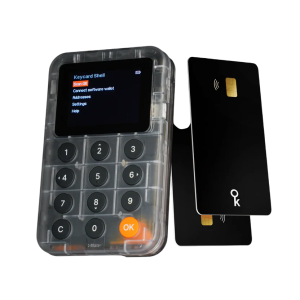 |
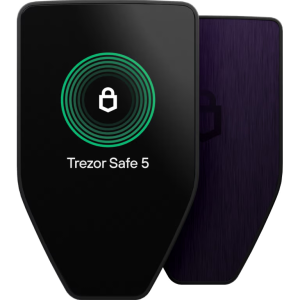 |
|
|---|---|---|
Price |
€99 (~$106) |
$169 |
Display Type |
Monochrome OLED |
Color LCD touchscreen |
Screen Size |
1.8″ (128x160px) |
1.54″ (240x240px) |
Input Method |
6-button physical keypad |
Touchscreen + haptic feedback |
Display Brightness |
Standard OLED |
Standard LCD |
Weight (Device) |
Not specified |
23g |
Card Weight |
5g per Keycard |
N/A |
Camera |
Yes (for QR signing) |
No |
Battery |
Nokia BL-4C Li-ion (replaceable) |
None (USB-powered) |
Battery Life |
18+ hours active use |
N/A (always USB-powered) |
Wireless Charging |
No |
No |
Bluetooth |
Optional via USB-C |
No |
NFC |
Yes (via Keycard) |
No |
USB Connection |
USB-C (optional, can disable) |
USB-C (required) |
Secure Chips |
EAL6+ JavaCard (in card) |
EAL6+ (in device) |
Quantum-Ready |
No |
No |
Firmware |
100% open-source (hardware + firmware) |
Open-source firmware |
Firmware Upgradability |
Non-upgradable by design |
Upgradable |
Water/Dust Rating |
Cards: water/dust resistant |
None |
Body Material |
Polycarbonate + rubber keypad |
PC-ABS plastic + aluminum back |
Glass Protection |
No glass (plastic OLED) |
Gorilla Glass 3 |
Architecture |
Modular (stateless shell + cards) |
Integrated all-in-one |
Backup Model |
Unlimited Keycards (each with PIN) |
Standard seed phrase + Shamir |
Included Cards |
2 Keycards |
N/A |
Colors Available |
Shell color not specified |
4 options |
What’s in the Box
Keycard Shell:
- Shell device,
- 2 Keycards,
- USB-C cable,
- setup guide,
- free card reader (limited time, for NFC pairing)
Trezor Safe 5:
- Hardware wallet,
- USB-C cable,
- 2x wallet backup cards,
- startup guide, stickers
The $63 price difference between Keycard Shell vs Trezor Safe 5 represents different approaches to achieving EAL6+ security.
Design & Build Quality
Both wallets offer compact, portable designs but with fundamentally different architectures.
Keycard Shell Build:
- Polycarbonate body with rubber keypad
- 1.8″ monochrome OLED display (no glass cover)
- Stateless architecture—device stores nothing without a Keycard inserted
- Modular system: Shell device + removable EAL6+ Keycards
- Shell weight not officially specified
- Each Keycard weighs 5g (standard smart card thickness 0.8mm)
- Replaceable Nokia BL-4C battery (widely available, $5-10)
- Embedded camera for QR code scanning
- 6-button physical keypad
- USB-C port with optional physical kill-switch
- Keycards: Water-resistant, dust-resistant, temperature resistant (-35°C to 50°C)
- Keycards: X-ray safe, 25+ year lifespan
- 100% open-source (even 3D-printable casing)
Trezor Safe 5 Build:
- Durable PC-ABS plastic body with tamper-evident casing
- Anodized aluminum backplate in various colors
- Gorilla Glass 3 display protection (scratch and impact resistant)
- No water/dust resistance rating
- Ultra-lightweight at only 23g—incredibly portable
- Compact design: 65.9 x 40 x 8mm
- Four color options: Black Graphite, Violet Ore, Green Beryl, Bitcoin Orange
- Intricate laser engraving on shield logo
- Two precise physical buttons (not used for navigation—touchscreen handles that)
- All-in-one integrated design
Design Philosophy:
The Keycard Shell vs Trezor Safe 5 comparison reveals fundamentally different security models:
Keycard Shell – Modular/Stateless: The Shell is stateless—it’s just a screen, keypad, camera, and battery. Your private keys live on removable EAL6+ Keycards (smart cards). Without a Keycard inserted, the Shell contains zero secrets. You back up by creating multiple Keycards, each protected by its own PIN. If your Shell breaks or gets stolen, buy another Shell (~€99) or use any NFC phone—your keys remain on the card.
Trezor Safe 5 – Integrated/Stateful: All components live in one device. Your private keys stay in the EAL6+ Secure Element inside the device. Everything you need is self-contained. You back up with a seed phrase written on paper. If device breaks, restore using seed phrase on new device.
Build Quality Winner: Safe 5 for proven durability and ultra-light portability; Keycard Shell for revolutionary modular design and 100% open-source everything.
Display & Input Comparison
The screen and input methods create different user experiences.
Display Feature |
Keycard Shell |
Trezor Safe 5 |
|---|---|---|
Technology |
Monochrome OLED |
Color LCD touchscreen |
Screen Size |
1.8 inches |
1.54 inches |
Size Advantage |
17% larger screen |
Smaller screen |
Resolution |
128 x 160 pixels |
240 x 240 pixels |
Colors |
Monochrome (white/blue on black) |
Full color spectrum |
Brightness |
Standard OLED |
Standard LCD |
Outdoor Visibility |
Good (OLED contrast) |
Good in shade |
Input Method |
6-button physical keypad |
Touchscreen + haptic feedback |
Navigation |
Button combinations |
Touch/swipe |
QR Code Display |
Yes + can scan with camera |
Display only (no scan) |
Haptic Feedback |
No |
Yes |
Learning Curve |
Requires button learning |
Intuitive (smartphone-like) |
Keycard Shell Display Experience:
The Shell’s 1.8-inch monochrome OLED (17% larger than Safe 5) provides clear, high-contrast text display. The six-button physical keypad (directional buttons + confirm/cancel) navigates menus reliably. No touchscreen means no accidental taps. The embedded camera scans QR codes for air-gapped transaction signing—a revolutionary feature the Safe 5 lacks completely.
Trezor Safe 5 Display Experience:
The Safe 5’s 1.54-inch color LCD touchscreen delivers vibrant colors in a compact package. Touch navigation feels familiar if you use smartphones. Haptic feedback provides satisfying tactile confirmation. Transaction details display in color. The smaller screen means more scrolling for long addresses compared to Keycard Shell’s slightly larger 1.8″ display.
Air-Gapped Operation:
This is where Keycard Shell offers a capability the Safe 5 cannot match:
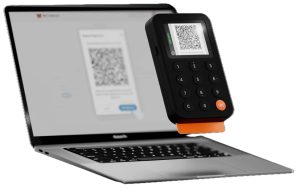
Keycard Shell:
- Your computer/phone displays transaction as QR code
- Shell’s camera scans the QR code
- You verify transaction details on Shell’s display
- You confirm with keypad buttons
- Shell displays a signed transaction QR code
- Your computer/phone scans Shell’s QR code to broadcast
Trezor Safe 5: Requires USB-C connection for all operations—never completely air-gapped. Cannot scan QR codes (no camera).
For cold storage in vaults or maximum security, air-gap capability is revolutionary. The Safe 5’s wired-only operation is simpler but less isolated.
Display Winner: Safe 5 for color touchscreen ease of use; Keycard Shell for larger display and unique air-gap camera capability.
Security Architecture
Both devices offer EAL6+ security with different implementation philosophies.
Keycard Shell Security:
- Single EAL6+ Secure Element: In removable JavaCard smart card
- No Quantum Readiness: Standard current-generation security
- 100% Open-Source Everything: Firmware, hardware designs, even 3D-printable casing
- Keys Stay on Card: Private keys never leave Keycard’s Secure Element, never touch Shell’s microcontroller
- Non-Upgradable Firmware: Keycard applet cannot be changed after manufacture (security feature)
- Stateless Shell: Device stores zero secrets—only Keycard contains keys
- PIN Protection: Each Keycard has its own PIN
- Duress PIN: Second PIN unlocks decoy wallet (empty addresses)
- Backup: Create multiple Keycards with same keys
- True Air-Gap Capable: QR-only operation possible
- USB Kill-Switch: Physically disable USB-C port
- Card Durability: Water/dust resistant, -35°C to 50°C, 25+ year lifespan
- Counterfeit Protection: Open-source protocol lets wallets verify genuine Keycards
Trezor Safe 5 Security:
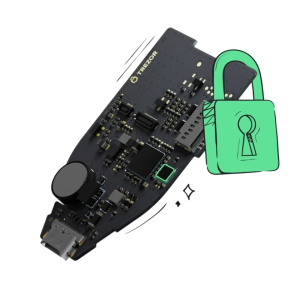
- Single Secure Element: NDA-free EAL6+ certified chip (first Trezor with Secure Element)
- No Quantum Readiness: Standard current-generation security
- Complete Open-Source Firmware: 100% publicly auditable
- Keys Stay in Device: Private keys stored in device’s Secure Element
- Upgradable Firmware: Can receive security updates and new features
- PIN Protection: Up to 50 digits
- Backup: Seed phrase (12/20/24 words) or Shamir multi-share (SLIP39)
- Passphrase Protection: 25th word capability
- Tamper-Evident Casing: Shows if device was opened
- MicroSD Encryption: Additional PIN encryption layer (no MicroSD slot on Safe 5)
- Two-Year Warranty: Standard protection
- No History of Hacks: Clean security record
The Non-Upgradable vs Upgradable Debate:
Keycard Shell (Non-Upgradable is a Feature): The design ensures that even if Keycard were subpoenaed or hacked to change firmware, they physically cannot extract private keys from existing cards. Once manufactured, the Keycard’s behavior is frozen forever. No future firmware update can introduce key extraction—even under government coercion.
Trezor Safe 5 (Upgradable is a Feature): Firmware updates add new cryptocurrencies, improve security, and patch vulnerabilities. Flexibility allows the device to evolve with threats and user needs.
Duress PIN Feature:
Only the Keycard Shell offers duress PIN capability. Set a second PIN that unlocks a decoy wallet with empty addresses. If someone coerces you to unlock your Keycard under threat, you enter the duress PIN. They see an empty wallet and believe you have no crypto, while your real funds remain protected by the main PIN.
Security Model Winner:
- Established Security: Safe 5 (proven since June 2024)
- Transparency: Keycard Shell (100% open hardware + firmware vs firmware only)
- Physical Separation: Keycard Shell (stateless architecture)
- Coercion Resistance: Keycard Shell (duress PIN + non-upgradable)
- Upgrade Flexibility: Safe 5 (can patch vulnerabilities)
- Air-Gap Capability: Keycard Shell (camera for QR)
Connectivity & Power
How you connect and power these devices affects daily convenience.
Connectivity Comparison:
Connection Type |
Keycard Shell |
Trezor Safe 5 |
|---|---|---|
USB-C |
Yes (optional, can disable) |
Yes (required always) |
Bluetooth |
Optional via USB-C adapter |
No |
NFC |
Yes (Keycard to phone/Shell) |
No |
QR Code Air-Gap |
Yes (embedded camera) |
No |
Wireless Charging |
No |
No |
Cable Included |
USB-C cable |
USB-C cable |
Mobile Use |
NFC + QR (wireless possible) |
Wired only (won’t work with iPhone) |
Desktop Use |
QR + USB-C |
USB-C only |
Truly Air-Gapped |
Yes (QR-only mode) |
No (requires USB) |
Keycard Shell Connectivity:
Revolutionary flexibility:
- NFC: Tap Keycard to NFC phones for mobile signing (Android)
- QR Codes: Completely air-gapped—scan transaction QR, display signed QR (ERC-4527 for Ethereum, UR 2.0 for Bitcoin)
- USB-C: Direct connection (can be physically disabled with kill-switch)
- Works with 10+ wallets: MetaMask, Rabby, UniSat, Backpack, BlueWallet, Sparrow, Specter, imToken, Status
Trezor Safe 5 Connectivity:
- USB-C only: Requires cable connection for all operations
- Android: Works with USB-C direct connection
- iPhone: Does NOT work for transaction signing (Apple’s iOS restrictions)
- Desktop: Works perfectly with Trezor Suite
- Simple and reliable: No wireless complexity
Battery & Power:
Keycard Shell:
- Nokia BL-4C Li-ion battery (replaceable)
- 18+ hours active use per charge
- Common battery type (available worldwide for $5-10)
- User-replaceable extends device lifetime indefinitely
- Charges via USB-C (no wireless charging)
- Keycards require no power (passive smart cards)
Trezor Safe 5:
- No battery—always USB-powered
- Must plug in for every use
- No charging concerns
- No battery degradation over time
- Simpler design with fewer components
- More portable (lighter without battery)
- Cannot operate wirelessly
Power Philosophy:
The Keycard Shell’s replaceable battery means infinite device lifespan—when the battery degrades in 3-5 years, pop in a new one for $5-10. The device can theoretically last 20+ years with battery replacements.
The Safe 5’s lack of battery eliminates one potential failure point and reduces weight. For desk-based use where USB power is always available, this simplicity is perfect.
Connectivity Winner: Keycard Shell for air-gap capability, NFC, and iPhone compatibility; Safe 5 for simplicity.
User Experience
Daily usability determines whether your wallet feels empowering or frustrating.
Setup Process:
Keycard Shell:
- Insert Keycard into Shell
- Use 6-button keypad to set main PIN
- Set optional duress PIN (unlocks decoy wallet)
- Generate keys on Keycard (or import existing)
- Optionally create additional backup Keycards
- Scan pairing QR in compatible wallet (WalletConnect 2.0)
- 10-15 minutes total
- No seed phrase to write down (keys stay on cards)
Trezor Safe 5:
- Connect via USB-C to computer or Android phone
- Small 1.54″ color touchscreen guides setup
- Touch-based PIN entry on device
- Generate seed phrase (12/20/24 words) OR Shamir multi-share
- Write seed phrase on included backup cards
- Verify seed phrase by touching on screen
- 15-20 minutes total
- Requires writing/storing paper seed phrase
Daily Usage:
Keycard Shell:
- Insert appropriate Keycard into Shell
- Enter PIN via 6-button keypad
- For desktop: Scan QR code OR USB-C connect
- For mobile: NFC tap or QR scanning
- Verify transaction on Shell’s 1.8″ display
- Press keypad buttons to confirm
- Remove Keycard when done (Shell returns to stateless)
- Can operate completely air-gapped via QR
Trezor Safe 5:
- Plug in USB-C cable to computer/Android phone
- Touch screen to navigate menus
- Verify transaction on 1.54″ color display
- Touch to confirm with haptic feedback
- Always requires cable connection
- Works seamlessly with Trezor Suite
Transaction Signing Speed:
- Keycard Shell: ~300ms for Bitcoin PSBT, similar for Ethereum (via QR or NFC)
- Trezor Safe 5: Very fast via USB-C
Both devices sign transactions quickly—the difference is negligible.
User Experience Winner: Safe 5 for intuitive touchscreen; Keycard Shell for flexible multi-card management and air-gap capability.
Cryptocurrency Support
Both wallets support major cryptocurrencies with slightly different coverage.
Keycard Shell:
- All EVM chains: Ethereum, Arbitrum, Optimism, Polygon, Avalanche, BSC, and all Layer 2s
- Bitcoin: SegWit, Taproot, Legacy addresses
- Bitcoin Lightning Network: Native support
- All ERC-20 tokens and NFTs
- No Solana support yet (roadmap item)
- Works with 10+ wallets: MetaMask, Rabby, UniSat, Backpack, BlueWallet, Sparrow, Specter, imToken, Status, Enno, WallETH
Trezor Safe 5:
- 8,000+ coins and tokens supported
- Bitcoin, Ethereum, Solana, Cardano, Polkadot, Arbitrum, all major chains
- ERC-20, BEP-20, TRC-20 tokens
- 70,000+ dApps via WalletConnect
- 30+ third-party wallets (MetaMask, Rabby, Backpack, Exodus)
- NFT support through integrations
- Continuous firmware updates add support
Cryptocurrency Support Winner: Safe 5 for Solana and broader out-of-box support; Keycard Shell excellent for Ethereum/EVM and Bitcoin.
Ecosystem & Compatibility
Keycard Shell Ecosystem:
- Wallet-agnostic design: Works with many existing wallets
- Status app: Native integration (mobile and desktop)
- MetaMask, Rabby: Full support via WalletConnect QR
- Bitcoin wallets: UniSat, BlueWallet, Sparrow, Specter, Nunchuk
- Open SDKs: Java, Swift, Go, Web—easy for developers
- No proprietary app required: Use your favorite existing wallet
Trezor Safe 5 Ecosystem:
- Trezor Suite: Mature desktop and mobile app
- Portfolio tracking, price charts, transaction history
- Built-in exchange integration (buy, sell, swap)
- Staking interfaces for major networks
- Privacy features (Tor integration, coin control, CoinJoin)
- 30+ third-party wallet integrations
The Keycard Shell’s wallet-agnostic approach is revolutionary—you’re not locked into one ecosystem. Use MetaMask, Rabby, or whatever you prefer.
Trading & Staking Features
Keycard Shell:
- Use trading features of your connected wallet (MetaMask, Rabby, etc.)
- Staking through wallet apps (Status, MetaMask)
- Shell provides secure signing—wallet handles trading interface
- Flexibility to choose best trading platform
Trezor Safe 5:
- Buy, sell, swap crypto through Trezor Suite
- Native staking for Ethereum, Solana, Cardano, Polkadot, ATOM, TON
- Exchange partner integration
- All-in-one convenience
Both enable staking on proof-of-stake networks—the difference is Safe 5 integrates trading in Trezor Suite, while Keycard Shell relies on your chosen wallet app.
Privacy Features
Keycard Shell Privacy:
- Completely stateless—Shell stores nothing
- Air-gapped QR operation—zero network connection possible
- Physical separation—keys on card, interface on Shell
- Duress PIN—unlocks decoy wallet under coercion
- Open-source everything—verify all code and hardware
- No account or registration required
- Use with privacy-focused wallets (Status, Sparrow)
Trezor Safe 5 Privacy:
- Built-in Tor integration in Trezor Suite
- Advanced coin control (UTXO selection)
- CoinJoin support for Bitcoin mixing
- Address reuse prevention
- No Trezor account required
- Passphrase protection (hidden wallets)
Privacy Winner: Keycard Shell for stateless architecture and air-gap; Safe 5 for built-in Tor and CoinJoin.
Advanced Features
Two-Factor Authentication:
- Trezor Safe 5: FIDO2/U2F authentication for online accounts
- Keycard Shell: Focus is crypto signing, not general 2FA
Backup & Recovery:
Backup Feature |
Keycard Shell |
Trezor Safe 5 |
|---|---|---|
Standard Recovery |
Multiple Keycards (no seed phrase) |
12/20/24-word seed phrase |
Multi-share |
Unlimited Keycards with unique PINs |
Shamir Backup (SLIP39) |
Passphrase |
BIP39 compatible |
Yes (25th word) |
Duress Protection |
Yes (duress PIN unlocks decoy) |
No |
Backup Medium |
Physical Keycards |
Paper (or metal) |
Backup Cost |
€25 (~$27) per additional card |
Free (paper) |
Single Point of Failure |
No (multiple cards) |
Yes (paper seed phrase) |
Keycard Backup Model Explained:
Instead of writing 24 words on paper, create multiple Keycards with the same keys:
- Keycard #1 (PIN: 123456) → Store at home
- Keycard #2 (PIN: 789012) → Store at parents’ house
- Keycard #3 (PIN: 345678) → Store in safe deposit box
Each card has unique PIN. If someone steals one card without the PIN, funds remain safe.
Firmware Updates:
- Keycard Shell: Non-upgradable firmware by design (security feature)
- Trezor Safe 5: Firmware updates via USB-C (upgradable)
Pricing
The $63 price difference represents different value propositions.
Keycard Shell at €99 (~$106):
What You Get:
- EAL6+ Secure Element (in removable cards)
- 100% open-source hardware + firmware + casing (3D-printable)
- 1.8″ monochrome OLED display (17% larger than Safe 5)
- 6-button physical keypad
- Embedded camera for QR air-gap signing
- Stateless architecture (device stores nothing)
- 2 Keycards included (€50 value)
- Replaceable Nokia BL-4C battery (infinite lifespan)
- Non-upgradable firmware (coercion-resistant)
- NFC + QR + USB-C connectivity
- Duress PIN capability
- Works with 10+ existing wallets
- Free card reader (limited time)
- Ships December 2025
Keycard Shell Total Cost for 3-Card Setup:
- Device + 2 cards: €99 (~$106)
- 1 additional Keycard: €25 (~$27)
- Total: ~$133
Trezor Safe 5 at $169:
What You Get:
- EAL6+ Secure Element (single chip in device)
- Open-source firmware (hardware designs proprietary)
- 1.54″ color LCD touchscreen
- Intuitive touch interface with haptic feedback
- Proven open-source firmware
- Ultra-lightweight 14g (vs Shell’s unspecified weight)
- Ultra-compact 65.9 x 40 x 8mm
- No battery to maintain
- Four color options
- Gorilla Glass 3 protection
- Upgradable firmware (can add features)
- Mature Trezor Suite ecosystem
- Immediate availability
- Established since June 2024
Trezor Safe 5 Total Cost:
- Device: $169
- Recommended: Protective case (~$15)
- Optional: Metal backup (~$99)
- Total: ~$184-283
Value Per Dollar:
Value Metric |
Keycard Shell |
Trezor Safe 5 |
|---|---|---|
Price |
~$106 |
$169 |
Security per Dollar |
Excellent (stateless + air-gap) |
Excellent (proven EAL6+) |
User Experience per Dollar |
Good (keypad, air-gap) |
Better (touchscreen) |
Transparency per Dollar |
Best (100% open-source) |
Good (firmware only) |
Backup Cost |
~$27 per card |
Free (paper) |
Unique Features per Dollar |
Stateless, air-gap, unlimited cards |
Color touchscreen, established |
Value Winner: Keycard Shell at $63 cheaper with revolutionary features; Safe 5 for immediate availability and proven track record.
Pros & Cons
Keycard Shell
Strengths:
- $63 cheaper ($106 vs $169)
- 100% open-source (hardware, firmware, casing—3D printable)
- Revolutionary stateless architecture
- True air-gap capability (embedded camera)
- Unlimited backup Keycards (~$27 each)
- Duress PIN unlocks decoy wallet
- Non-upgradable firmware (coercion-resistant)
- Replaceable battery (infinite lifespan)
- Physical key separation
- Works with iPhone via NFC (Safe 5 doesn’t)
- Works with 10+ existing wallets
- NFC + QR + USB-C connectivity
- Larger 1.8″ display (vs 1.54″)
- 2 Keycards included
- Free card reader (limited time)
- 25+ year Keycard lifespan
Weaknesses:
- Not available until December 2025
- Monochrome display (vs color)
- No touchscreen (6-button keypad)
- Learning curve for QR/NFC workflow
- No Solana support yet
- Additional cards cost ~$27 each
- New product (less track record)
- Non-upgradable (can’t add new features)
- No haptic feedback
- Weight not specified
Trezor Safe 5
Strengths:
- Available immediately (ships now)
- 1.54″ color LCD touchscreen
- Intuitive touch interface with haptic feedback
- Ultra-lightweight 14g (incredibly portable)
- Ultra-compact 65.9 x 40 x 8mm
- Gorilla Glass 3 protection
- Four color options
- Proven track record (June 2024)
- Upgradable firmware (add features)
- No battery to maintain
- Mature Trezor Suite ecosystem
- Built-in Tor, CoinJoin, coin control
- Supports Solana
- Simple USB-C operation
- 8,000+ coins supported
- Established company (Trezor since 2013)
Weaknesses:
- $63 more expensive ($169 vs $106)
- No air-gap capability (no camera)
- Keys stay in device (not separable)
- Single backup (paper seed phrase)
- No duress PIN feature
- Doesn’t work with iPhone for transactions
- Requires USB-C connection always
- Hardware designs not open-source
- No NFC support
- No wireless connectivity
- Single point of failure (device)
- Non-replaceable battery N/A (no battery)
Trezor Safe 5 or Keycard Shell: Which One Should You Buy
Choosing between Keycard Shell vs Trezor Safe 5 depends on your priorities.
Choose Keycard Shell if you:
- Want revolutionary stateless architecture
- Value 100% open-source transparency
- Need true air-gap capability
- Want unlimited backup cards
- Need duress PIN protection
- Appreciate non-upgradable security
- Want replaceable battery (infinite lifespan)
- Prefer wallet-agnostic design
- Use an iPhone (NFC signing works)
- Are budget-conscious ($63 cheaper)
- Can wait until December 2025
- Don’t need Solana immediately
- Manage multiple separate wallets (swap cards)
- Value physical key separation
- Want lower replacement cost
Choose Trezor Safe 5 if you:
- Want immediate availability (ships now)
- Prefer color touchscreen ease
- Value ultra-lightweight 14g portability
- Want established company track record
- Need Solana support now
- Prefer simpler USB-only operation
- Don’t need air-gap capability
- Want upgradable firmware
- Prefer mature Trezor Suite
- Use Android or desktop only
- Don’t want battery maintenance
- Value Gorilla Glass protection
- Want built-in Tor and CoinJoin
- Prefer all-in-one convenience
- Can afford $169 pricing
Keycard Shell vs Trezor Safe 7: Which Hardware Wallet Is Safer in 2026?
Final Verdict
The Keycard Shell vs Trezor Safe 5 comparison reveals two excellent EAL6+ wallets with different philosophies.
Keycard Shell reimagines hardware wallets with modular innovation at a lower cost. Safe 5 delivers trusted security with polished convenience at mid-range pricing. Both are excellent—choose based on your philosophy and timeline.
Frequently Asked Questions
Is the Keycard Shell as secure as the Trezor Safe 5?
Yes, both offer EAL6+ Secure Element protection—equivalent security certification. The difference is implementation: Safe 5 stores keys in the device, Keycard Shell stores keys on removable cards. The Keycard Shell’s stateless architecture and air-gap capability provide additional security layers (physical separation, zero electronic connection), while the Safe 5’s integrated design is simpler and proven since June 2024.
Which device will last longer?
The Keycard Shell’s replaceable Nokia BL-4C battery ($5-10) and 25+ year Keycard lifespan mean infinite device lifetime with battery replacements. If the Shell breaks, your keys remain safe on cards—buy another Shell or use any NFC phone. The Safe 5 has no battery (one less failure point), but if the device breaks, you must buy a new $169 device and restore from seed phrase.
Which is better for cold storage?
The Keycard Shell excels: true air-gap via QR, stateless design (store Shell and cards separately), 25+ year Keycard lifespan, and duress PIN. Store the Shell at home, Keycards in vault—bring one card home when needed to sign via QR, completely air-gapped.
Which supports more cryptocurrencies?
The Safe 5 supports 8,000+ coins including Solana, Cardano, Polkadot, and obscure altcoins. The Keycard Shell supports all EVM chains, Bitcoin, and Lightning—excellent coverage but no Solana yet. For Ethereum/EVM and Bitcoin users, both are equivalent.
Which is easier for beginners?
The Trezor Safe 5 is more beginner-friendly: intuitive color touchscreen, mature Trezor Suite with documentation, and immediate availability. The Keycard Shell requires learning button navigation, choosing which wallet to use, and understanding QR/NFC workflows—more complex initially.
Can I use both devices?
Yes, but create completely separate wallets. Never use the same seed phrase on multiple devices—this creates multiple points of failure. The Keycard Shell’s advantage is using one Shell with multiple Keycards for different purposes—no need for multiple hardware devices.