





Most beginners lose money because they trade real cash before they understand how markets, orders, and risk work. A good platform lowers that risk. It gives you a free practice account, clear charts, simple order tickets, and lessons you can follow.
This guide compares eight platforms on that basis. It ranks them by ease of use, paper trading, education, charting, mobile experience, cost, and room to grow. It is a beginner-journey guide, not a list of the cheapest brokers.
Affiliate disclosure: MarketsXplora may earn a commission if you open an account through our links. This never changes our rankings. Availability, features, and fees vary by country, so confirm details on each provider’s site.
Our Top Picks at a Glance
Platform |
Best For |
Practice Account |
Typical Cost |
|---|---|---|---|
TradingView |
Learning technical analysis |
Built-in paper trading, $100,000 default balance |
Free plan plus paid tiers |
Webull |
Beginner day traders |
Paper trading mode |
$0 commission on stocks, ETFs, options |
Interactive Brokers |
Growing into professional trading |
Free paper account (needs a live account) |
Lite $0; Pro from $0.005 per share |
thinkorswim |
Simulated trading |
paperMoney, $100,000 virtual buying power |
$0 online equity commissions |
eToro |
Learning from other traders |
$100,000 virtual portfolio (not in some US states) |
$0 on US stocks and ETFs |
Moomoo |
Research tools |
Paper trading |
$0 commission on US stocks, ETFs, options |
TradeStation |
Active stock traders |
Simulated trading |
$0 on stocks and ETFs |
NinjaTrader |
Futures day trading |
Free simulation with real market data |
From $0.39 per micro contract per side |
How We Chose the Best Day Trading Platforms for Beginners
We asked one question: which platform helps a beginner learn safely, practise without risking money, and later trade real markets? We weighted seven factors in this order.
Priority |
Factor |
What We Checked |
|---|---|---|
1 |
Ease of use |
Can a new trader place an order without confusion? |
2 |
Paper trading |
Is there a free practice account with real market conditions? |
3 |
Educational resources |
Are there lessons, videos, webinars, or a learning community? |
4 |
Charting tools |
Can a beginner read price movement clearly? |
5 |
Mobile experience |
Can you learn and trade from a phone or tablet? |
6 |
Cost |
What are the commissions, minimums, and platform fees? |
7 |
Room to grow |
Will the platform still fit you when you improve? |
This guide was built from each provider’s published information, regulator notices, and independent research. We do not publish invented test scores. Where we have not yet run a hands-on test, we say so.
Best Day Trading Platforms for Beginners Reviewed
1. TradingView: Best Platform for Learning Day Trading
Why We Chose TradingView
TradingView puts charts first. Beginners must learn to read price action before anything else, and this platform makes that easy. It is not a broker itself. It connects to supported brokers, and it includes a paper trading account.
Key Features
- Browser, desktop, and mobile charting
- Large library of indicators and drawing tools
- Built-in paper trading from the chart
- Price alerts and a social feed of trading ideas
- Broker connections for live trading (the list varies by country)
TradingView Paper Trading Explained
Open any chart, click the Trading Panel, and choose Paper Trading. TradingView then creates a virtual account. The default balance is $100,000, but you can reset it. Set it to the amount you plan to trade for real, such as $1,000, so your results feel realistic. TradingView explains the tool on its paper trading support page, and it has run virtual trading competitions called The Leap.
Learning Technical Analysis With TradingView
Start small. Learn trend lines, support and resistance, one moving average, and volume. Add one tool at a time. TradingView lets you save chart layouts, so you can keep a clean template for each strategy you study. Free plans limit some features, such as indicators per chart, so check the current plan table before you upgrade.
Pros and Cons
- Best charting experience for learning
- Paper trading sits inside the chart
- Works in a browser and on mobile
- Large community with shared chart ideas
- Connects to several brokers
- Not a broker on its own
- Broker choice depends on your country
- Paid plans unlock more indicators and data
- Community ideas vary in quality
- Paper fills are simulated, so real fills can differ
Who Should Use TradingView?
Choose TradingView if you want to learn charts before you open a broker account. It also suits anyone who wants one charting home across several brokers.
MarketsXplora Verdict

2. Webull: Best Beginner-Friendly Day Trading Platform
Why We Chose Webull
Webull pairs a friendly app with serious charts. It charges $0 commission on US stocks, ETFs, and options, and it has no minimum deposit. It also offers paper trading, so you can practise on the same interface you will use for real trades.
Key Features
- $0 commissions on stocks, ETFs, and equity options
- $0 minimum deposit
- Paper trading mode
- 60+ indicators on the main charting platform
- Mobile, tablet, desktop, and web apps
Paper Trading Experience
Webull lists paper trading as a core tool. You practise with virtual cash, place the same order types, and learn the layout before you deposit. That matters because the interface has many panels. Spend a full week in paper mode first.
Mobile Trading App Review
The Webull app puts quotes, charts, and order entry in one place, and a tablet app adds a wider trading layout. Beginners can trade from a phone, but small screens make chart study harder. Use a larger screen for planning and the phone for alerts.
Pros and Cons
- Simple to open, no minimum deposit
- $0 commission on US stocks, ETFs, and options
- Paper trading and strong charts
- Good mobile and desktop apps
- Funding options are limited (ACH, wire, and transfers)
- Non-US clients can face higher wire fees
- No 24/7 phone support or human advisers
- Mainly serves US markets
Who Should Use Webull?
Choose Webull if you want a low-cost account with charts, paper trading, and a modern app in one place.
MarketsXplora Verdict
3. Interactive Brokers: Best Platform to Grow With
Why We Chose Interactive Brokers
Interactive Brokers (IBKR) is the platform you may never outgrow. It offers wide market access and low costs. It is also harder to learn, so it suits patient beginners.
Key Features
- No account minimum for most accounts
- IBKR Lite with $0 commissions on US stocks and ETFs (US clients)
- IBKR Pro with per-share pricing for tighter cost control
- Trader Workstation (TWS) for advanced trading
- Free paper trading account
Trader Workstation Overview
TWS is IBKR’s professional desktop platform. It has deep order tools and heavy customisation. Beginners often find it overwhelming. IBKR says TWS is not available to Lite clients, so read the Lite versus Pro comparison before you choose.
Paper Trading Account
IBKR’s paper account uses simulated funds and copies the live platform. It is free, but you need a live IBKR account to open it. Use it to learn TWS layouts and order types before you fund the live account.
Lite Versus Pro Costs
IBKR Lite is for US clients and charges $0 on US stocks and ETFs. IBKR Pro charges either a fixed $0.005 per share or a tiered rate of $0.0005 to $0.0035 per share, in return for what independent reviewers describe as better execution. Outside the US, Pro is usually the only choice.
Pros and Cons
- Very low costs and wide market access
- No account minimum
- Professional tools when you need them
- Free paper account
- Steep learning curve
- TWS is not on Lite accounts
- Paper account needs a live account first
- Pricing options can confuse new users
Who Should Use Interactive Brokers?
Choose Interactive Brokers if you plan to trade seriously and want one account that scales from stocks to futures and global markets.
MarketsXplora Verdict
4. thinkorswim: Best for Simulated Trading
Why We Chose thinkorswim
thinkorswim is Charles Schwab’s trading platform, and its paperMoney simulator is one of the most complete free practice tools available. It supports stocks, options, futures, and forex in a live market simulation.
Key Features
- paperMoney with $100,000 of virtual buying power
- Simulation of equities, options, futures, and forex
- Desktop, web, and mobile versions
- Advanced charting and analysis tools
- Schwab education and trading specialists
PaperMoney Simulator
Schwab describes paperMoney as free virtual trading that mirrors many live thinkorswim tools. You need a Schwab account to log in. The simulator shows an orange interface, so you always know you are in practice mode. Schwab’s tutorial also notes that paperMoney quotes can carry a delay, so check the data setting. See the official paperMoney page.
Learning Order Types
Use paperMoney to place market, limit, stop, and bracket orders. A bracket order sets your entry, stop loss, and profit target together. That builds the habit of planning the exit before you enter.
Pros and Cons
- Free, feature-rich simulator
- Wide asset coverage in practice mode
- Strong education from Schwab
- Trusted, established broker
- Needs a Schwab account
- Desktop platform has a learning curve
- Mainly serves US residents
- Practice quotes may be delayed
Who Should Use thinkorswim?
Choose thinkorswim if you want the most realistic practice environment and you can open a Schwab account.
MarketsXplora Verdict
5. eToro: Best for Learning From Other Traders
Why We Chose eToro
eToro is a social trading platform. You can follow other traders, read their reasoning, and copy their portfolios. It also gives every new account a virtual portfolio.
Key Features
- $100,000 virtual portfolio (not available in NY, NV, HI, Puerto Rico, or the US Virgin Islands)
- $0 commission on US stocks and ETFs
- CopyTrader with a $200 minimum per copied trader
- Social feed and Popular Investor profiles
- Simple app for phone trading
Copy Trading Explained
With CopyTrader, you allocate money to a chosen investor. The platform then mirrors that person’s trades in proportion to your allocation. Slippage and timing can make your results differ from theirs. Copying is not the same as learning to trade, so study the trader’s style and risk.
Social Trading Benefits
Reading how experienced traders explain entries, exits, and losses teaches risk management fast. Use the virtual portfolio to follow a few profiles before you commit real money. eToro is stronger for social investing than for fast intraday scalping, and its products differ by country.
Pros and Cons
- Beginner-friendly app
- Virtual portfolio for practice
- Learn from public trader profiles
- Low barrier to start
- Fewer advanced day trading tools
- Crypto trading fees run about 1% per side
- Product range differs by country
- Copy results are never guaranteed
Who Should Use eToro?
Choose eToro if you learn best by watching real people trade and explain their choices.
MarketsXplora Verdict
6. Moomoo: Best Research Platform for Beginners
Why We Chose Moomoo
Moomoo gives beginners professional-style research for $0 commission. It has screeners, deep market data, and a paper trading mode.
Key Features
- $0 commission on US stocks, ETFs, and options for US residents
- $0 account and trade minimums
- 60+ technical indicators and 38+ drawing tools
- Free Level 2 data for eligible accounts
- Paper trading
Screeners and Market Research
Screeners help you build a short watchlist of liquid stocks. Beginners should track three to five symbols, not fifty. Moomoo’s ranking lists and data tools help you find active names without noise.
Paper Trading Tools
Moomoo lists paper trading as a built-in feature. Use it to test how Level 2 data looks when prices move. Moomoo says Level 2 is free for US accounts with a 30-day average value of $100 or more; see the Moomoo US page for current terms.
Pros and Cons
- Strong research and data for $0
- Low minimums
- Wide charting toolset
- Paper trading included
- Level 2 has eligibility rules
- Availability depends on your country
- Many tools can distract beginners
- Fewer futures options than dedicated futures brokers
Who Should Use Moomoo?
Choose Moomoo if you want to research stocks in depth and practise with real market data.
MarketsXplora Verdict
7. TradeStation: Best for Serious Stock Traders
Why We Chose TradeStation
TradeStation is built for active traders. It offers $0 commissions on stocks and ETFs, fast order entry, and a simulator. Its power can overwhelm a first-timer.
Key Features
- $0 commissions on stocks and ETFs
- Simulated trading across asset types
- Matrix one-click order entry
- Stocks, options, and futures
- TradingView integration for eligible users
Trading Simulator
TradeStation’s simulator lets you test strategies without real money. Use it to learn the Matrix, the one-click depth-of-market ticket. One-click trading is fast. That speed also lets you make mistakes fast, so practise before you go live.
Advanced Features Beginners Can Grow Into
Once your process is stable, you can add automation, deeper screeners, and futures. Account types and their costs differ, and options and futures carry per-contract fees. Check the current fee schedule, including inactivity and account fees, before you fund an account.
Pros and Cons
- Powerful tools and fast order entry
- $0 stock and ETF commissions
- Simulator included
- Room to grow into futures and automation
- Can overwhelm new traders
- Options and futures have per-contract fees
- Account rules and fees vary by plan
- Better suited to those with some experience
Who Should Use TradeStation?
Choose TradeStation if you already know the basics and want a platform built for active trading.
MarketsXplora Verdict
8. NinjaTrader: Best Futures Day Trading Platform
Why We Chose NinjaTrader
NinjaTrader is a futures-first platform with free simulation on real market data. Futures let you trade small contract sizes with low day trading margins, which many futures traders like.
Key Features
- Free simulated trading with real market data and no funding required
- Micro contracts with $50 intraday margin (Micro E-mini)
- Three plans: Free, Monthly ($99), and Lifetime ($1,499)
- Desktop, web, and mobile platforms
- Market Replay once you fund a live account
Futures Trading Tools
Commissions per side depend on your plan. Per NinjaTrader’s pricing page, the Free plan charges $0.39 per micro and $1.29 per standard contract. The Monthly plan charges $0.29 and $0.99. The Lifetime plan charges $0.09 and $0.59. Exchange, clearing, and NFA fees apply on top.
Simulator Features
The free simulator uses real market data, so you learn tick values, margin, and order types on live prices. Market Replay lets you replay past sessions tick by tick after you fund a live account. Futures use leverage. A small price move can cause a large gain or loss, so keep contract size tiny.
Pros and Cons
- Free sim with real data
- Low micro-contract costs on paid plans
- Flexible intraday margin
- Strong charting and add-ons
- Futures only, no stocks or ETFs
- Steep learning curve
- Leverage raises risk
- Best plans cost money
Who Should Use NinjaTrader?
Choose NinjaTrader if you want to day trade futures and are ready to study contract specs and margin.
MarketsXplora Verdict
Quick Comparison: All Eight Platforms
Platform |
Paper Trading |
Min. Deposit |
Stock Commission |
Best Asset Focus |
|---|---|---|---|---|
TradingView |
Built in ($100,000 default) |
N/A (charting platform) |
N/A (depends on connected broker) |
Charts across markets |
Webull |
Yes |
$0 |
$0 |
US stocks, ETFs, options |
Interactive Brokers |
Yes, needs a live account |
$0 for most accounts |
Lite $0 / Pro from $0.005 per share |
Global markets |
thinkorswim |
Yes ($100,000) |
$0 at Schwab |
$0 online equity |
Stocks, options, futures, forex |
eToro |
Yes ($100,000) |
Varies by country |
$0 on US stocks and ETFs |
Social and copy trading |
Moomoo |
Yes |
$0 |
$0 |
US stocks, options |
TradeStation |
Yes |
Depends on account type |
$0 |
Active stocks, options, futures |
NinjaTrader |
Yes, free |
$0 |
N/A (futures only) |
Futures |
Confirm minimums, fees, and availability on each provider’s site, because these change often.
What Is Day Trading?
Definition
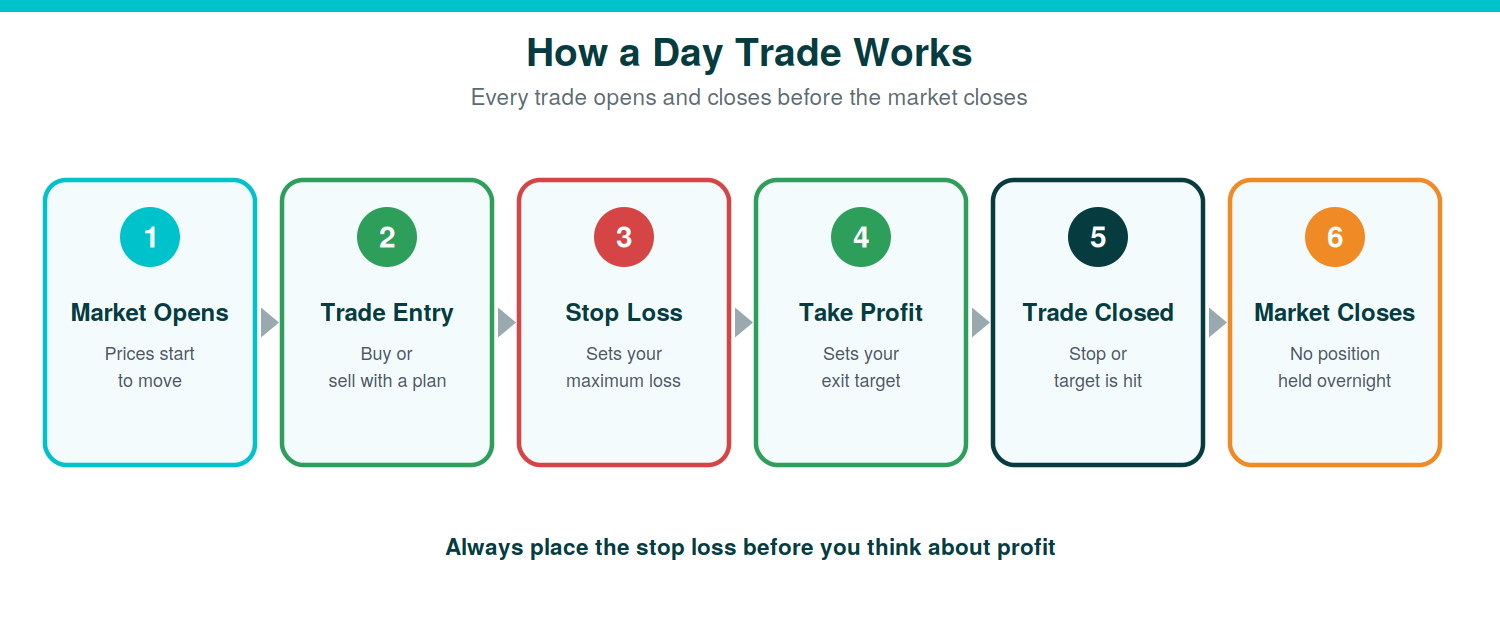
Day trading means buying and selling the same asset within one trading day. You close every position before the market closes, so you hold nothing overnight.
How Day Trading Works
You pick a liquid market, wait for a setup, enter with a stop loss, and exit at a target or at your stop. You repeat this on a small scale, using a written plan.
Example of a Day Trade
Say you buy 100 shares at $50.00 with a stop loss at $49.80 and a target at $50.40. Your risk is $20 (100 shares x $0.20). Your reward is $40 (100 x $0.40). That is a 1:2 risk-to-reward ratio. If the price hits your target, you make $40 before costs. If it hits your stop, you lose $20 before costs.
Why Most Beginners Struggle
Beginners often trade too big, skip stop losses, and chase losses. Research supports the warning. The Brazilian futures study above found that 97% of persistent day traders lost money and that traders showed no sign of learning by trading. That is why paper trading and small size matter.
Day Trading vs Investing
Feature |
Day Trading |
Investing |
|---|---|---|
Holding period |
Minutes to hours |
Months to years |
Frequency |
High |
Low |
Risk |
Higher |
Lower |
Time commitment |
Significant |
Minimal |
Skill needed |
Charting, risk control, discipline |
Research and patience |
Do You Still Need $25,000 to Day Trade? The New Rule Explained
No. FINRA removed the pattern day trader label and the $25,000 minimum. The new rule took effect on June 4, 2026. Brokers may take until October 20, 2027 to finish moving to it, so your broker’s timing can differ. See FINRA’s Regulatory Notice 26-10.
- There is no four-trades-in-five-days count anymore.
- You must hold enough equity for your exposure during the whole trading day, not only at the close.
- FINRA says you can trade a margin account under $2,000 in equity, but only with your own cash and no leverage.
- Maintenance margin is 25% of the current market value of long margin-eligible stocks, and brokers can set higher limits.
Schwab, for example, said it would stop counting day trades and adjust intraday buying power in real time. Ask your broker how it applies the rule. Lower minimums do not lower the risk. Start small.
What Beginners Should Look for in a Day Trading Platform
Paper Trading
Choose a platform with free practice trading on real prices. Reset the virtual balance to a realistic amount.
Fast Order Execution
Slow fills can turn a small win into a loss. Test the order ticket in practice mode.
Simple Charts
Pick clean charts with a few tools. Too many indicators create confusion.
Mobile App Quality
Check that the app can place, edit, and cancel orders quickly. You need it for alerts and exits.
Educational Resources
Look for lessons, videos, and webinars from the provider. Use them for practice ideas.
Risk Management Tools
Make sure you can set stop loss and take profit orders in one ticket.
Low Costs
Compare commissions, spreads, data fees, and platform fees. Zero commission does not mean zero cost.

TradingView vs Webull: Which Is Better for Beginners?
These two solve different problems. TradingView teaches you to read charts. Webull lets you trade with a low-cost account and a built-in practice mode. Many beginners use both.
Feature |
TradingView |
Webull |
|---|---|---|
Type |
Charting platform (connects to brokers) |
Broker with app and desktop platform |
Paper trading |
Built in, $100,000 default, resettable |
Paper trading mode |
Charting |
Deep tools and community ideas |
60+ indicators and solid tools |
Commissions |
None (depends on connected broker) |
$0 on US stocks, ETFs, options |
Minimum deposit |
None for charting/paper |
$0 |
Mobile |
Full app |
Phone and tablet apps |
Withdrawal methods and processing time |
Not applicable. TradingView does not hold your money. Withdrawals follow your connected broker. |
ACH, wire, and account transfers. Confirm current processing times on Webull’s funding page [verify]. |
Best for |
Learning charts first |
Placing and practising real orders |
Withdrawal Methods and Processing Time
TradingView never holds your funds, so you withdraw from your broker. Webull supports a narrow set of funding methods, and non-US clients can pay higher wire fees. Check the current fee table before you fund.
Choose TradingView If…
- You have never read a candlestick chart.
- You want one chart layout across several brokers.
- You want to test ideas before opening a broker account.
Choose Webull If…
- You want a low-cost account and practice in one app.
- You want to practise orders on the same interface you will trade on.
- You trade US stocks, ETFs, or options.
Common Beginner Mistakes When Choosing a Day Trading Platform
Starting With Real Money Too Soon
Practise for several weeks. Move to real money only after you follow your plan consistently.
Choosing a Platform Based Only on Fees
$0 commissions look good. Poor tools, slow fills, or confusing tickets can cost more than a small fee.
Ignoring Paper Trading
Paper trading is a free lesson. Skipping it means you pay for the same lessons with real money.
Using Too Many Indicators
Two or three indicators are plenty. More signals create more conflicts.
Trading Without a Plan
Write your setup, entry, stop, target, and size before the market opens.
How to Start Day Trading as a Beginner
Step 1: Learn Market Basics
Learn order types, spreads, market hours, and how stops work. Start with this beginner guide to reading candlestick charts.
Step 2: Open a Paper Trading Account
Use TradingView, thinkorswim, or another free simulator. Read our guide on what paper trading is. Set a realistic balance.
Step 3: Learn One Strategy
Pick one setup and one market. Trade only that until you can explain every entry and exit.
Step 4: Create a Trading Journal
Record the setup, entry, stop, target, result, and how you felt. Review it weekly.
Step 5: Trade Small
When you go live, use the smallest size the platform allows. Your goal is process, not profit.
Step 6: Focus on Risk Management
A common rule of thumb is to risk no more than 1% of your account on any one trade. Set a daily loss limit and stop when you reach it.
Which Day Trading Platform Is Best for You?
If You Want To… |
Use… |
|---|---|
Learn charting |
TradingView |
Practise trading |
thinkorswim |
Start simply |
Webull |
Grow into professional trading |
Interactive Brokers |
Learn from others |
eToro |
Research stocks |
Moomoo |
Trade actively |
TradeStation |
Trade futures |
NinjaTrader |
FAQs
What is the best day trading platform for complete beginners?
Webull suits most complete beginners because it has a simple app, $0 commissions on US stocks and options, and paper trading. TradingView is the best place to learn charts first. Availability depends on your country.
Can I learn day trading without risking real money?
Yes. Paper trading uses virtual money on real market prices. TradingView, thinkorswim, Webull, eToro, Moomoo, TradeStation, NinjaTrader, and Interactive Brokers all offer some form of practice account. Some need a live account first.
Is TradingView good for beginner day traders?
Yes. TradingView has clear charts, drawing tools, and built-in paper trading. It is not a broker, so you connect a supported broker when you want to trade with real money.
Which platform has the best paper trading account?
thinkorswim paperMoney is the most complete simulator on this list. It gives $100,000 in virtual buying power and covers stocks, options, futures, and forex, but you need a Schwab account to use it.
How much money do I need to start day trading?
You can practise with $0. For real trading, FINRA no longer requires $25,000 for US margin day trading. Margin accounts under $2,000 in equity cannot use leverage. Start with an amount you can afford to lose and check your broker’s rules.
Is day trading suitable for beginners?
It is high risk. A Brazilian study found 97% of persistent day traders lost money. Beginners should paper trade first, use small size, and keep strict risk limits.
What is the difference between TradingView and Webull?
TradingView is a charting platform that connects to brokers. Webull is a broker with its own app and desktop platform. TradingView is better for learning charts. Webull is better for placing low-cost trades.
Should beginners use Interactive Brokers?
Interactive Brokers suits patient beginners who want a long-term account. It has low costs and a free paper account, but Trader Workstation has a steep learning curve and the paper account needs a live account.
Can I day trade from my phone?
Yes. Webull, thinkorswim, eToro, Moomoo, TradeStation, NinjaTrader, and IBKR all have mobile apps. A larger screen makes chart study easier, so use the phone mainly for alerts and exits.
What is the safest way to learn day trading?
Learn the basics, paper trade for several weeks, follow one written strategy, keep a journal, and risk a very small share of your account per trade. Only then trade small with real money.
Related Guides
- Best TradingView Brokers
- Best MT5 Brokers
- Best MT5 Brokers for Beginners
- Best MT5 Brokers for Scalping
- Best Copy Trading Platforms
- Best Forex Brokers for Beginners
- How to Read Candlestick Charts
- What Is Paper Trading?
Disclaimer: This article is for education only and is not financial advice. Trading involves risk, and you can lose money. Hypothetical and simulated results have limits and do not predict real results.
About the author
Samson Ononeme is the founder of MarketsXplora, an independent financial education and research platform covering cryptocurrency, forex, brokers, exchanges, trading platforms, and blockchain technology. He has more than 12 years of experience in financial content, with bylines at EarnForex, Kryptomoney, Cryptorunner, and AtoZ Markets. He turns complex financial products into clear, practical information that readers can use when they compare their options. Connect on LinkedIn and X.