

This Keycard Shell Review examines one of the most unusual wallet concepts on the market. Its split design—Shell plus Keycard—creates a separation that instantly boosts security and convenience. If you want something minimalist yet deeply secure, keep reading.
What Is Keycard Shell?
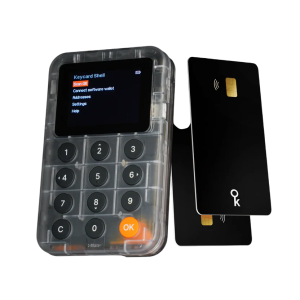
Keycard Shell is a two-part hardware wallet system that separates your controls from your private keys. The “Shell” is a compact 9mm device equipped with a 1.8-inch OLED display, a physical keypad, a QR-code camera, an NFC reader, and an optional USB-C port. It runs on a replaceable Nokia BL-4C battery, making it easy to maintain.
The second component—the Keycard—is an ultra-slim 0.8mm smart card that contains an EAL6+ secure element. This card is the only place your private keys ever live. To sign a transaction, you simply insert the Keycard into the Shell, complete the action, and then remove the card for safe storage or everyday carry.
This split design creates a strong security model. The Shell can sit at home with zero sensitive data on it, while the lightweight Keycard travels with you like a regular bank card. You can also pair one Shell with as many Keycards as you like, each costing €25.
How the Keycard Shell Works
- Insert the Keycard:
When you’re ready to sign a transaction, you insert the Keycard into the Shell’s slot. Once inserted, the Shell momentarily gains access to the secure element on the card.
Sign transactions on your favourite wallets through QR signing - Verify and Approve:
Using the Shell’s display and keypad, you review the transaction details and enter the required PIN or passphrase. The Shell communicates with the Keycard but never extracts or stores your private keys. - Secure Signing:
The Keycard performs the cryptographic signing internally. The Shell simply relays the signed transaction to the connected app or network via QR code, NFC, or USB-C. - Remove and Store the Card:
After signing, you remove the Keycard, and the Shell instantly returns to a “stateless” mode—holding no secrets, no seed, and no sensitive data. - Use Multiple Keycards:
Because the Shell stores nothing, one Shell can operate with unlimited Keycards. Each card acts like its own independent wallet.
Pricing & What You Get
Package Options
Package |
Price |
Contents |
Best For |
|---|---|---|---|
Standard Bundle |
€99 |
1 Shell + 2 Keycards |
Single user, basic backup |
Premium Bundle |
€159 |
1 Shell + 3 Keycards |
Multiple wallets or enhanced backup |
Additional Keycard |
€25 |
1 Keycard only |
Expanding existing setup |
Shell Replacement |
€74 |
Shell device only |
Replacing damaged device |
What’s In The Box (€99 Bundle)
- 1 Keycard Shell device with 1.8″ OLED display
- 2 Keycards with EAL6+ secure elements
- 1 Nokia BL-4C rechargeable battery (pre-installed)
- 1 USB-C charging cable
- 1 Free NFC card reader (limited time offer)
- Quick start guide and documentation
Long-Term Costs
Beyond the initial purchase, expect to spend €5-10 every 1-2 years for replacement BL-4C batteries. Each additional Keycard for separate wallets or extra backups costs €25. The Shell device itself has no subscription fees, no mandatory app purchases, and no hidden costs—you own it outright.
Technical Specifications
Specification |
Details |
|---|---|
Secure Element |
EAL6+ certified JavaCard |
Display |
1.8-inch OLED color screen |
Input Method |
Physical rubber keypad |
Connectivity |
NFC, QR codes (ERC-4527, UR 2.0), USB-C |
Battery |
Replaceable Nokia BL-4C Li-ion |
Battery Life |
18+ hours active use, ~3 months standby |
Charging |
USB-C, ~2 hours full charge |
Dimensions (Shell) |
9mm thick, ~45g with battery |
Dimensions (Keycard) |
0.8mm thick (credit card size), ~5g |
Materials |
Polycarbonate body, rubber keypad, PVC card |
Water Resistance |
Splash-proof (Shell), spill-resistant (Keycard) |
Temperature Range |
0-40°C (Shell), -35-50°C (Keycard) |
Firmware |
100% MIT open-source |
Source Code |
Available on GitHub |
Blockchain & Cryptocurrency Support
Supported Networks
Network Category |
Specific Support |
|---|---|
Bitcoin |
SegWit (Native & Nested), Taproot, Legacy addresses |
Lightning Network |
Yes (instant payments) |
Ethereum |
Full support including EIP-1559 |
Layer 2 Networks |
Arbitrum, Optimism, Polygon, Base, zkSync Era |
Other EVM Chains |
BNB Chain, Avalanche, Fantom, Cronos, all EVM-compatible |
Token Standards |
ERC-20, ERC-721 (NFTs), ERC-1155 |
NOT Supported |
Solana, Cardano, Polkadot, XRP, Tezos |
Compatible Wallets
The open-source SDK approach means Keycard Shell works with multiple wallet applications right out of the box:
Ethereum & EVM Chains:
- MetaMask (browser extension and mobile)
- Rabby Wallet (desktop and mobile)
- imToken (mobile)
- Bitget Wallet (Ethereum support)
- Status (native integration, best experience)
Bitcoin:
- UniSat (Bitcoin and Ordinals)
- Sparrow Wallet (desktop, advanced features)
- Specter Wallet (desktop)
- Nunchuk (mobile and desktop)
- BlueWallet (mobile, Lightning support)
- Bitget Wallet (Bitcoin support)
Multi-Chain:
- Backpack (Solana wallet that supports Bitcoin via Keycard)
- Any wallet supporting WalletConnect 2.0
- Any wallet using ERC-4527 or UR 2.0 QR standards
Coming Soon: Desktop integration for MetaMask and other browser wallets is continuously expanding. The open SDK (available in Java, Swift, Go, and Web) allows any developer to add Keycard Shell support to their wallet.
Security Architecture
Common Criteria Evaluation Assurance Level 6+ represents the highest practical security certification for commercial products. The Keycard’s secure element underwent rigorous testing including physical tampering attempts, side-channel attack resistance, and fault injection testing. This certification matches military-grade security standards and exceeds typical consumer electronics by several levels.
Security Features Breakdown
Feature |
How It Works |
Why It Matters |
|---|---|---|
Non-Upgradable Firmware |
Secure element applet cannot be modified after manufacturing |
Eliminates firmware update attacks permanently |
Stateless Shell |
Shell stores only public data (addresses, history) |
Zero secrets remain if Shell is lost or stolen |
Trusted Display |
Transaction details render on Shell’s own OLED |
Prevents malware from swapping addresses on phone/PC screen |
Duress PIN |
Secondary PIN unlocks decoy wallet path |
Protects from physical coercion with empty wallet |
PIN Protection |
6-18 digit PIN required before every signing |
Blocks unauthorized use even if card is stolen |
PUK Code |
Backup unlock code after 3 failed PIN attempts |
Prevents permanent lockout from typos |
Air-Gap Options |
QR code signing with zero electronic connection |
Maximum isolation from network-based attacks |
USB Kill Switch |
Physical mechanism disables USB-C entirely |
Ensures air-gap when desired |
Open-Source Security Model
Every line of code—from the secure element applet to the Shell firmware—is published under MIT license on GitHub. This transparency allows independent security researchers worldwide to audit the implementation, find vulnerabilities before attackers do, and verify that no backdoors exist. Major security firms and individual researchers can examine the cryptographic implementations, key generation routines, and signing logic without restriction.
What “Non-Upgradable” Really Means
The secure element’s applet is permanently locked after manufacturing. While this prevents patching bugs, it also means no future supply chain compromise, no malicious employee, no government order, and no company acquisition can ever modify how your Keycard handles private keys. The Shell’s firmware remains upgradable for feature improvements, but the Shell never touches your private keys—only the locked-down Keycard does.
How to Set Up Keycard Shell
Initial Setup Process (4 Minutes)
- Charge the Shell – Connect USB-C cable and charge until LED indicator shows full (approximately 2 hours for first charge)
- Insert First Keycard – Slide your first Keycard into the Shell’s card slot until it clicks
- Set Main PIN – Use the physical keypad to create a 6-18 digit PIN (write it down securely)
- Set Duress PIN – Create a second PIN that unlocks a decoy wallet path (optional but recommended)
- Record Recovery Phrase – Write down the 12 or 24-word BIP-39 seed phrase displayed on screen
- Verify Recovery Phrase – Re-enter words in correct order to confirm you recorded accurately
- Pair With Wallet – Scan the pairing QR code displayed on Shell into MetaMask, Rabby, or your chosen wallet
- Complete – Your first wallet is ready, and addresses appear in your wallet app
Setting Up Backup Cards
Insert your second Keycard into the Shell and choose “Initialize with existing seed.” Enter your 12/24-word recovery phrase and set a new PIN (can be different from your first card). This backup card can now sign transactions for the same wallet but requires its own PIN. You can create unlimited backups this way at €25 per additional Keycard.
Creating Multiple Separate Wallets
To use one Shell for multiple isolated wallets (trading account, cold storage, NFT collection), initialize each new Keycard with “Generate new seed” instead of “existing seed.” Each card then holds completely different keys and operates as an independent wallet. Switch between wallets by simply swapping Keycards in the Shell—the device adapts instantly.
Daily Usage Experience
Signing a Transaction (QR Method)
- Create transaction in MetaMask, Rabby, or any compatible wallet on your computer
- Wallet displays a QR code containing the unsigned transaction
- Press “Scan” button on your Keycard Shell
- Insert your Keycard when prompted
- Enter your PIN on the Shell’s keypad
- Shell displays recipient address, amount, and gas fee on its OLED screen
- Verify all details match your intention
- Press “OK” button to approve (or “Cancel” to reject)
- Shell displays a QR code containing the signed transaction
- Scan this QR code with your computer’s webcam or phone
- Wallet broadcasts the transaction—done
Signing a Transaction (NFC Method)
For mobile wallets supporting NFC, the process is even simpler. Open your transaction in the wallet app, tap the Shell against your phone’s NFC area, enter PIN on Shell, verify details on Shell screen, press OK, and tap again to transfer the signed transaction back. Total time: approximately 15-20 seconds.
Battery Management
The 18+ hour active battery life means you can sign dozens of transactions per charge. The Shell enters low-power standby mode when idle, extending battery life to approximately 3 months between charges. A battery indicator on the OLED screen warns you when charge drops below 20%. Charging takes about 2 hours via USB-C, and you can continue using the Shell while it charges.
Real-World Performance
Transaction Type |
Average Time |
|---|---|
Simple ETH send |
~8 seconds (QR) / ~6 seconds (NFC) |
ERC-20 token transfer |
~9 seconds (QR) / ~7 seconds (NFC) |
Uniswap swap |
~12 seconds (QR) / ~9 seconds (NFC) |
Bitcoin 2-input PSBT |
~300 milliseconds (signing only) |
NFT minting |
~10 seconds (QR) / ~8 seconds (NFC) |
Smart contract interaction |
~15 seconds (QR) / ~11 seconds (NFC) |
Backup & Recovery System
Traditional hardware wallets limit you to one device plus maybe one backup. Keycard Shell flips this model—one Shell device can work with an unlimited number of Keycards, each potentially holding different keys or serving as backups. Create as many backup cards as your security model requires without buying additional Shell devices.
Backup Strategies
Strategy |
Setup |
Best For |
|---|---|---|
Basic (2 cards) |
1 primary + 1 backup in safe location |
Most users, included in €99 bundle |
Geographic (3 cards) |
1 primary + 1 at relative’s house + 1 in bank safe deposit |
High-value holdings |
Separate Wallets |
1 card per purpose (trading, holding, NFTs) |
Active crypto users |
Family Sharing |
1 Shell, each family member has their own Keycard |
Household crypto management |
Multi-Sig Ready |
Multiple cards as signing keys in multi-sig setup |
Advanced security |
Recovery Scenarios
Lost Primary Card: Use any backup card with the same seed—they’re interchangeable. Order a new backup card (€25) and initialize it with your recovery phrase.
Lost Recovery Phrase: As long as you have a working Keycard with your PIN, you can access funds. However, you cannot create new backup cards without the recovery phrase. Consider sending funds to a new wallet with properly backed-up seed phrase.
Damaged Shell Device: Order replacement Shell (€74). Your Keycards are unaffected and work immediately with the new Shell—no re-pairing required.
Forgot PIN: Use your PUK code (recorded during setup) to reset PIN. If PUK code is also lost, use recovery phrase to initialize a new Keycard.
Pros & Cons
Pros
-
Fully open-source firmware and hardware (MIT-licensed) — independently auditable.
-
EAL6+ secure element with non-extractable keys and non-upgradable applet.
-
Trusted OLED display + keypad for verifying every transaction on the device itself.
-
True air-gap signing via QR codes (ERC-4527 / UR 2.0) — no electronic connection needed.
-
Unlimited removable Keycards for physical backups and redundancy.
-
Trusted Display vs. Blind Signing: Prevents malware from altering transaction details displayed on your phone or computer by showing the real address and amount directly on the Shell.
-
Air-Gap Capability: QR-only signing keeps private keys off compromised devices; malware, network sniffers, and keyloggers capture nothing.
-
Duress PIN: Unlocks a decoy account for coercion scenarios, protecting your real holdings under a separate PIN.
-
Open-Source Auditability: Every step—from key generation to signing—is fully published, letting anyone verify there are no backdoors, telemetry, or hidden operations.
Cons
-
Shell adds extra thickness compared to card-only wallets.
-
Requires replacing a BL-4C battery occasionally.
-
Slightly higher cost than simple NFC-only card wallets.
-
No Solana support at launch.
Keycard Shell vs. Tangem vs. Ledger Nano X vs. Trezor Model T
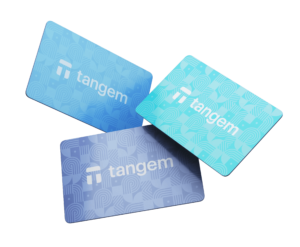
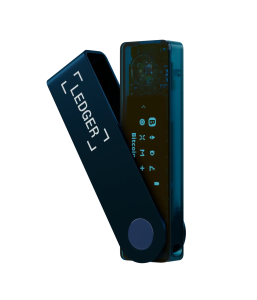
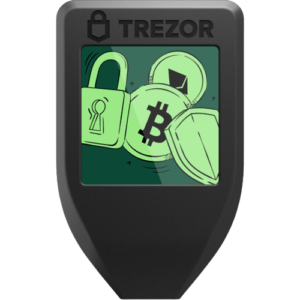
Choosing a hardware wallet can be confusing, especially when each brand takes a different approach to security, backups, and everyday use. The following comparison gives a quick side-by-side look at the most important features so readers can instantly see what fits their needs.
 |
 |
 |
 |
|
|---|---|---|---|---|
Price |
€99 (Shell + 2 Keycards) |
$59 (2-card pack) |
$149 |
$219 |
Display |
1.8″ OLED screen |
None (phone display) |
Small built-in screen |
Color touchscreen |
Firmware |
Fully open-source |
Closed firmware |
Partially closed (SE) |
Fully open-source |
Connectivity |
QR, NFC, optional USB-C |
NFC only |
Bluetooth & USB-C |
USB-C |
Backup Model |
Unlimited Keycards |
Clone to 2–3 cards |
Seed phrase (BIP-39) |
Seed phrase (BIP-39) |
Portability |
Shell stays home; card is ultra-thin |
Very portable (credit-card size) |
Pocket device |
Small device, pocketable |
Battery |
Replaceable BL-4C (Shell); card is battery-free |
Battery-free |
Rechargeable battery |
No battery (USB-powered) |
Crypto Support |
Bitcoin, Lightning, all EVM chains |
85+ chains |
Wide multi-chain support |
Wide multi-chain support |
Keycard Shell stands out for users who want an air-gapped signer with unlimited backup cards and full open-source transparency. Tangem offers extreme portability, Ledger Nano X balances convenience with rich ecosystem support, and Trezor Model T remains a trusted seed-phrase-based open-source option. So, which is the best choice
- Keycard Shell vs Tangem: Which Hardware Wallet Wins 2026?
-
Keycard Shell vs Trezor Safe 7: Which Hardware Wallet Is Safer in 2026?
-
Keycard Shell vs Trezor Safe 5: Which Hardware Wallet Is Better in 2026?
Who Should Buy Keycard Shell?
Ideal Users
- Bitcoin and Ethereum holders who primarily use these two networks and don’t need extensive altcoin support
- Privacy-conscious users who want fully open-source hardware and firmware they can audit themselves
- Multi-wallet managers who want separate wallets for trading, holding, DeFi, and NFTs without buying multiple devices
- Security-first users who prioritize trusted display and air-gap capabilities over ultimate convenience
- MetaMask and Rabby users who want hardware security without switching to proprietary wallet apps
- Lightning Network users who need hardware wallet support for instant Bitcoin payments
- Open-source advocates who refuse to trust closed-source security implementations
Not Ideal For
- Solana ecosystem users who primarily hold SOL, BONK, or other Solana tokens (no support yet)
- Multi-chain collectors who hold assets across Cardano, Polkadot, Tezos, and other non-EVM chains
- Ultimate convenience seekers who want the thinnest possible device and don’t care about trusted displays
- Immediate need users who cannot wait until December 2025 for shipping
- Smartphone-only users who never use desktop computers (better options exist for mobile-only workflows)
Expert Reviews on Keycard Shell
Hardware Wallets (independent reviewer) awarded Keycard Shell a 93% rating, noting: “Keycard Shell offers a unique approach to hardware wallet security with its modular design and open-source architecture.” The review specifically praised the trusted display implementation and unlimited backup model as innovations addressing pain points in existing hardware wallets.
Developer Community Response
Lukas Schor, co-founder of Safe (formerly Gnosis Safe), called it “Amazing piece of open-source hardware and surprisingly good UX” after testing a pre-release unit. Pol Lanski, co-founder of Dappnode, commented: “Impressed by how the project is thought out,” highlighting the modular approach’s flexibility for power users.
Open-Source Community
Contributors to the Status and Logos projects (which use Keycard technology) have emphasized the security benefits of the open-source model. One contributor called it a “Revolution in hardware wallet security,” while another noted it as “The wallet that doesn’t spy on you”—referring to the stateless design and absence of telemetry or tracking.
Where to Buy Keycard Shell
Keycard Shell is available for pre-order now through keycard.tech with shipping scheduled for December 2025. The manufacturer is accepting orders for the €99 standard bundle (Shell + 2 Keycards) and €159 premium bundle (Shell + 3 Keycards). A limited-time offer includes a free NFC card reader worth approximately €15-20 with each order.
Shipping Information
- Ships From: European Union
- Ships To: Worldwide
- Estimated Delivery: December 2025 (pre-orders), then ongoing stock
- Warranty: Standard manufacturer warranty (details on website)
- Return Policy: Check keycard.tech for current return terms
Purchase directly from keycard.tech to ensure authentic products. The company has not yet announced authorized reseller partnerships, so buying direct remains the safest option to avoid counterfeit devices. Additional Keycards (€25) can be purchased anytime after receiving your initial order.
Final Verdict
Overall Rating: 9/10
This Keycard Shell review finds a hardware wallet that prioritizes verifiable security and flexibility over ultimate convenience. The €99 price point delivers genuine innovation—a trusted display that eliminates blind signing, true air-gap capability via QR codes, unlimited backup cards for €25 each, and 100% open-source firmware that anyone can audit. For users managing significant cryptocurrency holdings primarily in Bitcoin and Ethereum ecosystems, these security features justify the slightly higher cost versus simpler alternatives.
The Bottom Line
Keycard Shell is not trying to be everything to everyone. It focuses on doing Bitcoin and Ethereum security exceptionally well with verifiable open-source implementations and genuine air-gap isolation. If those are your primary networks and you value transparency over convenience, this is one of the best hardware wallets launching in 2025. If you need broad altcoin support or absolute portability, consider alternatives.
FAQ
Can I use Keycard Shell without the Shell device?
No, the Keycard alone cannot sign transactions—it requires insertion into the Shell device to power on and display transaction details. However, you can carry the thin Keycard daily in your wallet and only use the Shell at home when you need to sign transactions.
What happens if my Shell device breaks?
Order a replacement Shell for €74. Your Keycards are unaffected and work immediately with the new Shell without any re-pairing or setup. All your wallet addresses and funds remain accessible through the Keycards.
How many Keycards can I use with one Shell?
Unlimited. You can purchase as many €25 Keycards as needed and use them all with the same Shell device. Each Keycard can hold different keys for separate wallets, or multiple cards can hold the same keys as backups.
Does Keycard Shell work with hardware wallet integrations in DeFi protocols?
Yes, any DeFi protocol that supports WalletConnect 2.0, MetaMask, or Rabby wallet integration works with Keycard Shell. Examples include Uniswap, Aave, Curve, Compound, and thousands of other dApps.
Can I import my existing MetaMask seed phrase into Keycard Shell?
Yes, during setup choose “Initialize with existing seed” and enter your 12 or 24-word BIP-39 recovery phrase. Your existing wallet addresses and balances will appear immediately. However, this means your seed phrase has been on an internet-connected device (security consideration).
How do I know my Keycard is genuine and not counterfeit?
The open-source protocol includes cryptographic verification that any compatible wallet can perform. When you pair your Keycard with a wallet, the software verifies the secure element’s certification and digital signature to confirm it’s an authentic Keycard.
What’s the difference between the main PIN and duress PIN?
Your main PIN (6-18 digits) unlocks your actual wallet with your real funds. The duress PIN unlocks a decoy wallet path that appears legitimate but contains minimal funds. In a coercion scenario, you give attackers the duress PIN—they see “your wallet” with a small balance while your real holdings remain hidden.
Can I use Keycard Shell for Bitcoin Lightning Network payments?
Yes, Keycard Shell is one of the few hardware wallets supporting Lightning Network. Use it with BlueWallet or other Lightning-compatible wallets to sign channel opening transactions and Lightning invoices with hardware security.
How does the non-upgradable firmware affect security long-term?
The secure element firmware cannot be updated, which means any undiscovered bugs cannot be patched. However, the code underwent extensive security auditing before manufacturing, and the open-source nature allowed community review. The trade-off is permanent protection against malicious firmware updates—no future compromise can modify the security-critical signing code.
If I lose all my Keycards and my recovery phrase, can I recover my funds?
No, cryptocurrency is secured by cryptographic keys—if you lose all copies of the keys (Keycards) and the recovery phrase, funds are permanently inaccessible. This is why the unlimited backup model exists—create multiple Keycard backups and store them in different secure locations.