



By Samson Ononeme, Founder & Financial Content Strategist, MarketsXplora
Last updated: October 16, 2026.
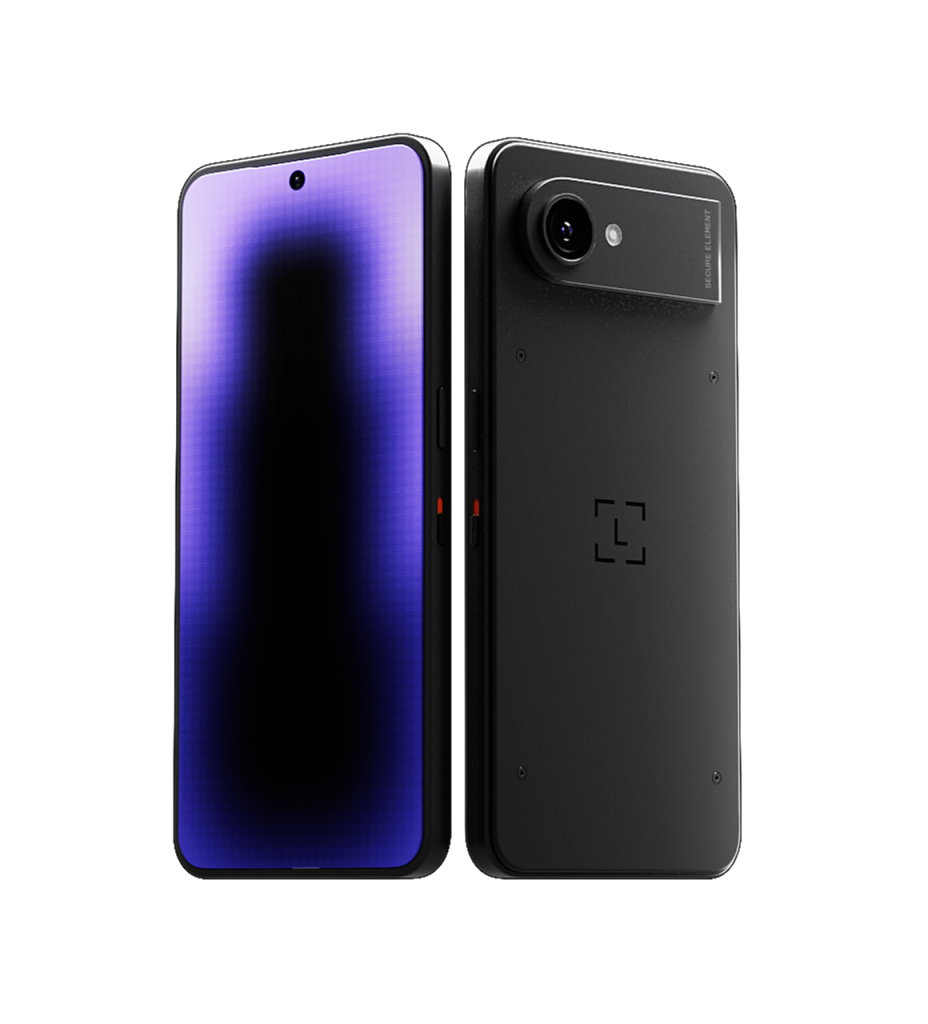
Ledger Atom™ is a new security-focused mobile device from Ledger. It runs everyday apps on one side. It keeps a separate, locked-down Ledger OS™ on the other. When you approve a transaction, log in or sign off on an AI agent’s request, Ledger OS™ takes over the whole screen.
Ledger announced Ledger Atom™ at its Op3n event in Paris on October 15, 2026. The Founder’s Edition costs $849, and you reserve one with a fully refundable $100 deposit. After launch, the price rises to $899. Ledger expects to ship in summer 2027.
This is a pre-release review. We have not held the device, and Ledger has not shipped any units. Everything below comes from Ledger’s announced specifications and launch material. We label each claim as Ledger’s, and we do not present any claim as tested.
One question drives this review. Does a device that combines everyday apps with a secure signing environment beat a regular phone plus a separate Ledger signer? We answer it below. Along the way, we keep pointing out what Ledger’s existing signers already do, so you can see what Ledger Atom™ actually adds.
Affiliate disclosure
MarketsXplora earns a commission if you reserve Ledger Atom™ through the links in this article. It costs you nothing extra, and it does not change our assessment.
In this review
Ledger Atom™ Review: Our Verdict So Far
Direct answer
Ledger Atom™ is worth a close look if you want one device for everyday apps, crypto, privacy controls and AI-agent approvals. It is not worth $849 if you only need to store and sign crypto safely. A $179 Ledger Nano™ Gen5 already does that today.
Preliminary verdict |
|
|---|---|
Best for |
Crypto holders who want a dedicated security environment for transactions, privacy controls and AI-agent workflows on one device |
Founder’s Edition price |
$849 / €849 / £789. After launch: $899. Reservation deposit: $100 / €100 / £90, fully refundable |
Expected availability |
Summer 2027, sold on Ledger.com |
Main strengths Ledger claims |
Secure Screen, isolated Ledger OS™, physical Privacy Switch, human approval of every AI-agent proposal |
Main concerns |
High price, no cellular voice calls or SMS, app availability still to be confirmed, regional network and certification limits, security claims not yet independently tested |
Testing status |
Pre-release. We have not tested the device. |
MarketsXplora rating |
8.1 (Very Good). A pre-release score based on Ledger’s announced features and published terms, not on hands-on testing. See the breakdown below. |
PRE-RELEASE RATING
Ledger Atom™ Founder’s Edition
Security and privacy device for everyday apps, crypto and AI agents
★★★★★8.1Very Good
Safety 8.4Platform 9.0Cost 6.5
Secure Screen
Physical Privacy Switch
Agents propose, you approve
Physical Privacy Switch
Agents propose, you approve
Founder’s Edition $849 · $100 refundable deposit · ships summer 2027
Rating breakdown
We score Ledger Atom™ from Ledger’s announced features and published terms. We have not tested the device. Each score reflects how strong the announced design is, how much it adds over Ledger’s existing signers, and what the price asks of you.
Category |
Weight |
Score |
Why |
|---|---|---|---|
Safety |
30% |
8.4 |
Secure Element listed as EAL6+, Secure Screen with isolated Ledger OS™, separate PIN, tamper detection and a physical Privacy Switch. Held below 9 because the isolation is untested and everyday apps widen the attack surface. |
Trust |
25% |
8.0 |
Ledger’s long record with hardware signers, an official launch, a fully refundable deposit and clear cancellation terms. Held back because the device has not shipped and has no independent audit yet. |
Platform |
25% |
9.0 |
No other Ledger device combines everyday apps, the Ledger Wallet™ app as interface and signer, Ledger Agent Intent and cameras with a hardware kill switch on a full-size screen. Held below 10 because app availability is unconfirmed and there are no calls or SMS. |
Cost |
20% |
6.5 |
$849 is $450 to $670 above Ledger’s signers. The $50 BTC voucher and premium accessory soften it, but the price is the main barrier. |
Overall |
100% |
8.1 (Very Good) |
Weighted average of the four scores above. |
We will re-score the device after hands-on testing. Announced features can earn a good score. Only testing can earn an excellent one.
Ledger Atom™ Specifications
These are Ledger’s announced specifications. We have not measured any of them.
Specification |
Announced details |
|---|---|
Product |
Ledger Atom™ Founder’s Edition |
Price |
$849 / €849 / £789 (Founder’s Edition). $899 after launch |
Reservation deposit |
$100 / €100 / £90, fully refundable |
Expected shipping |
Summer 2027 |
Display |
6.77-inch AMOLED Secure Screen, 1080 × 2392, 60 Hz, 1,300 nits peak, Gorilla® Glass 3 |
Software |
Hardened AOSP for everyday apps, plus an isolated Ledger OS™ that runs in the Secure Element |
Security chip |
Secure Element running Ledger OS™, listed as Common Criteria EAL6+ |
Cryptography |
“Quantum ready by design”. Ledger says it is compatible with the NIST post-quantum standards |
Rear camera |
50 MP with optical image stabilization, f/2 max, HDR, 4K video at 60 fps |
Front camera |
32 MP |
Battery |
4,000 mAh. Ledger says it lasts more than a day of use |
Authentication |
Fingerprint sensor in the power button, plus a separate Ledger OS™ PIN |
Connectivity |
4G/5G data only (eSIM), Wi-Fi 6, Bluetooth®, NFC, USB-C |
Calls and texts |
No cellular voice calls, no SMS, no calls to emergency services |
Privacy hardware |
Physical Privacy Switch for the cameras and microphone |
Durability |
IP54 |
Size and weight |
78 × 164 × 9 mm, 250 g |
Repairability |
Spare parts for 7 years after the last device is sold |
In the box |
Ledger Atom™, a privacy screen, a USB-C cable, a Ledger Recovery Key and Recovery Sheets |
Two small notes on the numbers. First, 6.77 inches is the exact screen size, and Ledger’s spec table rounds it to 6.8 inches. Second, Ledger has not published the processor, RAM or storage, so we do not list them.
What Is Ledger Atom™ and How Does It Work?
Ledger Atom™ is a data-only mobile device with two sides. Standard Mode runs your everyday apps like WhatsApp, X, and Instagram. Secure Mode handles anything sensitive. Ledger describes it as a device that is “not designed to replace your phone, but to secure you where your phone can’t.”
Two modes on one device
Standard Mode runs on hardened AOSP, an open-source mobile operating system base. Secure Mode runs Ledger OS™ inside a Secure Element chip. The two are meant to stay separate.
Here is how the handover works, according to Ledger. You start a sensitive action, such as a payment or a transaction approval. Ledger OS™ takes over the whole screen. Standard Mode loses access to the display and the touch panel. The cameras and microphone switch off. You then confirm with your Ledger OS™ PIN.
There is one limit to keep in mind. Ordinary apps do not inherit this protection. Ledger says its hardware security applies to select built-in apps and to partner apps that integrate with it. An unrelated app does not become safe just because it runs on this device.
How it differs from a traditional hardware wallet
Ledger’s current signers, the Nano Gen5, Flex and Stax, do one job. They hold your keys, show you a transaction and sign it. They run no everyday apps.
Ledger Atom™ keeps that signing job and adds a full-size screen, apps, cameras and cellular data. Ledger also says it is the first Ledger device that acts as both the interface and the signer for the Ledger Wallet™ app. You can send crypto, and you can buy, sell, swap and earn through third-party services. You sign every transaction on the Secure Screen.
Yield and rewards are not guaranteed. Ledger is a technology provider and does not provide financial advice. Crypto transaction services are provided by third-party providers.
The trade-off is simple. You gain convenience. You also give the device a bigger surface to defend, because everyday apps now live next to your signing environment.
Ledger also says the device will support GPG/OpenPGP message encryption “soon”. It gave no date, so we do not count it as a launch feature.
Who Ledger Atom™ is designed for
- Active crypto holders who manage assets often and connect to decentralised apps.
- Privacy-focused users who want a physical switch for the cameras and microphone.
- AI-agent users who want an agent to prepare transactions while a human approves each one.
- Advanced users and organisations that want hardware-backed approval for sensitive actions.
If you only want to store crypto safely, you probably do not need to pay $849 for Ledger Atom™. A dedicated signer costs far less. Our hardware wallet vs software wallet guide explains why a dedicated device matters.
Ledger Atom™ Security Review
Ledger announces a strong design. Nobody has tested it independently yet, because no units have shipped. We keep those two facts apart throughout this section.
How the Secure Element protects sensitive operations
The Secure Element is the most important part of the design. It is a tamper-resistant chip that stores your keys and runs Ledger OS™. Ledger compares it to the chips in biometric passports and credit cards.
Ledger lists the chip as Common Criteria EAL6+. Common Criteria rates security assurance from EAL1 to EAL7. According to the standard’s own text, EAL6 lets developers gain high assurance through security engineering techniques. Compared with EAL5, it adds a formal model of select security policies, a semi-formal design and a more advanced vulnerability analysis.
That rating has a clear boundary. Common Criteria evaluates a specific product configuration, and for a chip that means the chip and its evaluated software. It does not rate the screen path, the AOSP side, the apps or the finished device as a whole.
There is also a point that is easy to miss. Ledger lists the same EAL6+ rating for the Nano Gen5, Flex and Stax. So the chip rating does not set Ledger Atom™ apart. The screen control and the mode switching do. Ledger has also not named the exact chip model for Ledger Atom™ in the launch material we reviewed, so readers cannot yet check its evaluation scope.
How Secure Mode and the Secure Bar work
Secure Mode switches on automatically when you do something sensitive. Ledger gives a payment or a transaction approval in a compatible app as examples. Ledger OS™ takes over the whole display, and Ledger locks Standard Mode out of both display and touch.
The Secure Bar is a strip at the top of the screen. It shows SECURE or STANDARD. Ledger says only Ledger OS™ controls it and only the Secure Element can write pixels there, so it cannot be spoofed.
Here is why that matters. On a normal phone, a malicious app can draw a fake approval screen that looks real. Ledger’s design tries to stop that trick. The rule for you would be simple: no SECURE bar, no approval.
Ledger has not shipped units, so no independent researcher has tested whether the bar and the display isolation behave as described. That test matters more than any other claim on this page.
What “what you see is what you sign” means
This phrase means the screen shows the real details of what you approve. For a token swap, that would be the token, the amount and the contract address. Without it, you may approve a block of unreadable code and trust the app that asked.
Showing the details does not make a transaction safe. You still have to read them. If you approve a deceptive transaction, the Secure Screen will faithfully show you what you approved. Ledger says features like Clear Signing and Transaction Check help mitigate scams and detect threats. They help, but they do not replace your attention.
The separate Ledger OS™ PIN and fingerprint
Ledger Atom™ uses two layers. A pattern or fingerprint unlocks the Standard side. A separate Ledger OS™ PIN confirms sensitive actions. So someone who learns your unlock pattern can open your apps, but they still cannot approve a transaction without the PIN.
Ledger includes a Recovery Key and Recovery Sheets in the box. It has not published PIN lockout rules or reset behaviour yet.
Anti-tampering design
Ledger says the device includes its most advanced anti-tampering and tamper-evident solutions to date. It lists packaging designed to prevent resealing, detection if someone opens the enclosure or removes the display, and extra protection for the Secure Element.
Those measures only help if the device in your hands is the one Ledger built. That is why you should reserve only on Ledger’s own site. We cover that in the safety section below.
Is Ledger Atom™ quantum ready?
Ledger says it is “quantum ready by design”. It also says the device is compatible with the NIST post-quantum standards, with post-quantum cryptography accelerated in the secure hardware. NIST finalised those standards in August 2024: FIPS 203 (ML-KEM), FIPS 204 (ML-DSA) and FIPS 205 (SLH-DSA).
Ledger has not said which of those algorithms the device uses, what they protect, or how the device will update them. So this is a readiness claim. It is not proof that every part of the device is safe against future quantum attacks.
One more point helps put it in context. Most major blockchains, including Bitcoin and Ethereum, still rely on elliptic-curve signatures. A device that supports post-quantum algorithms cannot change which signature scheme a blockchain accepts.
What are the security limits of Ledger Atom™?
- Compromised everyday apps. A malicious app can still harm you outside Secure Mode.
- Phishing and social engineering. A convincing scam can still trick you into approving something.
- Deceptive transactions. The Secure Screen shows the details, but you must understand them.
- Third-party AI agents and services. Ledger does not provide, operate or endorse them.
- Updates and supply chain. Security depends on future software updates and on how the device reaches you.
Here is the clear line between claims and evidence:
Ledger announces |
What independent testing still has to show |
|---|---|
The Secure Bar cannot be spoofed |
That Standard Mode cannot draw or alter it |
Standard Mode is locked out of display and touch |
That the lock-out holds under attack |
EAL6+ Secure Element |
The chip model and the scope of its evaluation |
Quantum ready by design |
Which algorithms run, where, and how they update |
Tamper detection and tamper-evident packaging |
Teardown and attack testing by independent labs |
Ledger Atom™ Privacy Switch: How Does It Work?
The Privacy Switch is a physical switch that cuts power to the cameras and microphone at the circuit level. Ledger says it is not a software setting that an app can bypass.

Can you physically disable the camera and microphone?
Ledger says yes. A software permission asks the operating system to behave. A hardware cut removes the choice, because no power reaches the parts. That gives a physical switch stronger assurance than a permission toggle, if Ledger built it as described.
Circuit diagrams, hardware documentation or a teardown would show how Ledger built it. Ledger has not published any yet.
Does the Privacy Switch disable every sensor?
No. The switch covers the cameras and the microphone. Secure Mode works separately. When Secure Mode starts, Ledger says the cameras, the microphone and other sensors, such as the accelerometers, turn off automatically, whatever position the switch is in.
What privacy protection stays outside the switch?
The switch stops capture by the cameras and microphone. It does not stop an app from sharing what you type, what you install or what you choose to send. These still depend on you and on the apps you run:
- App permissions for contacts, storage and network access
- Telemetry and cloud processing by apps and services
- Network traffic over Wi-Fi and the cellular data connection
- Third-party AI services that receive your prompts and data

Reserve Ledger Atom™ Founder’s Edition
$100 fully refundable deposit. Cancel any time before it ships.
Ledger Atom™ AI Features Explained
Ledger Agent Intent lets an AI agent propose a crypto transaction. You approve or reject it on your Ledger signer’s Secure Screen. Ledger says the agent cannot move funds by itself. Ledger’s own summary is: agents propose, humans approve, Ledger signers enforce.
What is Ledger Agent Intent?
Here is the workflow Ledger describes:
- You connect your AI agent to your Ledger signer.
- The agent reads your accounts and prepares proposals.
- Each proposal waits in a queue on the signer.
- You review the details on the Secure Screen.
- You approve or reject. Your private keys never go to the agent.
Ledger Agent Intent is in beta. It works today on the Ledger Nano™ Gen5, Ledger Flex™ and Ledger Stax™. Ledger says it works best on Ledger Atom™, with the OpenClaw app preloaded. Ledger also launched Ledger Agent Stack, an open-source toolkit for developers, in July 2026.
Ledger gives a clear warning: until it leaves beta, use it with non-critical workflows and low-value accounts only. We agree with that advice.
What can AI agents do with Ledger Atom™?
Ledger’s examples are monitoring markets, suggesting portfolio changes, shopping online, preparing payments and proposing transactions. Ledger presents these as intended uses. Supported actions and behaviour can change while the product is in beta.
Can an AI agent move crypto without permission?
Ledger says no. An agent prepares a proposal, and a transaction only executes after you sign it on the signer. Preparing and executing are separate steps.
The weak point is you. If you approve a malicious proposal, the signer will sign it. Three habits reduce that risk. Read every detail on the Secure Screen. Keep agent-linked accounts small. Reject any address you do not recognise.
Do you need Ledger Atom™ to use Ledger’s AI features?
No. Ledger Agent Intent runs on compatible signers today. A $179 Ledger Nano™ Gen5 gives you the same approval flow. So the AI features alone do not justify the price of Ledger Atom™.
Crypto transaction services referenced or facilitated through Ledger Agent Intent are provided by third-party service providers. Any AI agent used in connection with Ledger Agent Intent is also a third-party tool and is not provided, operated, or endorsed by Ledger. Ledger provides no financial advice or recommendations on the use of these third-party services or any AI agent. Ledger Agent Intent is free to use with any compatible Ledger signer. Ledger device required. Standard network and third-party provider fees may apply to transactions proposed through Ledger Agent Intent.
Ledger Atom™ as an Everyday Device
Treat Ledger Atom™ as a second device, not a replacement for your phone. Ledger says so itself, and the missing calls and texts make it practical advice.
Can you install everyday apps?
Ledger says the device runs your everyday apps. Final availability depends on certifications and licences, and Ledger will confirm it before the device ships. The security features apply to select built-in apps and to partner apps that integrate with Ledger.
App availability depends on certifications and licences and will be confirmed before your device ships. Third-party apps are provided by their developers, not by Ledger.
Is Ledger Atom™ a phone?
No. It is a data-only device. It connects to 4G/5G networks for data only, with an eSIM. It does not support cellular voice calls, SMS or calls to emergency services such as 112 or 911.
Internet calling apps may work over data or Wi-Fi. Do not rely on them to reach emergency services. Always keep another way to contact them.
eSIM, 5G and where it works
The device comes in two regional versions, North America and rest of world, and each has its own cellular bands. It needs an eSIM and does not support 2G or 3G. Ledger says compatibility with a given operator is not guaranteed. Some operators do not offer plans or eSIM profiles for data-only devices. Ledger also says the planned bands will not fully cover all networks in Japan.
Reservations are open worldwide, but Ledger plans launch certification only in these countries:
Region |
Countries planned at launch |
|---|---|
North America |
United States, Canada, Mexico |
Europe |
All 27 EU countries, United Kingdom, Switzerland, Norway, Turkey |
Middle East and Africa |
United Arab Emirates, Israel, South Africa |
Asia-Pacific |
Australia, New Zealand, Hong Kong, Singapore, Taiwan, South Korea, Thailand, Vietnam, Malaysia, Philippines |
Latin America |
Brazil |
Ledger plans no certification for Japan, India and Indonesia. It says other countries may open later.
Nigeria is not on the list. Readers in Nigeria can still reserve, but Ledger makes each customer responsible for lawful import into their own country. Before you reserve, check two things with your mobile operator: eSIM support and compatibility with the rest-of-world bands.
Battery, display, cameras and portability
The battery is 4,000 mAh, and Ledger says it lasts more than a day. Led

ger rates its signers by runtime instead: up to 10 hours of normal use or up to 150 transactions. So a mAh comparison between a signer and Ledger Atom™ means little. A signer drives a small E Ink screen. Ledger Atom™ drives a 6.77-inch AMOLED screen and a 4G/5G modem.
The screen peaks at 1,300 nits and uses Gorilla® Glass 3. The rear camera is 50 MP with optical image stabilization, and the front camera is 32 MP. The device weighs 250 g and measures 9 mm thick. IP54 means protection against limited dust and splashing water. It does not mean waterproof.
Ledger also promises a repairable design with spare parts for seven years after the last device is sold. That is a useful commitment, and it is easy to check later.
Ledger Atom™ Price: Is the $849 Founder’s Edition Worth It?
The Founder’s Edition costs $849 / €849 / £789. After launch, Ledger Atom™ costs $899. So reserving now saves $50 and adds the extras below.
What comes with the Founder’s Edition?
- Included: a $50 BTC voucher at launch
- Included: an exclusive premium accessory
- Included: a place among the first units shipped
- Included with every unit: a Ledger Recovery Key and a privacy screen
- Optional: 3 months of Ledger Recover™ free, provided by Coincover
- Not announced yet: partner offers. Ledger says it will announce them soon.
Ledger Recover™ is provided by Coincover and requires a paid subscription. Auto-renews as a paid subscription following the free period unless cancelled. T&Cs apply.
Not sure what Ledger Recover™ does? Our Ledger Recover explainer covers it.
How the reservation and payment process works
You pay in two steps. First, you pay a fully refundable deposit of $100 / €100 / £90 on Ledger’s product page. Second, you pay the balance when you complete your purchase. On a $849 Founder’s Edition, a $100 deposit leaves $749 to pay later, before any currency change.
A reservation is not the purchase of a finished product. Ledger says the device is still in development, and specifications, features, design and price may change before launch.
You can cancel for a full refund at any time before the device ships. Ledger refunds the deposit in the currency you paid, and your statutory consumer rights stay intact.
Currency matters too. Depending on your location, Ledger either sets the price in your currency or converts it from the euro price. In the second case, the balance you see at reservation is an estimate. Ledger shows the exact balance before you confirm payment, and your bank may add its own fees.
Delivery of Ledger Atom™ is subject to obtaining applicable product certifications, and in particular FCC certification in the US.
What are the risks of reserving?
- A long wait. Ledger expects to ship in summer 2027.
- Specifications can change. Ledger says specifications, features, design and price may change before launch.
- Certifications come first. Delivery depends on approvals such as FCC in the US and CE marking in the EU.
- Network limits. Operator support is not guaranteed, and some operators do not sell data-only plans.
- App availability. Ledger will confirm it only before shipping.
Who should consider paying $849?
Ledger Atom™ suits people who value one integrated device enough to pay for it. That means everyday apps, a Secure Screen, hardware privacy controls and AI-agent approvals together. It is also a good fit if you already plan to carry a second device.
It suits you less if you mainly want secure storage, a replacement phone or the cheapest way to approve AI-agent transactions. For those needs, a dedicated signer is the better buy.
Ledger Atom™ vs Other Ledger Devices
Ledger Atom™ does not replace the Nano Gen5, Flex or Stax. All three already offer secure signing and Ledger Agent Intent. Ledger Atom™ adds a full-size screen, everyday apps, cameras, cellular data and a Privacy Switch.
Feature |
Ledger Atom™ |
Ledger Flex™ |
Ledger Stax™ |
Ledger Nano™ Gen5 |
|---|---|---|---|---|
Concept |
Security-focused mobile device |
Dedicated signer |
Dedicated signer |
Dedicated signer |
Price |
$849 Founder’s Edition, $899 after launch |
$249 |
$399 |
$179 |
Display |
6.77-inch AMOLED |
2.8-inch E Ink touchscreen |
3.7-inch curved E Ink touchscreen |
2.8-inch E Ink touchscreen |
Battery |
4,000 mAh, more than a day of use |
Up to 10 hours of normal use or 150 transactions |
Up to 10 hours of normal use or 150 transactions |
Up to 10 hours of normal use or 150 transactions |
Connectivity |
4G/5G data (eSIM), Wi-Fi 6, Bluetooth®, NFC, USB-C |
USB-C, Bluetooth®, NFC |
USB-C, Bluetooth®, NFC, Qi wireless charging |
USB-C, Bluetooth®, NFC |
Everyday apps |
Yes, announced |
No |
No |
No |
Cameras and Privacy Switch |
50 MP + 32 MP cameras, physical switch |
No camera or microphone |
No camera or microphone |
No camera or microphone |
Secure Element |
EAL6+ listed |
EAL6+ listed |
EAL6+ listed |
EAL6+ listed |
Ledger Agent Intent (beta) |
Yes, with OpenClaw preloaded |
Yes |
Yes |
Yes |
Availability |
Summer 2027 |
Available now |
Available now |
Available now |
Prices checked on October 16, 2026, from Ledger Academy. Battery and Secure Element details come from Ledger’s comparison page.
Check the Founder’s Edition price
See the current deposit and balance terms on Ledger.com.
Ledger Atom™ vs Ledger Flex
The Ledger Flex is the closest dedicated signer in spirit. It has a touchscreen and shows transaction details clearly, and it costs $600 less. Choose the Flex if you want a clear signing screen and nothing else. Choose Ledger Atom™ if you also want apps, cameras and cellular data in the same device.
Ledger Atom™ vs Ledger Stax
The Ledger Stax costs $399, which is $450 less. It has a larger curved screen and wireless charging. It stays a signer. Ledger Atom™ is the better fit only if you want a mobile device as well.
Ledger Atom™ vs Ledger Nano Gen5
The Ledger Nano Gen5 costs $179, which is $670 less than the Founder’s Edition. It is the cheapest way into Ledger’s signing ecosystem, and it supports Ledger Agent Intent. That $670 gap is the real price of Ledger Atom™’s extra features.
Ledger Atom™ vs a Regular Phone Plus a Ledger Signer
Because Ledger Atom™ makes no calls or texts, you will probably carry it next to your phone. So the real comparison is your phone plus Ledger Atom™, against your phone plus a signer.
Phone + Ledger Atom™ |
Phone + Ledger signer |
|
|---|---|---|
Upfront cost |
$849 for the Founder’s Edition |
$179 to $399, depending on the model |
Everyday apps on the secure device |
Yes, announced |
No. Apps stay on your phone |
Secure approvals |
Secure Screen on the same device |
Secure Screen on the signer |
Privacy hardware |
Physical switch for cameras and microphone |
Not needed, because a signer has no camera or microphone |
Attack surface |
Larger. Apps run next to Ledger OS™ |
Smaller. Nothing else runs on the signer |
Calls and texts |
Not supported |
Handled by your phone |
Which setup is safer?
For signing alone, the dedicated signer has the smaller attack surface by design, because nothing else runs on it. Ledger Atom™ runs everyday apps next to Ledger OS™. Ledger’s isolation is meant to contain that risk, but that isolation is exactly what nobody has tested yet.
Ledger Atom™’s real advantage is convenience, not safety. You approve on the same device that runs your apps, so you skip carrying and pairing a separate signer. A dedicated signer already protects you from a compromised phone, because your keys never touch the phone.
Which setup offers better value?
The signer wins on price. A reader who already owns a phone pays $179 for a Nano Gen5 and gets Ledger Agent Intent. The same reader pays $849 for Ledger Atom™. The extra $670 buys apps on the secure device, cameras, cellular data and the Privacy Switch. It is worth it only if you want those features in one place.
Ledger Atom™ Hands-On Testing: What We Will Verify
Ledger has not shipped units, so we have not tested Ledger Atom™. This is the plan we will follow once a unit reaches us. We will replace this section with real methods, screenshots and results, and we will re-score the device.
Area |
What we will test |
Evidence we will publish |
|---|---|---|
Setup and recovery |
Initial setup, PIN creation and the recovery workflow |
Original screenshots and timed notes |
Secure Mode |
How it starts and ends, and what the Secure Bar shows |
Screen recordings and exact steps |
Transaction signing |
Address, amount, network and data checks on the Secure Screen |
Test transactions and screenshots |
Ledger Agent Intent |
Proposal review, rejection, approval and permission removal |
A reproducible workflow |
Privacy Switch |
Whether the switch disables the cameras and microphone |
Documented tests and their limits |
Everyday apps |
Installing, updating and running common apps |
A tested app list with results |
Connectivity |
Wi-Fi, eSIM and cellular performance |
Operator, region and test conditions |
Battery |
Screen-on time, standby drain and charging time |
Measured results and test conditions |
Performance |
App speed, heat and stability |
Repeatable observations |
Repairability and support |
Parts, update commitments and recovery help |
Official documents and support replies |
We will not claim to audit the Secure Element. Claims about chip isolation, firmware integrity and post-quantum implementation need specialist labs. If independent audits appear, we will report them.
Ledger Atom™ Pros and Cons
This list is based on announced features. We will update it after hands-on testing.
Pros
- Everyday apps and a crypto-signing workflow on one device
- A dedicated security environment for sensitive actions
- A physical switch for the cameras and microphone
- Human approval for every AI-agent proposal
- Post-quantum readiness announced by Ledger
- Seven years of promised spare parts
Cons
- $849 is a large upfront cost, and $899 after launch
- Shipping is not expected until summer 2027
- No cellular voice calls, SMS or emergency calls
- App availability and regional network support are still to be confirmed
- Nigeria, India and Indonesia are not on the launch certification list
- Security and performance claims are not independently tested
Is Ledger Atom™ Safe and Legitimate?
Is Ledger Atom™ a legitimate Ledger product?
Yes. Ledger announced it at its Op3n event in Paris on October 15, 2026. Ledger’s own product page lists it, and the page says it is sold on Ledger.com only.
Reserve only on Ledger’s official site. Ledger devices bought directly from Ledger remain our recommended route, and we do not recommend buying through authorized resellers at the moment. Our news report on the Ledger supply-chain attack has the full story.
Is Ledger Atom™ safe for storing and managing crypto?
The announced design is strong on paper. It has a Secure Element, a protected screen, a separate PIN and a physical Privacy Switch. But nothing ships until 2027, and no one has tested the design independently. Security also depends on software updates, your habits and how you protect your recovery backup.
If you need to protect crypto today, shipping a signer is the safer choice. Our Ledger Flex review and hardware wallet security guide cover the options.
What should you check before you pay?
Pre-reservation checklist
- The official product page at shop.ledger.com, and its latest specifications
- The deposit, balance and refund terms for your currency
- Whether your country is on the launch certification list
- Whether your operator supports eSIM and data-only plans, and the bands for your regional version
- Which apps and services Ledger confirms before shipping
- Any security documents or independent evaluations Ledger publishes
- The risks of third-party AI agents and transaction services. Our transaction-signing safety guide explains how to review what you sign
Frequently Asked Questions
What is Ledger Atom™?
Ledger Atom™ is a security-focused mobile device announced by Ledger. It runs everyday apps in Standard Mode and keeps a separate Ledger OS™ for sensitive actions such as transactions, logins and AI agent approvals in Secure Mode.
How much does Ledger Atom™ cost?
The Founder’s Edition costs $849 / €849 / £789. After launch, the price will be $899. You reserve a unit with a fully refundable deposit of $100 / €100 / £90.
When will Ledger Atom™ be released?
Ledger expects to ship it in summer 2027. Delivery depends on obtaining the applicable product certifications, in particular FCC certification in the US and CE marking in the EU.
Is Ledger Atom™ a phone?
No. It is a data-only device. It connects to 4G/5G networks for data only, with an eSIM. It does not support cellular voice calls, SMS or calls to emergency services such as 112 or 911.
Can Ledger Atom™ make phone calls?
Not over the mobile network. Voice or video calls may work through internet calling apps over data or Wi-Fi, but you must not rely on them to reach emergency services.
Does Ledger Atom™ support AI agents?
Yes, through Ledger Agent Intent. Your AI agent can read your accounts and prepare proposals. Every transaction still needs your approval on the Secure Screen. Ledger Agent Intent is in beta.
Do I need Ledger Atom™ to use Ledger Agent Intent?
No. Ledger Agent Intent is available today, in beta, on compatible Ledger signers such as Ledger Nano™ Gen5, Ledger Flex™ and Ledger Stax™. Ledger says it works best on Ledger Atom™.
Is Ledger Atom™ quantum ready?
Ledger says it is quantum ready by design and compatible with the NIST post-quantum standards. Ledger has not published which algorithms it uses or exactly what they protect, so treat it as a readiness claim and not a guarantee.
Can I install normal apps on Ledger Atom™?
Ledger says it runs your everyday apps. App availability depends on certifications and licences and will be confirmed before the device ships. Third-party apps come from their developers, not from Ledger.
Can I reserve Ledger Atom™ from Nigeria?
Yes. Ledger opens reservations from anywhere. Nigeria is not on Ledger’s list of countries for launch certification, so you are responsible for making sure you can lawfully import the device. Check eSIM and network support with your operator before you reserve.
Is Ledger Atom™ worth $849?
It suits people who want everyday apps, crypto, privacy hardware and AI-agent approvals on one device. If you only need to store and sign crypto, a dedicated Ledger signer such as the $179 Ledger Nano™ Gen5 does that today.
Final Verdict: Should You Buy Ledger Atom™?
Ledger Atom™ is a promising idea with a high price and a long wait. Our pre-release score is 8.1 (Very Good). It tries to give you everyday apps, hardware privacy controls and AI-agent approvals in one device, with a separate Ledger OS™ guarding sensitive actions.
The strongest reason to consider it is the Secure Screen design. If Secure Mode works as Ledger describes, you approve transactions on a screen that no app can fake. No dedicated signer offers that on a full-size mobile display.
The strongest reason to wait is that nobody has tested it. Ledger has not shipped units, the security claims have no independent evidence yet, and the Founder’s Edition costs $670 more than a Nano Gen5 that already supports Ledger Agent Intent.
Decide by need, not by marketing. If you want one integrated device and you accept the wait, a $100 refundable deposit lets you hold a Founder’s Edition spot while you watch for test results. If you only want secure storage, buy a shipping signer. We will update this verdict as soon as we can test a unit.
Ledger Atom™ Founder’s Edition
$849 · $100 fully refundable deposit · cancel any time before it ships
Includes a $50 BTC voucher at launch and an exclusive premium accessory. Ships summer 2027.
Reserve Your Founder’s Edition →
Affiliate link. MarketsXplora may earn a commission at no extra cost to you.
Ledger disclosures
Delivery: Delivery of Ledger Atom™ is subject to obtaining applicable product certifications, and in particular FCC certification in the US.
Apps: App availability depends on certifications and licences and will be confirmed before your device ships. Third-party apps are provided by their developers, not by Ledger.
Ledger Recover™: Ledger Recover™ is provided by Coincover and requires a paid subscription. Auto-renews as a paid subscription following the free period unless cancelled. T&Cs apply.
Wallet services: Yield and rewards are not guaranteed. Ledger is a technology provider and does not provide financial advice. Crypto transaction services are provided by third-party providers.
Ledger Agent Intent: Crypto transaction services referenced or facilitated through Ledger Agent Intent are provided by third-party service providers. Any AI agent used in connection with Ledger Agent Intent is also a third-party tool and is not provided, operated, or endorsed by Ledger. Ledger provides no financial advice or recommendations on the use of these third-party services or any AI agent. Ledger Agent Intent is free to use with any compatible Ledger signer. Ledger device required. Standard network and third-party provider fees may apply to transactions proposed through Ledger Agent Intent.
About the author
Samson Ononeme is the founder of MarketsXplora, an independent financial education and research platform covering cryptocurrency, forex, brokers, exchanges, trading platforms, and blockchain technology. He has more than 12 years of experience in financial content, with bylines at EarnForex, Kryptomoney, Cryptorunner, and AtoZ Markets. He turns complex financial products into clear, practical information that readers can use when they compare their options. Connect on LinkedIn and X.