


Last reviewed: May 2026 | Tested by: Samson Ononeme, MarketsXplora | 13 Minutes Read
Ledger Nano Gen5 Review: Quick verdict
The Ledger Nano Gen5 is the most significant upgrade to the Nano line in the device’s decade-long history. At $179, it delivers the same EAL6+ Secure Element chip found in the $249 Ledger Flex, adds a Certified Secure Touchscreen, Clear Signing, Bluetooth, NFC, and a free Ledger Recovery Key card — all for $70 less than Ledger’s own mid-range flagship. For first-time hardware wallet buyers and upgraders from older Nano models, it is the clearest recommendation in its price bracket. For advanced users who require open-source firmware, it isn’t.
Overall rating: 8.6 / 10
Category |
Rating |
|---|---|
Security architecture |
9 / 10 |
Design & build quality |
8 / 10 |
User experience |
8.5 / 10 |
Value for money |
9.5 / 10 |
Ecosystem & compatibility |
8.5 / 10 |
Pros:
- EAL6+ Certified Secure Element — same chip tier as the $249 Ledger Flex
- Certified Secure Screen driven directly by the Secure Element chip
- Clear Signing + Transaction Check built in — eliminates blind signing risks
- Full Bluetooth 5.2 and NFC — wireless use on iOS and Android
- Free Ledger Recovery Key NFC card included in box
- 20% loyalty discount for existing Nano S owners
- Lightest and most compact touchscreen hardware wallet available today
- Best value-per-security-dollar of any Ledger device
Cons:
- Plastic housing — less premium feel than the Flex’s aluminum frame
- Monochromatic E-Ink display (black and white only) vs Flex’s 16-shade grayscale
- Closed-source firmware — cannot be independently audited
- Ledger Recover trust controversy applies equally to this device
- App storage: 1.5MB (~10–15 apps simultaneously)
- No wireless charging
- Customer support response times up to 72 hours
What Is the Ledger Nano Gen5?
On October 23, 2025, Ledger took the stage at its annual “Ledger Op3n” event in Paris and announced something the community had been waiting years for: a touchscreen hardware wallet priced under $200.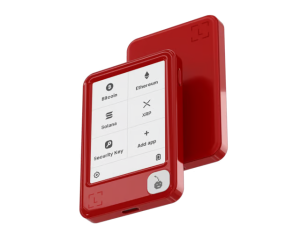
The Ledger Nano Gen5 is the fifth and most advanced generation of the Nano product line — a series that began in 2016 with the original Nano S, which went on to become the best-selling hardware wallet of all time. The Gen5 doesn’t just iterate on that legacy. It functionally obsoletes every Nano model that preceded it.
The premise is straightforward: take the security architecture from Ledger’s premium Flex and Stax devices — specifically the EAL6+ Secure Element, the Certified Secure Screen, and Clear Signing — and make them accessible to the mainstream at $179.
Ledger has also used the Gen5 launch to formalize a positioning shift. The company now calls its devices “signers” rather than “hardware wallets.” This reflects a broader vision: the Gen5 is not just a place to store crypto, but a device for authorizing any digital action — from cryptocurrency transactions to Web3 logins to password-less authentication across apps. That vision is still maturing in practice, but the hardware infrastructure to support it is already in place.
Key specs at a glance
Specification |
Detail |
|---|---|
Price |
$179 USD |
Launch date |
October 23, 2025 |
Display |
2.76-inch E-Ink Secure Touchscreen |
Resolution |
300×400 pixels, 181 ppi |
Display colors |
Monochromatic (black and white) |
Secure Element |
ST33K1M5, CC EAL6+ certified |
Operating system |
Ledger BOLOS (proprietary) |
Connectivity |
USB-C, Bluetooth 5.2, NFC |
Battery |
330mAh (LiFePO₄) |
Weight |
46 grams |
Dimensions |
79.40 × 53.35 × 8.64mm |
App storage |
1.5MB (~10–15 apps simultaneously) |
Supported assets |
5,000+ via Ledger Wallet; thousands more via third-party wallets |
Recovery |
Ledger Recovery Key (NFC card) — included in box |
Customization |
Susan Kare-designed collector badges — sold separately |
Loyalty discount |
20% off for existing Nano S owners |
Design and Build Quality
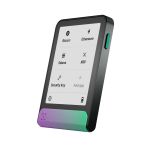
The Nano Gen5 is the lightest and most compact touchscreen hardware wallet on the market. At 46 grams and 79.40 × 53.35 × 8.64mm — roughly the footprint of a thick credit card — it disappears into a pocket in a way that the Ledger Flex (57.5g) and Trezor Safe 7 (45 g) cannot match.
The housing is plastic, which is the most honest trade-off Ledger made to reach the $179 price point. It does not carry the premium heft of the Flex’s aluminum frame or the Trezor Safe 7’s milled unibody aluminum. But it is sturdy, well-fitted, and designed to survive daily carry without flexing or rattling. For most users this is a non-issue — hardware wallets live in drawers and safes far more often than they live in pockets.
The front is dominated by the 2.76-inch E-Ink Secure Touchscreen. E-Ink display technology is the right choice for a battery-powered signing device: it consumes power almost exclusively when the display refreshes, not while showing content. This is why the Gen5 can sit in standby for weeks on a single charge. In direct sunlight, E-Ink is exceptionally readable — far better than a backlit LCD screen. The trade-off is that E-Ink has no backlight, making the device harder to use in low-light conditions without an external light source.
The Gen5’s display is monochromatic — pure black and white, unlike the 16-shade grayscale of the Flex. In practical use, this means slightly lower visual clarity for text-heavy transaction details, though the 300×400 pixel resolution still renders addresses and amounts clearly enough to verify.
A USB-C port on the bottom edge handles charging and wired computer connections. NFC is embedded in the device for the Ledger Recovery Key and Security Key features. Bluetooth 5.2 handles wireless connection to the Ledger Wallet mobile app.
The Susan Kare badges:
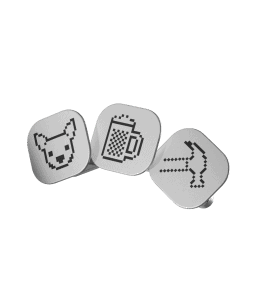
One of the more playful design elements of the Gen5 is a set of collector badges designed by Susan Kare — the graphic designer who created the original Macintosh icon set in 1984. These magnetic accessories attach to the front of the device, letting users personalize their Gen5 the way you might customize a phone case. They are sold separately and are entirely optional. Their practical purpose is nil; their cultural resonance for anyone who grew up with early Mac systems is considerable.
What’s in the box:
- Ledger Nano Gen5
- USB-C cable
- Recovery Sheet
- Ledger Recovery Key NFC card
- user guide
The inclusion of the Ledger Recovery Key NFC card in the box at this price point is notable — it was not always standard across Ledger’s lineup.
Security Architecture
The Nano Gen5’s security model rests on the same foundation as Ledger’s most expensive devices. This is the core of the Gen5’s value proposition, so it warrants a proper technical explanation.
The ST33K1M5 Secure Element (CC EAL6+)
At the center of the Gen5’s security is the ST33K1M5 — a Secure Element chip manufactured by STMicroelectronics and independently certified at Common Criteria EAL6+. This is the same chip used in the $249 Ledger Flex and the $399 Ledger Stax. It is not a downgraded version. The chip tier is identical.
Common Criteria EAL6+ is the second-highest security evaluation level in the international Common Criteria framework — one level below EAL7, which is reserved for classified government and military systems. EAL6+ is the certification level used in biometric passports, national identity cards, banking hardware security modules, and government smart cards. The evaluation is conducted by independent, government-accredited laboratories that physically and logically attack the chip to verify its resistance to known attack vectors.
What the Secure Element does on the Gen5:
Private key generation happens inside the chip, using hardware-level true random number generation. Your keys are born inside the Secure Element and never leave it — not to the Ledger Wallet app, not to your phone, not to your laptop.
Every signing operation — approving a transaction, confirming a login, authorizing a contract interaction — is executed entirely inside the chip. The signed output travels outward. The keys themselves do not.
The chip also directly controls the touchscreen display, which is the subject of the next section.
Ledger BOLOS: Application Isolation
The Gen5 runs Ledger BOLOS (Blockchain Open Ledger Operating System), Ledger’s proprietary firmware. BOLOS operates on strict application sandboxing — each blockchain app runs in complete isolation from every other app and from the OS itself. A compromised Ethereum app cannot access Bitcoin keys. An exploited third-party dApp integration cannot reach the operating system outside its own sandbox.
The firmware transparency limitation: BOLOS is proprietary and closed-source. The Secure Element driver is covered by STMicroelectronics’ NDA requirements and is not publicly auditable. This is the same limitation that applies to the Flex and Stax — and it is the primary reason Trezor users argue for open-source alternatives. The verification model relies on the CC EAL6+ third-party certification rather than open community code review. This is a legitimate trade-off, not a flaw, but it requires informed acceptance.
Three-Layer Boot Process
Every time the Gen5 powers on, a three-stage verification sequence runs:
- Boot ROM — Factory-written, immutable code that verifies the integrity of the bootloader before allowing the device to proceed.
- Bootloader — Verifies and installs firmware. Can trigger a device wipe if firmware integrity checks fail.
- Firmware (BOLOS) — The operating layer you interact with, verified by both preceding layers before execution begins.
Ledger’s “Genuine Check” feature lets users independently verify that their device is running authentic, unmodified Ledger firmware at any time through the Ledger Wallet app.
The Certified Secure Screen
This is the most important security feature the Gen5 adds over older Nano models, and it rarely gets the explanation it deserves.
Every Ledger device before the touchscreen generation — Nano S, Nano X, Nano S Plus — used a display driven by a general-purpose processor, not the Secure Element itself. This created an architectural gap: the chip responsible for signing and the display showing you what you were signing were separate components. In theory, malware or a compromised component could manipulate the display output, showing you one transaction while the device signed a different one.
The Gen5 closes this gap. The 2.76-inch E-Ink touchscreen is driven directly by the ST33K1M5 Secure Element chip. There is no intermediate display controller. The chip that stores your private keys is the same chip that controls everything you see on screen.
The practical implication is significant: no software running on your connected phone or computer can alter what appears on the Gen5’s display. The transaction you see, read, and approve on the device screen is the transaction that gets signed — cryptographically guaranteed.
This architecture has been independently certified by ANSSI, France’s national cybersecurity agency, as well as through the EAL6+ evaluation process itself. Ledger’s internal security team, the Donjon — one of the most capable white-hat hardware security teams in the consumer tech industry — has subjected the Secure Screen to adversarial hardware attacks. It holds.
For users coming from Nano X or Nano S Plus devices, this upgrade is the single most important security improvement in the Gen5. On those older devices, you were trusting that your computer wasn’t compromised when verifying transaction details. On the Gen5, that trust assumption is gone — the screen itself is secure.
Clear Signing and Transaction Check
The hardware protects your keys. The software protects your judgment. Both matter.
Clear Signing
Clear Signing is built on ERC-7730, an open-source standard that translates the opaque hexadecimal data of complex smart contract transactions into plain, human-readable language. On the Gen5’s touchscreen, every transaction you approve displays:
- The exact amount being transferred
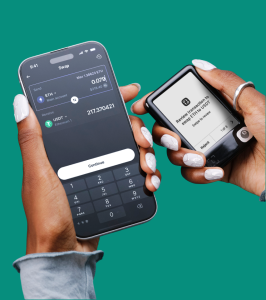
Ledger’s Clear Signing technology - The full destination address
- The specific permissions being granted
- Token approval amounts and spending limits — in clear terms, not raw contract data
This matters because the leading attack vector against hardware wallet users in 2026 is not a hardware exploit — it is blind signing. Users are tricked into approving contract interactions they cannot read, which transfer spending permissions to an attacker’s address. Clear Signing makes those interactions visible and understandable before you commit. It is free, built-in, and available across all Ledger Wallet integrations and WalletConnect connections.
Transaction Check
Transaction Check uses AI-assisted threat detection to analyze Ethereum-based transactions before you approve them. It scans interactions against a live database of known malicious patterns — scam dApps, rug-pull contracts, address-poisoning attempts, and AI-generated phishing transactions — and surfaces a warning on the Secure Screen if a threat signature is detected.
Because the warning appears on the Secure Screen, it cannot be suppressed or altered by malware on your connected device. You see the warning on the chip-verified display. You decide whether to proceed.
Current coverage: Transaction Check covers Ethereum and EVM-compatible chains (Arbitrum, Base, Optimism, Polygon, and others). Non-EVM chains — Bitcoin, Solana, XRP — have limited or no Transaction Check support at time of writing. Check Ledger’s documentation for current chain coverage.
Connectivity: Bluetooth, NFC, and USB-C
Bluetooth 5.2
The Gen5 connects wirelessly to the Ledger Wallet mobile app via Bluetooth 5.2. This enables a genuinely cable-free signing workflow: open the app on your iPhone or Android, pair the device, and manage your crypto without reaching for a cable.
Private keys never travel over Bluetooth. Only signed transaction outputs — encrypted at the application layer — are transmitted. Even if the Bluetooth channel were compromised, the data in transit would be encrypted and useless without the session keys held on the device. Bluetooth can be fully disabled for wired-only use if preferred.
Full iOS support is included — a meaningful practical upgrade from older Nano models that had limited iOS functionality.
NFC
NFC serves two specific functions on the Gen5. First, it is used with the included Ledger Recovery Key NFC card for seed phrase backup and recovery. Second, it enables Ledger Security Key functionality — using the Gen5 as a FIDO2 hardware authentication key for password-less logins to Web2 apps and services. This is part of Ledger’s broader “digital identity signer” positioning and represents a genuine expansion of the device’s utility beyond cryptocurrency.
USB-C
USB-C handles wired connection to desktop and laptop computers (Windows 10/11, macOS Monterey/Ventura/Sonoma, Ubuntu LTS 20.04/22.04 — excluding ARM processors). For users who prefer the simplicity of a cable connection, the full signing workflow is available over USB-C exactly as on previous Nano models.
Chromebook compatibility note: The Gen5 is not compatible with Chromebooks. If Chromebook is your primary device, verify current compatibility with Ledger’s support documentation before purchasing.
Setup and User Experience
First-Time Setup
Setup begins with downloading the Ledger Wallet app — available on Windows, macOS, Linux, iOS, and Android. Connect the Gen5 via USB-C or pair via Bluetooth. The device walks you through:
- Firmware verification — The Genuine Check confirms the device is running authentic Ledger firmware before you proceed
- PIN creation — 4–8 digits, entered on the device’s touchscreen only, never on your computer or phone
- Recovery phrase — The device generates a 24-word recovery phrase displayed on the Secure Screen. Write it down on the included Recovery Sheet. Never photograph it. Never store it digitally.
- Ledger Recovery Key setup — The included NFC card can store an encrypted backup of your recovery phrase. Tap the card to the device to complete the pairing
Total setup time for a first-time user is approximately 10–15 minutes. The touchscreen interface — despite being E-Ink rather than a responsive LCD — is significantly more comfortable than the two-button navigation of the Nano S, Nano X, and Nano S Plus. Scrolling through long addresses, navigating menus, and confirming multi-step transactions are all noticeably faster.
Daily Use
For day-to-day use, the Gen5 handles everything through the Ledger Wallet app (formerly Ledger Live — rebranded at the October 2025 launch). From the app, you can:
- View portfolio balances across all connected accounts
- Send and receive cryptocurrency with full on-device address verification
- Stake supported assets directly through the app
- Swap currencies via Ledger’s third-party exchange integrations
- Connect to dApps through WalletConnect
- Manage NFTs on Ethereum and Polygon
- Use the device as a FIDO2 Security Key for Web2 logins
The 2.76-inch touchscreen makes transaction verification considerably more practical than on older Nano models. Full addresses are readable. Token approval amounts are legible. The haptic-free E-Ink interface requires slightly more deliberate interaction than a smartphone screen — taps need to be firm and intentional — but the security-first design priority of requiring deliberate confirmation is a feature, not a bug.
App Storage Limitation
The Gen5 has 1.5MB of app storage — enough for approximately 10–15 blockchain apps simultaneously. Each app ranges from roughly 70KB to 150KB, with larger chains like Bitcoin and Ethereum sitting at the upper end.
For most users, 10–15 simultaneous apps is more than sufficient. If you actively trade or manage assets across more than 15 chains simultaneously, you will need to delete and reinstall apps — a minor inconvenience that does not affect your funds or keys. Deleting an app removes the app software only; your accounts and balances are restored immediately upon reinstallation.
Customer Support
Ledger provides support through a chatbot, ticket system, community forum, and comprehensive knowledge base. The limitation noted consistently by users is response time on live support tickets — up to 72 hours is realistic. For a $179 device, this is acceptable. For users in an active recovery situation, it can feel slow. Ledger’s documentation and community forums are genuinely comprehensive for the vast majority of setup and compatibility questions.
Supported Coins, NFTs, and dApps
The Ledger Wallet app directly supports 500+ cryptocurrencies including Bitcoin, Ethereum, Solana, XRP, Tron, Polygon, Arbitrum, Base, Optimism, Avalanche, BNB Smart Chain, and major stablecoins.
Through third-party wallet integrations (MetaMask, Rabby, Sparrow, Uniswap, and others), the Gen5 extends compatibility to thousands of additional tokens and networks. WalletConnect integration provides access to tens of thousands of dApps.
NFT management is supported for Ethereum and Polygon-based collections directly through the Ledger Wallet app. Viewing, receiving, and verifying NFT ownership are all supported; NFT trading is handled through connected third-party dApps.
Notable third-party wallet compatibility:
Wallet |
Gen5 Support |
|---|---|
MetaMask |
✅ Full |
Rabby Wallet |
✅ Full |
Uniswap |
✅ Full |
Sparrow (Bitcoin) |
✅ Full |
Phantom (Solana) |
✅ Full |
Crypto.com DeFi Wallet |
✅ Full |
Wasabi Wallet |
✅ Full |
Electrum |
✅ Full |
Monero |
⚠️ Limited |
Ledger Security Key: Beyond cryptocurrency, the Gen5 supports FIDO2 password-less authentication through the Ledger Security Key app. This allows the device to function as a hardware authentication key for supported websites and apps — the same use case served by dedicated security keys like YubiKey — adding a layer of identity security beyond crypto holdings.
Ledger Nano Gen5 vs the Competition
Gen5 vs Ledger Flex ($249 — $70 more expensive)
This is the most important comparison for anyone deciding where to spend within Ledger’s lineup.
From a security standpoint, the Gen5 and Flex are functionally identical.
- Both use the ST33K1M5 EAL6+ Secure Element.
- Both run Ledger BOLOS.
- Both have the Certified Secure Screen.
- Both support Clear Signing and Transaction Check.
- The cryptographic security model is the same device.
The Flex’s $70 premium buys you three things: a 16-shade grayscale display vs the Gen5’s monochromatic black-and-white, an aluminum frame vs plastic, and Gorilla Glass screen protection. The Flex also has a slightly larger display (2.84 inches vs 2.76 inches) and 200mAh battery vs the Gen5’s 330mAh — meaning the Gen5 actually has better battery capacity despite the smaller size.
Verdict: If you are deciding purely on security, save the $70 and buy the Gen5. If display clarity for transaction verification and premium physical durability are worth $70 to you, the Flex is a fair upgrade.
Gen5 vs Trezor Safe 5 ($169 — $10 cheaper)
Both are sub-$200 hardware wallets with touchscreens and strong security track records. The philosophical difference is the same as with all Ledger vs Trezor comparisons: Trezor’s firmware is fully open-source and community-auditable; Ledger’s is not.
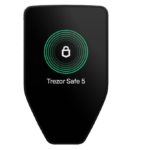
The Trezor Safe 5 has a smaller 1.54-inch color touchscreen with haptic feedback. The Gen5 has a larger 2.76-inch display — a meaningful difference for address verification. The Safe 5 supports Shamir Backup (SLIP39), which splits the seed phrase into shares for safer distributed storage. The Gen5 has Ledger Recover as an option but uses a simpler standard 24-word phrase as default.
Verdict: At similar prices, the choice comes down to: do you require open-source auditable firmware (Trezor Safe 5) or do you prefer a larger certified secure touchscreen with Bluetooth and NFC (Gen5)?
Gen5 vs Trezor Safe 7 ($249 — $70 more expensive)
The Safe 7 is Trezor’s flagship at the same price as the Ledger Flex. Compared to the Gen5, it adds: dual secure element architecture (TROPIC01 + OPTIGA), fully open-source hardware and firmware, post-quantum boot architecture (SLH-DSA-128), a 2.5-inch color LCD display (700 nits), full metal construction, LiFePO₄ battery with 4× charge cycle longevity, and a free Qi2 wireless charger included in box.
These are substantive differences, not cosmetic ones. The Safe 7 is architecturally more advanced in multiple security dimensions. But it costs $70 more than the Gen5.
Verdict: If $249 is your budget and advanced security architecture matters, the Safe 7 is the stronger device. If $179 is your budget and you want proven, certified security with the Ledger ecosystem, the Gen5 is an excellent choice.
Gen5 vs Ledger Nano X ($149 — $30 cheaper, now discontinued)
The Nano X has effectively been succeeded by the Gen5 in Ledger’s lineup. The Gen5 upgrades the chip from EAL5+ to EAL6+, adds the Certified Secure Screen, introduces Clear Signing, adds NFC, and brings a touchscreen in place of the two-button interface. The Nano X’s sole remaining advantage is lower price if found discounted.
Verdict: Do not buy a Nano X in 2026. The Gen5 is the same price or close to it, and is significantly more capable and secure in every measurable way.
Ledger vs Trezor Comparison
Ledger Nano Gen5 |
Ledger Flex |
Trezor Safe 5 |

Trezor Safe 7 |
|
|---|---|---|---|---|
Price |
$179 |
$249 |
$169 |
$249 |
Secure Element cert |
EAL6+ |
EAL6+ |
EAL6+ |
EAL6+ (dual) |
Open-source firmware |
❌ |
❌ |
✅ |
✅ |
Certified Secure Screen |
✅ |
✅ |
✅ |
✅ |
Clear Signing |
✅ |
✅ |
✅ |
✅ |
Quantum-ready |
❌ |
❌ |
❌ |
✅ |
Wireless charging |
❌ |
❌ |
❌ |
✅ (free) |
Full iOS support |
✅ |
✅ |
✅ |
✅ |
NFC |
✅ |
✅ |
❌ |
❌ |
Display type |
E-Ink mono |
E-Ink 16-gray |
Color LCD |
Color LCD |
Display size |
2.76″ |
2.84″ |
1.54″ |
2.5″ |
Weight |
46g |
58g |
~26g |
45 g |
Shamir Backup |
❌ |
❌ |
✅ |
✅ |
Who Should — and Should NOT — Buy the Ledger Nano Gen5
Buy the Gen5 if:
- You want EAL6+ certified security at the best value price in Ledger’s lineup
- You are upgrading from a Nano S, Nano X, or Nano S Plus and want a substantial leap in both security and usability without paying $249
- You are a first-time hardware wallet buyer who wants a polished, app-supported onboarding experience
- Mobile-first use matters to you — the Bluetooth + iOS + Android support is fully operational
- You want NFC Security Key capability for password-less Web2 authentication alongside crypto storage
- You can accept a “trust the certification” rather than “verify the code” security model
- Portability is a priority — at 46g, it is the lightest touchscreen hardware wallet available
- The $179 price point fits your budget and you recognize that $179 still buys you identical chip-level security to the $249 Flex
Consider alternatives if:
- Open-source firmware auditability is non-negotiable — buy the Trezor Safe 5 ($169) or Safe 7 ($249) instead
- You hold only Bitcoin and want air-gapped QR signing — Coldcard Mk4 or Q is the right tool
- You frequently use your wallet in low-light conditions — the non-backlit E-Ink display is a real practical limitation
- You manage assets across more than 15 blockchains simultaneously — the 1.5MB app storage limit will require regular app rotation
- The Ledger Recover controversy has permanently altered your trust in Ledger as a company — Trezor is your alternative
- Premium build materials are important to you — the plastic housing is functional but not premium
- You need Shamir Backup (SLIP39) for split seed phrase storage — Trezor supports this; Ledger does not natively
Ledger Nano Gen5 Review: Final Verdict
The Ledger Nano Gen5 is the best hardware wallet available under $200 in 2026. That is a straightforward conclusion that holds up to scrutiny.
At $179, it delivers the same EAL6+ Secure Element as Ledger’s $249 and $399 flagship devices. It adds the Certified Secure Screen — the architectural feature that prevents transaction manipulation regardless of what is happening on your connected devices. Clear Signing and Transaction Check address the most common real-world fraud vectors. Bluetooth 5.2, full iOS support, and NFC make it genuinely usable as a mobile-first signing device. The free Ledger Recovery Key NFC card and a 20% loyalty discount for existing Nano S owners make the value case even stronger.
The limitations are real but specific. The plastic housing is functional, not premium. The monochromatic E-Ink display is readable but not as polished as the Flex’s 16-shade grayscale.
The best hardware wallet isn’t always the most expensive one. The Gen5 is proof of that.
Final Rating: 8.6 / 10
Related
- Ledger Nano Gen5 vs Ledger Flex (2026): Which One Should You Buy?
- Trezor Safe 7 vs Ledger Nano Gen5
- Trezor Safe 5 vs Ledger Nano Gen5
FAQ
Is the Ledger Nano Gen5 worth it?
Yes — especially at $179. It delivers EAL6+ chip security (same tier as the $249 Flex), a Certified Secure Touchscreen, Clear Signing, Bluetooth 5.2, NFC, and a free Recovery Key card.
What is the difference between the Ledger Nano Gen5 and the Ledger Flex?
The security architecture is functionally identical — same EAL6+ chip, same BOLOS firmware, same Certified Secure Screen, same Clear Signing and Transaction Check. The Flex adds a 16-shade grayscale display (vs Gen5’s monochromatic), an aluminum frame (vs plastic), and Gorilla Glass protection. The Gen5 has a slightly larger battery (330mAh vs 200mAh). The Flex costs $70 more.
How many coins does the Ledger Nano Gen5 support?
The Ledger Wallet app directly supports 500+ cryptocurrencies. With third-party wallet integrations, the Gen5 extends to 5,000+ coins, tokens, and NFTs across all major networks. New assets are added regularly through app and firmware updates.
Is the Ledger Nano Gen5 safe?
Yes. The EAL6+ Secure Element and Certified Secure Screen architecture provide strong protection against both remote software attacks and local transaction manipulation. No Gen5 user has lost funds through a direct device exploit. The qualified concerns are the same as for all Ledger devices: closed-source firmware and the Ledger Recover trust controversy. See our full dedicated safety assessment: “Is the Ledger Nano Gen5 Safe?” for the complete breakdown.
Does the Ledger Nano Gen5 work with iPhone?
Yes — full iOS support via Bluetooth 5.2. The Ledger Wallet app is available on iOS 14 and later. This is a significant improvement over older Nano models, which had limited or unreliable iOS Bluetooth functionality.
What is the Ledger Recovery Key?
The Ledger Recovery Key is a physical NFC smart card included in the box with every Gen5. It can store an encrypted backup of your 12- or 24-word seed phrase, accessible by tapping the card to the device. It is the default, physical-only recovery method — distinct from the optional cloud-based Ledger Recover subscription service.
How long does the Ledger Nano Gen5 battery last?
The Gen5’s 330mAh LiFePO₄ battery powers weeks of standby and several hours of active use. Because E-Ink displays consume power only during screen refreshes — not while showing static content — the Gen5 uses significantly less energy than LCD-screen hardware wallets during normal signing sessions.
Tested and reviewed in May 2026 by Samson Ononeme, founder of MarketsXplora. Specifications verified against Ledger’s official product pages and Ledger Academy documentation. Security architecture details cross-referenced with CC EAL6+ certification documentation and Ledger’s published security model. This review is updated quarterly. For our dedicated safety assessment of this device, see: “Is the Ledger Nano Gen5 Safe?” For our Ledger Flex review, visit MarketsXplora.
About the author
Samson Ononeme is a crypto investor, blockchain writer, and content strategist with 12 years of experience in the cryptocurrency and Web3 space. He is the founder of MarketsXplora, an independent platform covering crypto security, hardware wallets, and digital asset investing. His work has been published across EarnForex, Kryptomoney, Cryptorunner, and AtoZ Markets. Samson reviewed the Ledger Nano Gen5 through direct hands-on testing across multiple sessions covering device setup, Shamir Backup alternatives, Bluetooth pairing on iOS and Android, Ledger Wallet app integration, firmware update cycles, and dApp transaction signing via WalletConnect.