


The Trezor Safe 7 and Ledger Stax is the pinnacle of crypto security technology in 2026, each bringing unique innovations to the table. This comprehensive comparison will help you decide which wallet deserves your hard-earned money.
Trezor Safe 7 vs Ledger Flex: Quick Specs Comparison
Here’s how the Trezor Safe 7 vs Ledger Flex stack up at first glance:
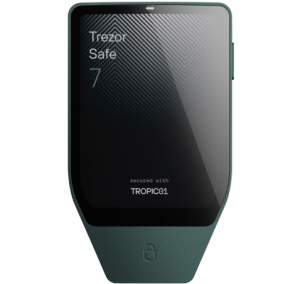 |
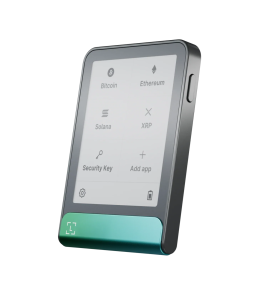 |
|
|---|---|---|
Price |
$249 |
$249 |
Launch Date |
October 21, 2025 |
July 26, 2024 |
Display Type |
Color LCD |
E-Ink Monochrome |
Screen Size |
2.5″ (520x380px) |
2.84″ (600x480px) |
Display Brightness |
700 nits |
N/A (E-Ink) |
Weight |
45g |
57.5g |
Dimensions |
75.4 x 44.5 x 8.3mm |
78.4 x 56.5 x 7.7mm |
Battery Type |
LiFePO₄ (330mAh) |
Lithium-ion (200mAh) |
Battery Life |
Years in storage |
10 hours active use |
Wireless Charging |
Yes (Qi2) |
No |
Secure Chip |
TROPIC01 + EAL6+ |
ST33K1M5 (EAL6+) |
Firmware |
Open-source |
Closed-source |
Supported Assets |
1,000s of coins |
5,500+ coins |
Water/Dust Rating |
IP54 |
None |
Colors Available |
3 options |
5 options |
What’s in the Box:
Trezor Safe 7: Hardware wallet, USB-C cable, 2x backup cards, startup guide, safety guide, stickers, free magnetic wireless charger
Ledger Flex: Hardware wallet, USB-C cable, recovery sheet, user manual
The Ledger Flex vs Trezor Safe 7 pricing is identical, but Trezor throws in a wireless charger for free.
Design & Build Quality
The Trezor Safe 7 and Ledger Flex wallets feel premium, but they achieve this in different ways.
Trezor Safe 7:
- Premium anodized aluminum unibody construction (milled from a single aluminum block)
- Reinforced glass backplate with NCVM coating
- Gorilla Glass 3 display (scratch and impact resistant)
- IP54-rated protection against dust and water splashes
- Lighter at 45g—perfect for everyday carry
- Slightly more compact design
- Three color choices: Charcoal Black, Obsidian Green, Bitcoin Orange
Ledger Flex:
- Aluminum frame with plastic back cover
- No official water/dust resistance rating
- Heavier at 57.5g but still portable
- Credit card-like form factor
- Four color options: Graphite, BTC Orange, Neptune Blue, Oxidate Green
The Safe 7 wins on durability with its full metal construction and IP54 rating. If you work outdoors or travel frequently, the Trezor’s rugged build makes more sense. The Ledger Flex takes a more conventional approach with mixed materials that keep costs reasonable while maintaining a premium feel.
Display Comparison:
The screens tell a fascinating story in this Flex vs Safe 7 matchup:
Display Feature |
Trezor Safe 7 |
Ledger Flex |
|---|---|---|
Technology |
Color LCD with haptic feedback |
E-Ink touchscreen |
Colors |
Full color |
16 shades of gray |
Brightness |
700 nits |
Always visible (no backlight) |
Power Consumption |
Higher |
Extremely low |
Outdoor Visibility |
Excellent (bright) |
Readable in direct sunlight |
Dark Usage |
Perfect |
Good |
Screen Size Advantage |
62% bigger than Trezor Safe 5 |
Larger than Safe 7 |
The Trezor Safe 7’s vibrant color display with 700 nits brightness works brilliantly in sunlight and features haptic feedback for reassuring touch confirmation. Meanwhile, the Ledger Flex uses E-Ink technology (like a Kindle) that consumes almost no power and displays your custom NFT or image even when powered off. However, E-Ink struggles in darkness and bright outdoor conditions.
Security Architecture
Security is where these wallets truly differentiate themselves. Both offer top-tier protection, but their philosophies differ significantly.
Trezor Safe 7 Security:
- Dual Secure Element Protection: TROPIC01 chip (world’s first auditable Secure Element) + additional EAL6+ certified chip
- Quantum-Ready Architecture: Specifically designed to receive quantum-secure firmware updates
- Open-Source Firmware: Every line of code can be audited by anyone
- Transparent Security: TROPIC01 chip allows public verification of security mechanisms
- PIN Protection: Up to 50 digits
- Advanced Multi-share Backup: Split your recovery across multiple secure shares
Ledger Flex Security:
- Single Secure Element: ST33K1M5 chip with CC EAL6+ certification
- Proprietary OS: Ledger OS runs the device
- Closed-Source Firmware: Core security code is not publicly available
- Clear Signing: Verify transaction details directly on the secure screen
- PIN Protection: Standard PIN security with auto-reset after 3 wrong attempts
- 24-Word Recovery: Industry-standard backup method
The Open-Source Debate:
This is crucial. Trezor’s completely open-source approach means security researchers worldwide can examine every aspect of the device. The TROPIC01 chip represents a breakthrough—it’s the first Secure Element with publicly auditable architecture. Ledger’s closed-source firmware relies on “security through obscurity,” which some experts question. However, Ledger argues their approach prevents attackers from finding vulnerabilities.
Quantum Threats:
The Trezor Safe 7 is the only hardware wallet built with quantum-ready architecture. While quantum computers aren’t an immediate threat, the Safe 7 can receive quantum-secure firmware updates when blockchain networks transition to post-quantum cryptography. This future-proofing matters if you plan to hold crypto for decades.
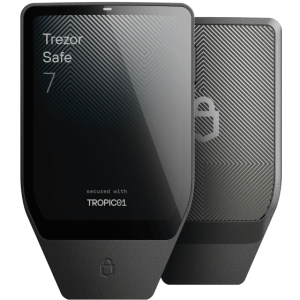 |
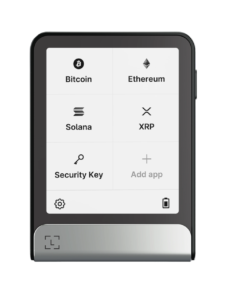 |
|---|---|
Connectivity & Power
How you connect and power your wallet affects daily usability.
Connectivity Options:
Connection Type |
Trezor Safe 7 |
Ledger Flex |
|---|---|---|
Bluetooth |
Yes (encrypted) |
Yes (Bluetooth 5.2) |
USB-C |
Yes |
Yes |
NFC |
No |
Yes |
Wireless Charging |
Yes (Qi2 magnetic) |
No |
Cable Included |
USB-C to USB-C |
USB-C to USB-C |
Both wallets offer encrypted Bluetooth using open-source protocols. The Trezor Safe 7 uses the Trezor Host Protocol (THP) to encrypt every command, while the Ledger Flex employs Bluetooth 5.2 for mobile connectivity. You can disable Bluetooth entirely on both devices if you prefer wired-only connections.
The Ledger Flex includes NFC for contactless authentication—tap it on your phone for quick 2FA logins. The Trezor Safe 7 counters with Qi2 magnetic wireless charging, eliminating cable hassles.
Battery Performance:
This is where the Ledger Flex vs Trezor Safe 7 comparison gets interesting:
Trezor Safe 7:
- LiFePO₄ (lithium iron phosphate) battery—330mAh
- 4x more charge cycles than standard lithium batteries
- Retains power for years in storage
- Safe to fully drain without damage
- Can operate via USB-C even if battery fails
- Thermal stability and safety advantages
Ledger Flex:
- Standard lithium-ion battery—200mAh
- Up to 10 hours of active use
- Approximately 150 transactions per charge
- Weeks or months in standby mode
- E-Ink display drastically reduces power consumption
- Requires regular charging for active users
The Trezor’s LiFePO₄ battery is revolutionary. It won’t degrade significantly even after years of sitting in storage, making it perfect for long-term cold storage. The Ledger’s smaller battery benefits from its E-Ink screen but needs more frequent charging if you’re an active trader.
User Experience
Setup and daily usage determine whether you’ll actually enjoy using your wallet.
Initial Setup:
Both wallets offer straightforward setup processes that take about 15-20 minutes. You’ll create a PIN, write down your recovery phrase, and install cryptocurrency apps. The Trezor Safe 7’s color display makes the process more visually appealing, while the Ledger Flex’s larger E-Ink screen provides more text space.
Touchscreen Comparison:
- Trezor Safe 7: Responsive color LCD with vibrant haptic feedback. Every tap feels reassuring. The 700-nit brightness makes outdoor use effortless. The 2.5-inch screen is 62% bigger than previous Trezor models.
- Ledger Flex: Smooth E-Ink touchscreen that responds well to taps. The 2.84-inch screen offers more space for transaction details. However, no tactile feedback and poor visibility in darkness or bright sunlight can frustrate users.
Navigation & Interface:
The Trezor Safe 7 uses Trezor Suite (desktop and mobile app) for management. The interface is clean, modern, and beginner-friendly. The color display makes navigation intuitive with clear icons and visual hierarchy.
The Ledger Flex pairs with Ledger Live, which supports 5,500+ assets natively. The app is mature and feature-rich, though some users find it cluttered. The E-Ink screen’s grayscale display requires careful UI design to maintain readability.
Learning Curve:
- Beginners: The Ledger Flex wins here. Its larger screen displays more information at once, and Ledger Live’s extensive support documentation helps newcomers.
- Experienced Users: The Trezor Safe 7 appeals to crypto veterans who value open-source transparency and advanced security features like multi-share backups.
Cryptocurrency Support
Both wallets support thousands of assets, but there are differences.

Trezor Safe 7:
- Supports 1,000s of coins and tokens
- Bitcoin, Ethereum, Solana, Arbitrum, USDC, and more
- 70,000+ dApps via WalletConnect
- 30+ third-party wallet app support (MetaMask, Rabby, Backpack, Exodus, etc.)
- NFT support through connected wallets
Ledger Flex:
- Supports 5,500+ coins and tokens in Ledger Live
- 15,000+ total assets with third-party wallet integration
- Bitcoin, Ethereum, Ripple, Solana, and all major networks
- ERC-20, BEP-20, TRC-20 token standards
- Direct NFT viewing and management in Ledger Live
- Ethereum and Polygon NFTs displayed on device screen
The Ledger Flex provides more native support within its app, while the Trezor Safe 7 excels at third-party wallet integration. If you hold obscure altcoins, research specific compatibility before buying.
|
|
|---|---|
Ecosystem & Compatibility
Your wallet needs to work seamlessly with the broader crypto ecosystem.
Native Apps:
Feature |
Trezor Suite |
Ledger Live |
|---|---|---|
Platforms |
Desktop, Mobile, Web |
Desktop, Mobile |
Portfolio Tracking |
Yes |
Yes |
Price Charts |
Yes |
Yes |
DeFi Integration |
Via WalletConnect |
Built-in & WalletConnect |
NFT Gallery |
Through third-party |
Native support |
Staking Interface |
Available |
Available |
News Feed |
No |
Yes |
Third-Party Integration:
Both wallets work with MetaMask, MyEtherWallet, Exodus, and dozens of other applications. The Trezor Safe 7 supports 30+ third-party wallets directly, while the Ledger Flex integrates with over 50 wallet apps and services.
dApp Support:
- Trezor Safe 7: 70,000+ dApps accessible via WalletConnect
- Ledger Flex: Extensive dApp support through Ledger Live and WalletConnect
Both wallets connect to DeFi platforms (Aave, Uniswap, Jupiter, Balancer, Lido), NFT marketplaces (OpenSea), and Web3 applications seamlessly. Your transaction signing always happens on the physical device, keeping your keys safe.
Trading & Staking Features
Modern hardware wallets need to support more than just storage.
Built-in Trading:
Both devices let you buy, sell, and swap crypto directly through their companion apps without exposing your private keys.
Trezor Safe 7:
- Buy, sell, swap, and stake through Trezor Suite
- Integration with multiple exchange partners
- Competitive fee comparison
- Direct access to trading without leaving the ecosystem
Ledger Flex:
- Buy, sell, swap, and stake in Ledger Live
- Compare service providers for each transaction
- Access to institutional-grade exchange integrations
- One-click access to major exchanges
Staking Options:
Staking Feature |
Trezor Safe 7 |
Ledger Flex |
|---|---|---|
ETH Staking |
Yes |
Yes |
Solana Staking |
Yes |
Yes |
Cardano Staking |
Yes |
Yes |
Polkadot Staking |
Yes |
Yes |
Stablecoin Yields |
Through partners |
Yes |
ATOM, TON Staking |
Yes |
Yes |
Both wallets support staking for major proof-of-stake networks. You earn passive income while maintaining full custody of your assets.
Privacy Features
Privacy matters when managing significant crypto holdings.
Trezor Safe 7:
- Coin Control: Advanced UTXO management prevents tracking
- Tor Integration: Hide your IP address and online activity
- CoinJoin Support: Mix your Bitcoin with others for enhanced privacy
- Address Management: Generate new addresses to avoid clustering
- No Account Creation: Use the wallet without creating a Trezor account
Ledger Flex:
- Basic Coin Control: Standard address management
- No Built-in Tor: Must use external tools
- Privacy-Focused Coins: Support for Monero and privacy tokens
- Account Management: Multiple accounts per cryptocurrency
- Optional Ledger Account: Anonymous usage possible
The Trezor Safe 7 offers superior privacy features with built-in Tor support and advanced coin control. Privacy-conscious users will appreciate not needing a Trezor account to use the device.
Advanced Features
Power users need sophisticated capabilities.
Authentication & Security:
Both wallets support FIDO2 two-factor authentication. Use your hardware wallet to log into Google, Amazon, Binance, Coinbase, and thousands of other services without passwords.
- Trezor Safe 7: FIDO2 authentication, password manager integration
- Ledger Flex: Ledger Security Key app for 2FA and Passkey capabilities, NFC tap-to-login
Backup & Recovery Options:
Backup Feature |
Trezor Safe 7 |
Ledger Flex |
|---|---|---|
Standard Recovery |
12/20/24 words |
24 words |
Advanced Backup |
Multi-share backup |
Ledger Recover (optional paid service) |
Passphrase Protection |
Yes (25th word) |
Yes |
Shamir Backup |
Yes (split recovery) |
No |
Cloud Recovery |
No |
Optional ($9.99/month) |
The Trezor Safe 7’s Multi-share Backup lets you split your recovery across multiple secure locations without trusting any single entity. Ledger offers Ledger Recover, a paid subscription service that stores encrypted recovery phrase shards with third parties.
Firmware Updates:
- Trezor Safe 7: Wireless firmware updates via Bluetooth or USB-C
- Ledger Flex: Wireless updates via Bluetooth or USB-C
Memory & App Storage:
The Ledger Flex has approximately 1.5MB of storage for cryptocurrency apps, allowing you to install 10-17 apps depending on their size. The Trezor Safe 7’s storage capacity isn’t publicly specified but supports thousands of assets simultaneously through its dual-chip architecture.
Price & Value Analysis
At $249, both wallets target the premium mid-range market. Here’s what you get for your money:
Trezor Safe 7 Value:
- Revolutionary TROPIC01 auditable Secure Element
- Dual secure chip protection
- Quantum-ready architecture for future-proofing
- Free magnetic wireless charger (worth $30-40)
- Color touchscreen with 700 nits brightness
- IP54 water/dust resistance
- Superior battery technology (LiFePO₄)
- Full open-source transparency
- No ongoing subscription fees
Ledger Flex Value:
- CC EAL6+ certified Secure Element
- Larger 2.84″ E-Ink touchscreen
- NFC contactless authentication
- Exceptional battery efficiency
- Support for 5,500+ assets natively
- Mature Ledger Live ecosystem
- Optional Ledger Recover service
- More color options (4 vs. 3)
Long-Term Considerations:
The Trezor Safe 7’s quantum-ready design and LiFePO₄ battery offer better long-term value if you plan to hold crypto for 5-10+ years. The open-source firmware means community support will continue indefinitely. The Ledger Flex benefits from Ledger’s established ecosystem and larger user base, ensuring robust app support and frequent updates.
Warranty:
- Trezor Safe 7: Standard warranty (details on Trezor website)
- Ledger Flex: One-year limited warranty with optional three-year replacement plan
|
|
|---|---|
Pros & Cons
Trezor Safe 7
Strengths:
- First and only quantum-ready hardware wallet
- Dual Secure Element protection with auditable TROPIC01 chip
- Completely open-source firmware and security
- Vibrant color display with 700 nits brightness and haptic feedback
- IP54-rated dust and water resistance
- Superior LiFePO₄ battery lasts years without degradation
- Qi2 magnetic wireless charging included
- Advanced privacy features (Tor integration, coin control)
- Multi-share backup for distributed recovery
- Lighter and more compact (45g)
- Free wireless charger in the box
Weaknesses:
- Smaller screen than Ledger Flex (2.5″ vs. 2.84″)
- Slightly fewer natively supported assets
- Color LCD consumes more power than E-Ink
- No NFC support
- No customizable lock screen
Ledger Flex
Strengths:
- Larger 2.84″ E-Ink touchscreen
- Exceptional battery efficiency (weeks in standby)
- Support for 5,500+ assets natively (15,000+ with third-party wallets)
- NFC contactless authentication
- Mature Ledger Live ecosystem
- Customizable lock screen with NFT display
- More color options
- Established company with 10+ years experience
- Extensive documentation and support
- Clear Signing for transaction verification
Weaknesses:
- Closed-source firmware reduces transparency
- Single Secure Element (vs. Trezor’s dual protection)
- No quantum-ready architecture
- No wireless charging capability
- Heavier at 57.5g vs. 45g
- No IP rating for water/dust resistance
- No built-in Tor support
- Ledger Recover is a paid subscription
- Smaller battery capacity (200mAh vs. 330mAh)
Which Should You Buy: Ledger Flex or Trezor Safe 7?
Choosing between Trezor Safe 7 vs Ledger Flex depends on your specific needs.
Choose Trezor Safe 7 if you:
- Value open-source transparency above all else
- Want quantum-ready security for long-term holdings
- Need the most advanced physical protection (dual Secure Elements)
- Prefer a rugged, IP54-rated device for travel
- Want wireless charging convenience
- Care deeply about privacy (Tor integration)
- Plan to hold crypto for 10+ years
- Like vibrant color displays
- Want the longest-lasting battery technology
- Prefer a lighter, more compact wallet
- Are security-conscious and technically savvy
Choose Ledger Flex if you:
- Want the largest touchscreen available
- Prefer the E-Ink reading experience
- Need NFC for quick authentication
- Hold many different cryptocurrencies (5,500+ native support)
- Like displaying NFTs on your lock screen
- Want exceptional battery efficiency for mobile use
- Prefer an established ecosystem with extensive support
- Are comfortable with closed-source security
- Value the mature Ledger Live interface
- Need Clear Signing for DeFi transactions
- Want more color options for personalization
- Are a beginner needing extensive documentation
For Mobile Users:
The Ledger Flex edges ahead with its NFC support and lighter power consumption. Tap-to-authenticate and weeks of standby battery life suit on-the-go management.
For DeFi Enthusiasts:
Both excel here, but the Ledger Flex’s Clear Signing feature helps you understand complex smart contract interactions better. The Trezor Safe 7 counter with broader WalletConnect support (70,000+ dApps).
For Long-Term Holders (HODLers):
The Trezor Safe 7 wins decisively. Its quantum-ready architecture, LiFePO₄ battery that retains charge for years, and IP54 protection make it the ultimate cold storage solution.
For Security Researchers & Privacy Advocates:
The Trezor Safe 7’s completely open-source approach with the auditable TROPIC01 chip is the clear winner. You can verify every security claim independently.
For NFT Collectors:
The Ledger Flex’s customizable lock screen displays your favorite NFTs even when powered off, creating a personal touch that E-Ink renders beautifully.
|
|
|---|---|
Final Verdict
The Trezor Safe 7 vs Ledger Flex debate has no universal winner—both are exceptional wallets that excel in different areas.
If you’re a long-term investor who values maximum security, open-source transparency, and future-proofing, choose the Trezor Safe 7. Its quantum-ready design and auditable security make it the most forward-thinking hardware wallet available.
If you prefer a larger screen, want to display NFTs, need NFC authentication, or value an established ecosystem with extensive asset support, choose the Ledger Flex. Its mature platform and user-friendly experience make daily crypto management effortless.
Both wallets represent excellent choices at $249. Your decision should align with your specific needs: maximum security and transparency (Trezor Safe 7) or extensive support and user experience (Ledger Flex).
Compare
Trezor Safe 7 vs Safe 5 — Which Next-Gen Wallet Should You Buy?
Frequently Asked Questions
1) Is the Trezor Safe 7 more secure than the Ledger Flex?
Ledger Flex uses a CC EAL6+ secure element and Clear Signing, while Trezor Safe 7 uses a dual-chip open-source model with no certified secure element. Flex has a higher evaluated hardware certification, but both keep keys offline and secure for normal users.
2) Which is easier to use — Trezor Safe 7 or Ledger Flex?
Ledger Flex is easier for most people thanks to its E Ink touchscreen and Bluetooth pairing that works like a phone app. Trezor Safe 7 is simpler in design but requires a cable connection.
3) Does Ledger Flex support iPhone and Android better than Trezor Safe 7?
Yes. Ledger Flex connects wirelessly to iOS and Android via Bluetooth 5.2. Trezor Safe 7 needs a USB cable and does not support wireless pairing.
4) Which wallet is better for beginners — Ledger Flex vs Trezor Safe 7?
Beginners who want wireless setup and a guided mobile app tend to prefer Ledger Flex. Users who prefer a wired-only, open-source firmware device choose Trezor Safe 7.
5) Is Trezor Safe 7 cheaper than the Ledger Flex?
Yes. Trezor Safe 7 is in a lower price tier. Ledger Flex costs more because it includes a secure element, touchscreen, Bluetooth, and the Recovery Key smart card.
6) Which one should I buy in 2026 — Trezor Safe 7 or Flex Wallet?
Pick Ledger Flex if you want wireless UX, a secure element, and better iPhone support. Pick Trezor Safe 7 if you want open-source firmware, no Bluetooth, and a lower entry price.