


The Trezor Safe 7 is here, and it promises to redefine how crypto enthusiasts protect their assets. In this Trezor Safe 7 Review, we’ll explore its groundbreaking security, wireless convenience, and future-ready features that make it a must-have for serious crypto users.
Trezor Safe 7 Review – Quick Overview
Feature |
 |
|---|---|
Next-gen TROPIC01 secure chip |
New standard for advanced, verifiable Bitcoin security |
Quantum-ready security |
Specifically designed to receive quantum-secure updates |
Wireless connectivity |
Securely pairs with mobile and desktop, no cables needed |
2.5″ high-res color display |
520 x 380 pixels, intuitive touchscreen for responsive navigation |
Premium aluminum unibody |
All-metal body for exceptional build quality |
IP54-rated protection |
Resistant against dust & water splashes |
Buy & sell |
Securely buy Bitcoin and other crypto directly with your device |
What Is the Trezor Safe 7?
The Trezor Safe 7 is the newest flagship hardware wallet in Trezor’s lineup, introduced as the successor to the Safe 5 and the long-standing Model T. Unlike minor refreshes that focus on cosmetic tweaks or firmware updates, the Safe 7 is a generational upgrade — built to correct legacy limitations and anticipate threats that will matter later, not just now.
Trezor positions the Safe 7 as a wallet for users who want long-term, offline crypto protection without giving up modern conveniences that earlier Trezor devices lacked. It is still an entirely offline, self-custody device — your private keys never leave the device, and you do not need any third party to access or transfer your funds — but the engineering inside pushes the category one step further.
What It Replaces in the Lineup
The Safe 7 essentially steps into the feature tier previously occupied by the Model T and Safe 5 — but with a stronger chip set, broader protections, and a longer usable life. Existing Trezor owners looking to upgrade are not swapping “sideways”; they are jumping to a new tier.
Who It Is Built For
The Safe 7 is aimed at three buyer profiles:
- First-time hardware wallet owners who want a flagship-grade device instead of starting cheap and upgrading later
- Existing Trezor users ready for a significant jump in durability, battery life, and security
- Risk-aware holders thinking about future threats (e.g., quantum-class computing, chip auditability, long-horizon custody)
What’s Actually New (vs older Trezors)
In brief, the Safe 7 introduces all-new capabilities that did not exist on Safe 5, Safe 3, or Model-T, including:
- Future-oriented security with new secure chip architecture
- Features built around long-life and auditability rather than incremental tweaks
- Convenience upgrades that remove long-standing friction points from past devices
We will unpack each of these in detail throughout the review.
Build Quality
The moment you unbox the Trezor Safe 7, it’s clear this isn’t just another refresh — it’s a complete design reboot. The wallet arrives in a compact, premium box that immediately feels more high-end than past Trezor releases. The presentation is clean, simple, and modern: you get the device itself, a USB-C to USB-C cable, two 20-word backup cards, a startup and safety guide, and the usual Trezor stickers. But the real story starts when you pick up the device.
A Premium Aluminum Unibody
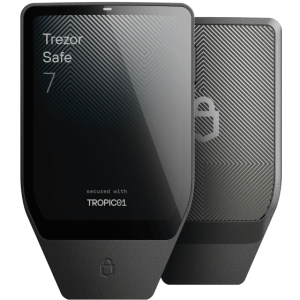
Gone are the lightweight plastic casings of earlier models. The Safe 7 introduces a solid anodized aluminum unibody, milled from a single block for strength and precision. It feels closer to a luxury smartphone than a USB stick — cold, sturdy, and confidence-inspiring in hand. Trezor also added an NCVM-coated glass backplate, which not only gives it a subtle metallic sheen but improves Bluetooth and wireless charging performance.
Built to Last
Durability is a major leap forward. The Safe 7 is IP54-rated, making it resistant to dust and light water splashes — a first for any Trezor wallet. Add to that Gorilla Glass 3 protection on the screen, a reinforced backplate, and you get a wallet designed to survive years of use (and a few accidental drops).
Quick Build Overview:
Specification |
Details |
|---|---|
Material |
Anodized aluminum body + Gorilla Glass 3 display + glass backplate |
Dimensions |
75.4 × 44.5 × 8.3 mm |
Weight |
45 g (1.6 oz) |
Ingress Protection |
IP54 (dust and splash resistant) |
Color Options |
Charcoal Black, Obsidian Green, Bitcoin Orange |
Elegant and Functional Design
The device itself feels sleek — no sharp edges, no creaks, and no loose buttons. The large 2.5-inch color touchscreen dominates the front panel, framed by smooth aluminum and minimal branding. It’s 62% larger than the screen on the Trezor Safe 5 and easily the sharpest display Trezor has ever shipped, boasting 520 × 380 px resolution and 700 nits of brightness.
The touch response is smooth, thanks to vibrant haptic feedback that gives every tap a tactile confirmation. Texts and QR codes appear crisp, even outdoors.
The Look and Feel of a Modern Flagship
Visually, this is the first Trezor that could sit next to premium tech like an iPhone or a Ledger Stax without feeling dated. It’s minimalist but polished — a design that finally bridges the gap between “secure tool” and “modern device.”

Display & User Experience
The screen is the centerpiece of the Safe 7, and it transforms how you interact with a hardware wallet. At 2.5 inches with a 520×380 pixel resolution, it’s both the largest and sharpest display Trezor has ever used. The difference isn’t cosmetic — it changes the experience.
Readable, Trustworthy, and Comfortable to Use
The bright 700-nit panel paired with Gorilla® Glass 3 gives clarity and durability simultaneously. Where older Trezor screens could feel cramped or pixelated, the Safe 7 makes every confirmation — address, amount, network, and fees — comfortably readable without straining your eyes.
You don’t just approve transactions — you verify them with confidence.
Highlight features of the new display
- 62% larger than Safe 5 (more information onscreen without scrolling)
- High-res color panel for crisp QR codes, warnings, and transaction fields
- Gorilla Glass for scratch and impact resistance
- Haptic feedback adds a physical “confirmation feel” to taps
Touchscreen That Feels Modern — Not Like a Compromise
Earlier Trezor models required button-click navigation or basic low-resolution touch. The Safe 7 moves navigation closer to smartphone fluidity:
- Smooth scrolling and tap targets sized for real fingers
- Clear panels, iconography, and layout that reduce errors
- Haptics meaningfully confirm actions (not just buzz for show)
Wireless-First UX Done Intentionally
Unlike previous models that assumed a cable-first workflow, the Safe 7 is designed from the ground up for wireless pairing via a secure open-source protocol — but without forcing you to use Bluetooth if you prefer wired.
You can seamlessly:
- Pair to phone or desktop over Bluetooth with encryption
- Disable Bluetooth fully in settings if you want a cable-only workflow
- Charge wirelessly via Qi2-compatible pads — cable no longer required
This is the first Trezor that feels like it was built for daily use, not just “cold storage to be opened once a year.”
Security Architecture & Quantum-Ready Protection
The Trezor Safe 7 is built around a security stack that is both more transparent and more future-oriented than any previous Trezor device.
Dual Secure Elements — Two Chips, Two Lines of Defense
Unlike earlier Trezor models that used a single secure chip, the Safe 7 combines:
- TROPIC01 — the world’s first auditable Secure Element
- Open architecture, fully reviewable
- Publicly testable and verifiable — no NDA required
- Designed to eliminate “black-box” trust assumptions
- Additional EAL6+ Secure Element
- Industry-grade physical tamper resistance
- Certified to one of the highest assurance levels
- Adds a hardened physical barrier on top of TROPIC01
These two layers operate in tandem — one gives transparency, the other gives certified, closed-boundary physical protection.
Quantum-Ready Architecture
The Safe 7 is the first hardware wallet specifically engineered to receive quantum-secure firmware updates. That means when post-quantum cryptography becomes the new standard, you will not have to replace the device — only update it.
Trezor positions Safe 7 as “future-proofed” against a scenario where quantum computers could break current cryptography.
Open-Source Security (Still a Core Principle)
Even with the addition of secure elements, Trezor keeps its full firmware stack open-source. The cryptographic processes, Bluetooth encryption layer, host protocols — all remain publicly auditable.
Key points in this layer:
- Entire security model remains open to community review
- No NDAs or hidden components required to inspect it
- Firmware logic and update pathways are verifiable end-to-end
Transaction & Device Protection Layers
Beyond hardware design, the Safe 7 extends traditional Trezor protections:
- PIN up to 50 digits
- Passphrase support
- Advanced Multi-Share Backup
- 12/20/24-word seed options
- FIDO2 for 2FA authentication
- Coin control & Tor for privacy
Even if a device is stolen or disassembled, both the dual secure elements and local encryption layers ensure funds remain inaccessible.
Wireless Security — Not a Backdoor
Bluetooth is fully encrypted via the open-source Trezor Host Protocol (THP). Every command and signature is wrapped in cryptographic protection, making it resistant to interception, injection, or spoofing.
Users may also disable Bluetooth entirely and run USB-only if preferred.
Battery, Charging & Wireless Freedom
The Safe 7 is the first Trezor designed to operate comfortably without ever being plugged in — both for use and charging.
Long-Life LiFePO₄ Battery
Instead of using a standard lithium-ion cell, Trezor equipped the Safe 7 with a LiFePO₄ power system, which is known for longevity and safety.
Why that matters:
- Up to 4× more charge cycles than typical lithium batteries
- More stable under temperature stress
- Safe to fully drain without degrading quickly
- Retains usability even after years of storage
Even if the battery eventually fails, the device remains fully functional when powered via USB-C — meaning your access to funds is never battery-dependent.
Wireless Charging — Qi2 Compatible
For the first time on a Trezor, you can charge the wallet without cables. It works with modern Qi2 wireless chargers and comes with a Magnetic Wireless Charger included as a free gift during launch.
This removes one of the last remaining “tether points” and makes the wallet behave more like a premium mobile accessory than a technical tool.
Wireless Connectivity Designed for Real Use
Safe 7 supports secure Bluetooth pairing with desktop, phone, or tablet — all protected by open-source encryption under Trezor Host Protocol. Unlike older models that assumed cable-only workflows, this one is intentionally built to work wirelessly end-to-end.
- Encrypted Bluetooth pairing
- Invisible to unknown devices
- Option to disable Bluetooth entirely in settings
- USB-C still available for wired purists
This is Trezor’s first “carry-and-use” device — not a desk-bound cold storage brick.
Supported Assets, dApps & Ecosystem Integration
The Safe 7 doesn’t just store keys offline — it connects you to the wider crypto ecosystem without exposing those keys in the process.

Thousands of Coins & Tokens
Directly inside Trezor Suite (desktop & mobile), users can manage major assets such as:
- Bitcoin, Ethereum, Solana, Arbitrum, USDC
- Plus thousands of other supported coins and tokens
Support is continually updated through firmware and app releases.
Access to 70,000+ dApps via WalletConnect
Unlike early hardware wallets that were mostly “HODL-only,” Safe 7 integrates securely with Web3 applications using encrypted remote signing.
Examples of compatible dApps and platforms:
- DeFi: Aave, Balancer, Jupiter, Lido
- DEX trading: Uniswap, 1inch, Pump.fun
- NFTs: OpenSea and similar marketplaces
- Prediction & social apps: Polymarket, others
Private keys never leave the device — the dApp only receives signed approvals.
Works With Third-Party Wallets & Apps
Beyond Trezor Suite, the device is compatible with a wide range of external wallets:
- MetaMask
- Backpack
- MyEtherWallet
- Exodus
- Rabbit
- Lace
- Ronin
- Monero wallets
This flexibility is critical for users who operate across ecosystems and require one secure signing device to interface with many services.
Built-In Trading & Earning Functions
From within Trezor Suite, Safe 7 users can:
- Buy & sell crypto
- Swap assets across chains
- Stake supported coins
- Execute trades with hardware-level approvals
This turns the device from a vault into a usable command center — without reducing security.
Real-World Usability & Daily Workflow
The Safe 7 is the first Trezor that feels built for people who actually use crypto — not just store it away. Its physical design, wireless capability, and software integrations reduce friction in everyday use without compromising offline security.
Mobile-First, Desktop-Ready
You can work entirely from your phone, entirely from a computer, or switch between both — all without cables.
Typical daily tasks now feel natural:
- Approve swaps on Uniswap from phone without digging for a cable
- Sign NFT listings while away from desk
- Stake or bridge assets with full on-screen verification
- Travel with the wallet powered and ready without a laptop nearby
This is a use-case shift from “cold storage in a drawer” to “secure daily driver.”
Designed for Repeated Interaction — Not Just Emergencies
Past hardware wallets assumed infrequent use. That often meant:
- Small screens
- Awkward button input
- Required cables
- Short-lived batteries
Safe 7 flips all of that:
- Large readable screen reduces approval errors
- Haptic feedback prevents mis-taps
- Wireless + long battery supports frequent sessions
- IP54 ruggedness supports carry and travel
You don’t dread using it — you prefer using it over browser wallets.
Privacy & Identity Protection Built In
For users who connect to dApps frequently, privacy becomes as important as custody. Safe 7 extends Trezor’s privacy stack:
- Coin control to avoid wallet tracking
- Tor routing inside Trezor Suite to hide IP metadata
- No account, no cloud, no linkage to your identity
Unlike some wallets that offload trust to closed cloud services, Safe 7 keeps the user sovereign by design.
Travel-Safe and Airport-Friendly
The device is X-ray safe and certified for international travel compliance under CE, FCC, RCM, RoHS, WEEE, and more. You can transport it without risk of customs seizure or airport damage.
Trezor Safe 7 vs Safe 5 vs Safe 3 vs Ledger Flex
|
Trezor Safe 7 |
Trezor Safe 5 |

Trezor Safe 3 |
Ledger Flex |
|
|---|---|---|---|---|
Display |
2.5″ color touchscreen 520 x 380 px 700 nits brightness Gorilla Glass 3 Haptic feedback |
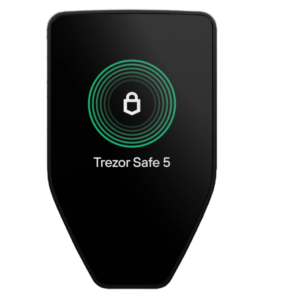
1.54″ color touchscreen 240 x 240 px Gorilla Glass 3 Haptic feedback |
0.96″ monochromatic OLED 128 x 64 px Two physical buttons No touchscreen |
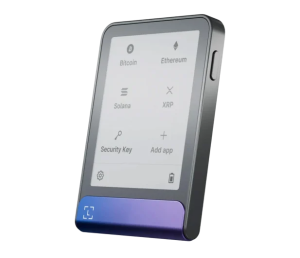
2.84″ E Ink touchscreen 600 x 480 px 16 grayscale levels Gorilla Glass No backlight |
Secure Element |
Dual Secure Element: • TROPIC01 (auditable) • EAL6+ certified element |
Single EAL6+ certified Secure Element (NDA-free) |
Single EAL6+ certified Secure Element (NDA-free) |
CC EAL6+ certified Secure Element |
Quantum-Ready Architecture |
✅ Yes First quantum-ready hardware wallet Can receive quantum-secure firmware updates |
❌ No |
❌ No |
❌ No |
Battery |
LiFePO₄ battery 3.2V, 330mAh 4× longer lifecycle vs standard lithium Built-in overheating protection |
❌ No battery USB-C powered only |
❌ No battery USB-C powered only |
200 mAh lithium-ion Up to 10 hours active use Weeks/months standby |
Wireless Charging |
✅ Yes Qi2-compatible Magnetic wireless charger included (launch gift) |
❌ No |
❌ No |
❌ No (Ledger Stax has wireless charging, Flex does not) |
Wireless Connectivity |
✅ Bluetooth Open-source THP encryption Can be disabled in settings |
❌ No Wired USB-C only |
❌ No Wired USB-C only |
✅ Bluetooth 5.2 Also USB-C wired option |
Supported Assets |
1000+ coins and tokens Bitcoin, Ethereum, Solana, Arbitrum, USDC, etc. 70,000+ dApps via WalletConnect |
1000+ coins and tokens Bitcoin, Ethereum, Solana, Cardano, etc. |
8000+ coins and tokens Bitcoin, Ethereum, Cardano, Solana, etc. |
5500+ coins and tokens in Ledger Live 15,000+ with third-party wallets |
Price |
$249 USD |
$169 USD |
$79 USD |
$249 USD |
Pros & Cons of the Trezor Safe 7
Pros
- Dual secure element (TROPIC01 + EAL6+) for enhanced key isolation
- Fully open-source firmware and auditable hardware
- Wireless connectivity via encrypted Bluetooth
- Qi2-certified wireless charging support
- Built-in LiFePO₄ rechargeable battery
- Larger 2.5” color touchscreen with haptic feedback
- Aluminum unibody design with IP54 durability rating
- Compatible with 70,000+ dApps through WalletConnect
- Supports native trading and staking in Trezor Suite
- Backward-compatible with existing Trezor accounts and recovery seeds
- Ships with magnetic wireless charger (launch gift)
Cons
- Premium pricing compared to Safe 3 and Safe 5
- Slightly heavier due to metal construction
- Battery-powered design may not suit users who prefer fully wired operation
Should You Buy Trezor Safe 7 Now or Wait?
The Trezor Safe 7 is not a minor refresh — it is the first Trezor in years that meaningfully moves the experience forward while still preserving the parts users trust Trezor for: offline keys, transparency, and full user control.
Who should buy now:
- You’re on an older Trezor and want a real usability upgrade, not a lateral move
- You’re buying your first wallet and want something future-proof, not entry-level
- You regularly sign transactions and want bigger, safer, clearer confirmations
- You want a wallet designed for the next cycle, not the previous one
Who might wait:
- You already bought a Trezor recently and don’t feel friction with it
- You prefer wireless connectivity (Safe 7 is USB-only by design)
- You’re waiting to compare price vs. Ledger’s next release
Where to Buy the Trezor Safe 7 (Official Channels Only)
If you’re looking to purchase the Safe 7 with a full manufacturer’s warranty and guarantee of authenticity, you should limit your buying options to the following official channels:
- The official Trezor website: trezor.io (the primary source, and the safest way to ensure your device has not been tampered with)
- Authorized Trezor reseller list available on trezor.io (check for official badge/verification)
- In-store when listed by Trezor-certified retail partners (verify packaging and serial number at point of sale)
- Ensure you purchase a sealed package and register the device on Trezor’s backend for authenticity.
Trezor Safe 7 Review — Conclusion
The Safe 7 is clearly positioned as the successor that Trezor users have been waiting for, not just a cosmetic refresh but a full leap in experience while keeping the offline-first, open-source DNA intact. It removes the friction points that beginners hated (small screens, confusing signing, cable-dependence) and finally brings the “modern wallet feel” without outsourcing trust to closed firmware or cloud services.
If you still use a Safe 3, Model One, or even Model T — this is the first upgrade that actually feels like a generational step, not a side-grade.
Compare
Trezor Safe 7 vs Ledger Flex: The 2026 Winner You Didn’t Expect
Trezor Safe 7 vs Safe 5 — Which Next-Gen Wallet Should You Buy?
FAQs
1) How much does the Trezor Safe 7 cost and where can I buy it?
The Trezor Safe 7 is priced at $249 and is officially available from the Trezor website. Buying directly from Trezor ensures the device has not been tampered with.
2) Is the Trezor Safe 7 safer than the Safe 5, Safe 3, or Model T?
Yes — the Safe 7 introduces dual Secure Elements, the new auditable TROPIC01 chip, quantum-ready security, and Bluetooth with open-source encryption, all of which are not available on earlier Trezor models.
3) Does the Trezor Safe 7 support wireless use and mobile devices?
Yes — it supports Bluetooth pairing, wireless Qi2 charging, and works with mobile, desktop, and tablet through Trezor Suite and supported 3rd-party apps.
4) What coins, tokens, and apps can I use with the Trezor Safe 7?
It supports thousands of coins and tokens (BTC, ETH, SOL, USDC, etc.) and connects to dApps, DeFi, exchanges, and wallets like MetaMask, Backpack, Aave, Uniswap, OpenSea, and more via WalletConnect.
5) What happens if the Trezor Safe 7 battery dies over time?
The LiFePO₄ battery is built for long life and can handle 4× more charge cycles than standard lithium batteries — but even if it fails, the wallet still works via USB-C cable power. Your crypto access is not lost.
6) Is the Trezor Safe 7 open-source like older Trezor devices?
Yes — even with secure chips, the Safe 7 keeps open-source firmware and auditable architecture, allowing independent review and verification — a major difference from closed-source competitors.