

By Samson Ononeme | Last updated: May 2026 | 13-min read
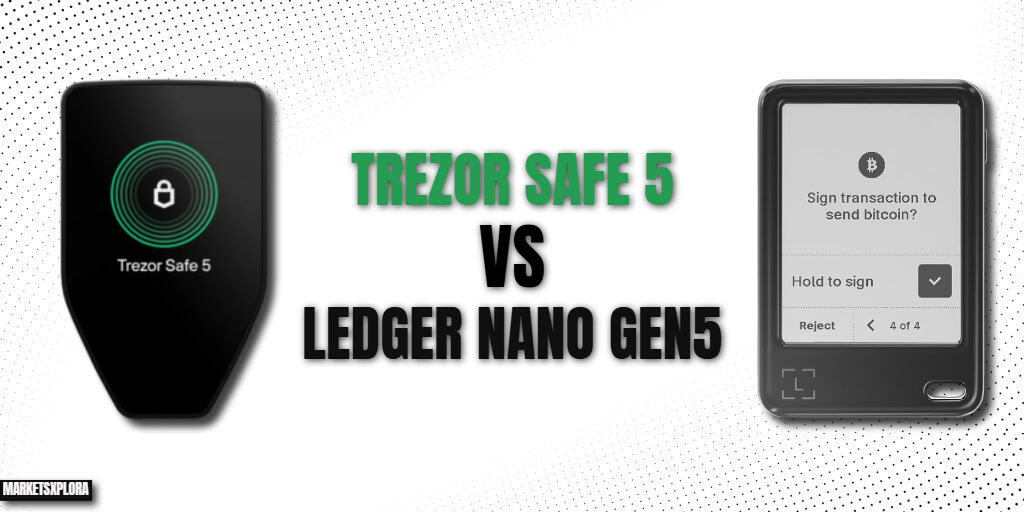
The Trezor Safe 5 ($169) and the Ledger Nano Gen5 ($179) are the two most closely contested hardware wallets on the market. They are for people who want modern touchscreen hardware wallets with serious security credentials, without stepping up to the $249+ premium tier.
This is not a comparison where one device wins across the board. It is a comparison where the right answer depends entirely on how you use your wallet. This article gives you a clear, use-case-specific recommendation — not a spec table with no conclusion.
Quick verdict:
- Buy the Trezor Safe 5 ($129) if open-source firmware auditability is a priority, you use your wallet from a desktop computer, you hold a large number of altcoins, or you want Shamir Backup for distributed seed phrase storage.
- Buy the Ledger Nano Gen5 ($179) if you use your wallet primarily from a smartphone, you are an iOS user, you want wireless signing via Bluetooth, or you prefer a larger screen for transaction verification.
Trezor Safe 5 vs Ledger Nano Gen5: Quick Comparison
Feature |
Trezor Safe 5 |
Ledger Nano Gen5 |
|---|---|---|
Price |
$129 |
$179 |
Launch |
July 2024 |
October 2025 |
Display size |
1.54 inches |
2.76 inches |
Display type |
Color LCD touchscreen |
E-Ink touchscreen |
Display colors |
Full color |
Monochromatic (black & white) |
Resolution |
240×240px |
300×400px |
Screen protection |
Gorilla Glass 3 |
None |
Haptic feedback |
Yes |
No |
Secure Element |
EAL6+ (open-source, NDA-free) |
EAL6+ (ST33K1M5, proprietary) |
Firmware |
Fully open-source |
Proprietary (Ledger BOLOS) |
Certified Secure Screen |
Yes |
Yes |
Clear Signing |
Yes |
Yes |
Bluetooth |
No |
Bluetooth 5.2 |
NFC |
No |
Yes |
Battery |
No (USB-C powered) |
330mAh LiFePO4 |
USB-C |
Yes |
Yes |
Wireless charging |
No |
No |
iOS support |
No (USB-C only) |
Yes — Full |
MicroSD card slot |
Yes |
No |
Backup method |
Shamir Backup (SLIP39) |
Standard 24-word phrase |
Shamir Backup |
Yes — Default |
No |
Coin support |
9,000+ |
5,000+ |
FIDO2 / 2FA |
Yes |
Yes |
Frame material |
Plastic + aluminum backplate |
Plastic |
Colors |
Black Graphite, Violet Ore, Green Beryl |
Black + Limited Edition colors |
Weight |
~26 grams |
46 grams |
Software |
Trezor Suite (desktop + mobile) |
Ledger Wallet (desktop + mobile) |
Price and Value
At $129 and $179 respectively, the Trezor Safe 5 and Ledger Nano Gen5 are separated by $50 — meaningful enough that value deserves serious attention, but not so large that it overrides a clear feature preference. If budget alone were the deciding factor, the Safe 5 wins. But neither device’s value case rests on price alone.
Trezor Safe 5 value case: $129 buys you a fully open-source, NDA-free EAL6+ secure element, a color touchscreen with haptic feedback, Gorilla Glass protection, Shamir Backup support, 9,000+ coin compatibility, and a decade-long track record of transparent security. At this price, the Safe 5 is arguably the strongest security-per-dollar hardware wallet available anywhere.
Ledger Nano Gen5 value case: $179 buys you the same EAL6+ chip tier used in the $249 Ledger Flex and $399 Ledger Stax, a 2.76-inch E-Ink Secure Touchscreen, Bluetooth 5.2, NFC, a 330mAh battery, full iOS support, and a free Ledger Recovery Key NFC card. For users who want wireless, mobile-first functionality at the lowest Ledger price point, the Gen5 is exceptional value.
Value verdict: Safe 5 wins on value per dollar — $129 for open-source EAL6+ security, Gorilla Glass, Shamir Backup, and 9,000+ coins is exceptional. The Gen5 at $179 justifies its $50 premium through wireless connectivity, a larger screen, and iOS support. Choose based on your workflow, not the price tag.
Design and Build Quality
Trezor Safe 5
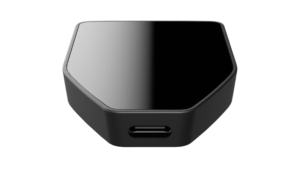
The Safe 5 is the most compact touchscreen hardware wallet on the market. It weighs approximately 26 grams — nearly half the Gen5’s 46 grams — and its small footprint makes it genuinely pocketable. The frame is plastic with an aluminum backplate, giving it a slightly more premium rear surface than a pure plastic device.
The display is protected by Gorilla Glass 3 — the same scratch-resistant glass found on the Ledger Flex at $249. For a $169 device, Gorilla Glass is a notable inclusion. It prevents the kind of pocket-and-key scratching that accumulates on unprotected screens over years of ownership.
Available in three colors: Black Graphite, Violet Ore, and Green Beryl. A MicroSD card slot on the right side supports optional hardware-level encryption of the device’s firmware — an advanced security feature most users will not use, but which signals the depth of Trezor’s security commitment at this price.
Ledger Nano Gen5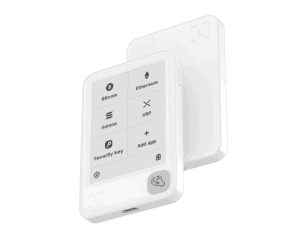
The Gen5 is larger in every physical dimension — 79.40 × 53.35 × 8.64mm versus the Safe 5’s smaller footprint — but the size is justified by its larger 2.76-inch display. At 46 grams, it is still genuinely lightweight for a device with a built-in battery.
The housing is plastic throughout — no aluminum elements and no screen protection. The display is vulnerable to scratching from daily pocket carry. Limited Edition colors (Cherry Red, Matcha Green, Glacier White) are available alongside standard Black. Susan Kare-designed magnetic decorative badges are sold separately as optional personalization.
Build verdict: Safe 5 edges ahead on build quality despite being the cheaper device — Gorilla Glass and an aluminum backplate are meaningful durability advantages. Gen5 wins on screen real estate and wireless convenience.
Display: The Counterintuitive Difference
Most comparisons assume the more expensive device has the better display. Here, the relationship is more nuanced — and counterintuitive.
Trezor Safe 5: 1.54-Inch Color LCD with Haptics
The Safe 5 has a 1.54-inch color touchscreen at 240×240 pixel resolution with haptic feedback. It renders full color — visually differentiating transaction fields, warning states, and confirmation prompts through color-coding. The haptic engine provides physical confirmation on every tap, reducing accidental double-approvals during fast signing sessions.
The limitation is size. At 1.54 inches, long Ethereum contract details, multi-token approvals, and complex DeFi interactions require scrolling. Long addresses must be read in segments.
Ledger Nano Gen5: 2.76-Inch E-Ink Monochrome
The Gen5 has a 2.76-inch E-Ink touchscreen — 80% larger in surface area than the Safe 5. Full addresses, token approval amounts, and contract interaction fields often fit on screen without scrolling. The trade-off is color: the Gen5 renders in pure black and white only, with no visual hierarchy through color-coding.
E-Ink has no backlight — exceptional in direct sunlight, difficult in dim or dark environments without an external light source.
Display verdict: Safe 5 wins on color quality and haptic feedback. Gen5 wins on screen size and outdoor readability. The better display depends on where you use your wallet — indoors at a desk favors Safe 5; outdoor and mobile use favors the Gen5.
Security Architecture: The Open-Source vs Certified Divide
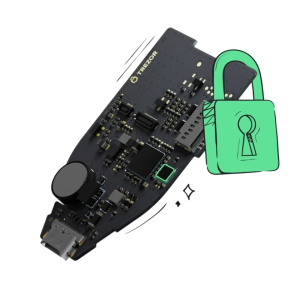
Both devices use EAL6+ Secure Elements and both have Certified Secure Screens driven directly by the Secure Element chip. The meaningful difference is in how that security is verified.
Trezor Safe 5: Open-Source, NDA-Free
The Safe 5 uses a fully open-source EAL6+ Secure Element with no NDA restrictions. Every line of firmware is publicly readable and auditable by any security researcher at any time — including after every firmware update. The global security community continuously tests the device. Trezor patches vulnerabilities as they are found. The result is a continuously adversarially-tested security posture.
Trezor has a clean company track record: no successful remote hack, no customer data breach, and no firmware controversy.
Ledger Nano Gen5: Certified, Closed-Source
The Gen5 uses the ST33K1M5 Secure Element — EAL6+ certified by independent government-accredited laboratories. The certification is rigorous, internationally respected, and the same tier used in biometric passports. However, Ledger BOLOS firmware is proprietary. The Secure Element driver is under NDA. Post-update, users cannot independently verify what changed in the firmware.
Ledger’s history includes three separate customer data breaches (2020, 2023, 2026) and the Ledger Recover controversy — the revelation that firmware was architecturally capable of exporting encrypted key material.
Security verdict: Safe 5 wins on transparency and auditability. Gen5 wins on certification breadth and third-party validation. For users who want to verify their security: Safe 5. For users who trust certified-by-authority assurance: Gen5.
Backup and Recovery
Trezor Safe 5: Shamir Backup (SLIP39) as Default
The Safe 5 uses Shamir’s Secret Sharing (SLIP39) as its primary backup standard. Your seed is split into multiple shares — for example, 2-of-3, where any two shares recover the wallet but one alone is useless. Shares can be stored in separate physical locations: a home safe, a bank safety deposit box, a trusted family member’s possession.
This is architecturally superior to a single seed phrase for long-term cold storage. An attacker who finds one share cannot access your funds. Losing one share does not lose your wallet. The Safe 5 also supports legacy 12- and 24-word standard phrases for users migrating from other wallets.
Ledger Nano Gen5: Standard 24-Word Phrase + Ledger Recovery Key
The Gen5 uses a standard BIP39 24-word recovery phrase. The included Ledger Recovery Key NFC card provides an encrypted physical backup. Shamir Backup is not supported — your seed exists as a single secret that must be guarded in one piece.
Ledger Recover (optional cloud-based backup subscription) is available but carries the trust implications outlined in our dedicated safety articles.
Backup verdict: Trezor Safe 5 wins clearly. Shamir Backup (SLIP39) is architecturally superior to a single-share seed phrase for serious long-term cold storage.
Connectivity: The Biggest Practical Difference
Trezor Safe 5: USB-C Only
The Safe 5 connects exclusively via USB-C. No Bluetooth, no NFC pairing, no battery. The device must be physically connected to use. iOS users cannot sign transactions natively — the Safe 5 has no Bluetooth for Trezor Suite iOS. Android users can connect via USB OTG but the experience involves more friction than wireless.
For desktop-first users who sign transactions from a computer, USB-C-only is entirely adequate. For mobile-first users, it is a hard limitation.
Ledger Nano Gen5: Bluetooth 5.2 + NFC + USB-C + Battery
The Gen5 supports all three connection methods with a 330mAh battery for wireless operation. Full Bluetooth pairing with iOS 14+ and Android. Complete wireless signing from a smartphone — no cable required. NFC for the Ledger Recovery Key and Security Key (FIDO2) authentication. USB-C for desktop use when preferred.
Connectivity verdict: Gen5 wins decisively for mobile and iOS users. Safe 5 is fully adequate for desktop-only users and preferred by users who want to minimize wireless attack surface.
Coin and Token Support
The Trezor Safe 5 supports over 9,000 cryptocurrencies and tokens through Trezor Suite and third-party integrations. Monero support is particularly strong — a deliberate advantage for privacy-focused users.
The Ledger Nano Gen5 supports 5,000+ via Ledger Wallet, with broader coverage through third-party integrations. All major chains are covered: Bitcoin, Ethereum, Solana, XRP, Tron, BNB Smart Chain, Polygon, Arbitrum, and more.
For mainstream portfolios across the top 20–50 chains, both devices cover everything. For long-tail altcoins, niche chains, or privacy coins, the Safe 5’s breadth is the stronger choice.
Coin support verdict: Safe 5 wins — 9,000+ vs 5,000+ is meaningful for diversified or niche portfolios.
App and Software Ecosystem
Trezor Suite is available on Windows, macOS, Linux, and Android. It is open-source, community-extensible, and feature-rich for advanced users: portfolio management, coin joins for Bitcoin privacy, staking, token swaps, and deep third-party wallet compatibility (MetaMask, Electrum, Sparrow, Wasabi, Casa). The learning curve is steeper for beginners but the feature ceiling is higher.
Ledger Wallet is available on Windows, macOS, Linux, iOS, and Android. The mobile app is fully functional via Bluetooth on the Gen5. The ecosystem is broader in officially supported dApps and integrations — WalletConnect, NFT management, staking, and swaps within a single app. More curated, less open, but highly polished.
Ecosystem verdict: Trezor Suite wins for open-source extensibility and advanced users. Ledger Wallet wins for mobile-first users wanting a polished, all-in-one experience.
Setup and Daily Use Experience
Both devices set up in 10–15 minutes through their respective apps. The Safe 5’s color touchscreen and haptic feedback make desktop signing clearer and more tactile — color-coded transaction fields, physical tap confirmation, and responsive navigation. The limitation appears on mobile: no Bluetooth means iOS is unsupported and Android requires a USB OTG cable.
The Gen5’s 2.76-inch screen makes PIN entry, seed phrase verification, and transaction approval comfortable to navigate on both desktop and mobile. Its Bluetooth + iOS support transforms the signing experience for smartphone users. The monochromatic display is the trade-off — no color hierarchy for complex DeFi transaction fields.
Daily use verdict: Safe 5 wins for desktop users. Gen5 wins for mobile users.
Ledger Nano Gen5 vs Trezor Safe 5: Side-by-Side Use Cases
Use case |
Better choice |
Reason |
|---|---|---|
Desktop-only user |
Safe 5 |
Color display, haptics, open-source |
Mobile-first user |
Gen5 |
Bluetooth, battery, iOS + Android |
iOS user |
Gen5 |
Safe 5 has no native iOS support |
Open-source required |
Safe 5 |
Fully auditable firmware |
Shamir Backup needed |
Safe 5 |
Gen5 does not support SLIP39 |
Large altcoin portfolio |
Safe 5 |
9,000+ vs 5,000+ |
Privacy coin (Monero) |
Safe 5 |
Stronger Monero support |
Outdoor / bright sunlight |
Gen5 |
E-Ink far superior in direct light |
Low-light / night use |
Safe 5 |
Backlit LCD vs non-backlit E-Ink |
Long-term cold storage |
Safe 5 |
Shamir Backup + open-source = superior vault |
Beginner on iPhone |
Gen5 |
Wireless, iOS-native, simple onboarding |
Upgrading from Trezor Safe 3 |
Safe 5 |
Same ecosystem, no migration needed |
Upgrading from Ledger Nano X |
Gen5 |
Same ecosystem, major security upgrade |
Multi-chain DeFi trader |
Gen5 |
Bluetooth + mobile + WalletConnect |
Who Should Buy the Trezor Safe 5?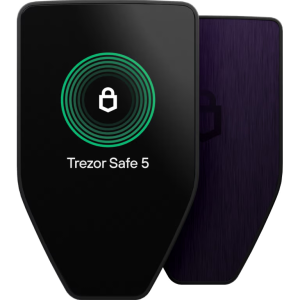
Open-source auditability is non-negotiable. The Safe 5’s fully open-source, NDA-free EAL6+ firmware is verifiable by anyone. If you need to verify — not just trust — your device’s security, there is no comparable option at this price.
You want Shamir Backup. Splitting your recovery phrase into distributed shares is meaningfully more resilient than a single 24-word phrase. The Safe 5 supports this natively; the Gen5 does not.
You use your wallet from a desktop or laptop. USB-C-only is perfectly adequate for desktop workflows. You lose nothing practical by not having Bluetooth, and you gain color display, haptic feedback, and open-source peace of mind.
You hold a broad portfolio including altcoins or privacy coins. With 9,000+ supported assets and strong Monero support, the Safe 5 serves diverse and privacy-focused portfolios better.
You are storing significant funds for the long term. For assets held for 5–10+ years with minimal access, Shamir Backup plus open-source auditability plus a clean company track record makes the Safe 5 the stronger vault device.
You are upgrading within the Trezor ecosystem. No seed phrase migration, full Trezor Suite continuity, and a clear upgrade path from Safe 3.
Who Should Buy the Ledger Nano Gen5?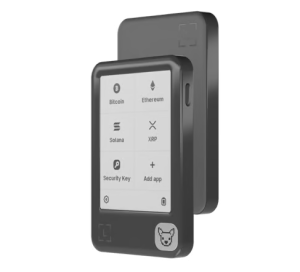
You use your wallet primarily from a smartphone. Bluetooth 5.2, a 330mAh battery, and full Ledger Wallet mobile support make the Gen5 the only practical choice for mobile-first users between these two devices.
You are an iOS user. The Safe 5 has no native iOS Bluetooth support. The Gen5 connects to iPhones natively. For iPhone users, this decision is straightforward.
You want a larger screen for transaction verification. The Gen5’s 2.76-inch display is 80% larger than the Safe 5’s 1.54-inch screen. Reading full addresses, approval amounts, and contract details without scrolling is a daily quality-of-life improvement.
You want the entry-level price into Ledger’s EAL6+ ecosystem. The Gen5 gives you the same security chip as the $249 Flex and $399 Stax at $179 — the most accessible price into Ledger’s certified premium security model.
You are upgrading from a Ledger Nano X or Nano S Plus. Staying in the Ledger ecosystem means no migration, Ledger Wallet continuity, and a significant EAL5+ to EAL6+ security upgrade with the Certified Secure Screen added.
You frequently use your wallet outdoors. E-Ink displays dramatically outperform backlit LCD in direct sunlight. If bright environments are part of your workflow, the Gen5’s screen wins.
Trezor Safe 5 vs Ledger Nano Gen5: Final Verdict
The Trezor Safe 5 and Ledger Nano Gen5 are both excellent hardware wallets. At $129 vs $179, the $50 gap is real — but neither device wins purely on price. The right choice comes down to two questions: where do you use your wallet, and what is your security philosophy?
Choose the Trezor Safe 5 ($129) if you use your wallet from a desktop computer, open-source auditability matters to you, Shamir Backup is important for your recovery strategy, you hold a broad altcoin portfolio, or you are staying within the Trezor ecosystem.
Choose the Ledger Nano Gen5 ($179) if you use your wallet from a smartphone — especially an iPhone — Bluetooth wireless signing is central to your workflow, a larger screen for transaction verification is your priority, or you want the entry-level price into Ledger’s EAL6+ certified ecosystem.
The $50 gap is worth paying if the Gen5’s wireless and iOS features match your daily workflow. It is not worth paying if they don’t.
FAQ
Is the Trezor Safe 5 more secure than the Ledger Nano Gen5?
Both use EAL6+ certified Secure Elements. The difference is verification model: Safe 5 firmware is fully open-source and independently auditable by anyone; Gen5 firmware is proprietary and relies on third-party certification. For users who want to verify their security independently, Safe 5 is more transparent. For users who trust certified-by-authority assurance, both are equally secure.
Which is better for beginners — Safe 5 or Gen5?
Depends on your device. iPhone users: Gen5, no question — Safe 5 has no native iOS support. Desktop users: Safe 5’s color display and haptic feedback make it the more intuitive signing experience. Both have solid onboarding, but the Safe 5’s Shamir Backup setup has a slightly steeper first-time learning curve.
Does the Trezor Safe 5 work with iPhone?
Not natively. The Safe 5 connects via USB-C only. Trezor Suite’s iOS app requires Bluetooth, which the Safe 5 lacks. iOS users should choose the Ledger Nano Gen5 or upgrade to the Trezor Safe 7, which has full Bluetooth support.
Which device has better coin support?
Trezor Safe 5: 9,000+ assets. Ledger Nano Gen5: 5,000+. For the top 50 coins, both cover everything. For long-tail altcoins, niche chains, or Monero, the Safe 5 has meaningfully broader coverage.
What is Shamir Backup and why does it matter?
Shamir Backup (SLIP39) splits your seed phrase into multiple shares — for example, 3 shares where any 2 recover the wallet. You store shares in separate locations. An attacker needs multiple shares to access your funds; losing one share does not lose your wallet. The Safe 5 supports this natively. The Gen5 does not. For long-term cold storage, it is a significantly more resilient recovery architecture.
Is the Ledger Nano Gen5 wireless?
Yes. Bluetooth 5.2, NFC, and a 330mAh battery enable fully wireless operation. The Safe 5 is wired-only via USB-C with no battery.
Which has a better display?
Depends on the metric. Safe 5: smaller (1.54″) but full color with haptic feedback — better for indoor, desk-based signing with visual hierarchy. Gen5: larger (2.76″) but monochromatic E-Ink — better for outdoor use and reading long addresses without scrolling. Neither is objectively better.
Does the Safe 5 have a battery?
No. The Safe 5 draws power exclusively from its USB-C connection and has no internal battery. It cannot operate wirelessly. The Gen5 has a 330mAh LiFePO4 battery.
Which is better for long-term cold storage?
Safe 5. Shamir Backup allows distributed share storage across multiple locations — significantly more resilient than a single seed phrase. Open-source firmware means you can verify the device’s behavior years from now. Trezor has no history of data breaches or firmware controversies. For assets held 5–10+ years with minimal access, the Safe 5 is the stronger vault device.
Related Articles
- Ledger Nano Gen5 and Ledger Flex
- Trezor Safe 7 vs Ledger Nano Gen5
- Ledger Nano Gen5 Review
- Is the Ledger Nano Gen5 Safe?
- Ledger Flex Review
- Trezor Safe 7 Review
About the Author
Samson Ononeme is a crypto investor, blockchain writer, and content strategist with 12 years of experience in the cryptocurrency and Web3 space. He is the founder of MarketsXplora, an independent platform covering crypto security, hardware wallets, and digital asset investing. His work has been published across EarnForex, Kryptomoney, Cryptorunner, and AtoZ Markets.